

Trusted by:
University of Southern California
Warner Bros.
Volvo
Amazon
Stanford University
Updated: September 04, 2026
15 min read
What does "good" actually mean when you're choosing an enterprise digital badge platform? In this guide, we lay out the five capabilities that matter and the questions to ask every vendor before signing.
Research with AI:
Enterprise software decisions usually fail in one of two ways: the tool passes today’s demo but later proves not to be worth the price or the effort. Gartner data backs it up: 70% of enterprise software rollouts fail to deliver expected ROI. Digital badge platforms are no exception.
Often, the tool’s post-buy mismatch happens because the evaluation focused on core features: bulk issuance, social sharing, and template design. While these capabilities matter, enterprise-level evaluation demands more than testing the widely adopted basics.
At scale, a modern enterprise badge platform has to prove it can protect data, verify credentials at the source, connect to your existing system, support multiple teams, and also manage badges after they’ve been issued.
So, where should an enterprise evaluation actually start? That's what this guide will help you figure out, with a clear framework and a practical checklist for picking a digital badge platform that fits your organisation.
Evaluate enterprise badge platforms across five layers: credential trust, system trust, operational fit, organizational scalability, and lifecycle control.
Look for: Open Badges 3.0 compliance, live verification, ISO 27001 and GDPR alignment, SSO and 2FA, native integrations and a REST API, workspaces with role-based access, and full lifecycle control (updating, expiring, revoking, tracking credentials).
Certifier is built on this model — with EU-based infrastructure, procurement-ready compliance evidence, native integrations, and full credential lifecycle control in one platform.

Before getting into what to look for in your next digital badge maker, let's explore what's already been proven not to work.
Most badge tools are good at one thing: making and sending credentials, and almost every platform on the market can do it well enough to pass a demo. That's why evaluating against the basics doesn't actually separate one platform from another.
The differences that matter at enterprise scale only show up later, in the issues that surface as your program grows:

Issuing turns into a part-time job. Bulk upload works for a one-off send, but without native integrations to the LMS, CRM, or HRIS, someone on the team is still exporting completion data, cleaning it, and reformatting it into spreadsheets every cycle.
Brand and template control slip across teams. Without workspaces, permissions, and centralized governance, teams may indiscriminately edit templates or issue inconsistent credentials.
Loss of verification reliability over time. When credentials aren't built to last beyond the platform that issued them, badges can end up with broken links or missing metadata a year or two later, leaving recipients unable to prove what they earned.
The program can outgrow the platform within a year. What worked for the pilot can't handle the scale of the full rollout, and the team ends up re-platforming, migrating thousands of credentials, rebuilding integrations, and asking recipients to update their LinkedIn badges.
Tip: Before any vendor demo, picture the program you expect to be running in a year: more teams, more volume, more departments. Evaluate the platform against that future state, not just the pilot you’re about to launch.
So if we look past the widely adopted features and dig a bit deeper, what will make an enterprise badge platform good to you?
At Certifier, after years of working with enterprise clients across education, training, and certification programs, we've identified five capabilities that define real product-to-organization fit at enterprise scale. Each one is independent, but they work as a set: when you evaluate them together, you get a far more accurate picture of how the platform will perform as the program grows.
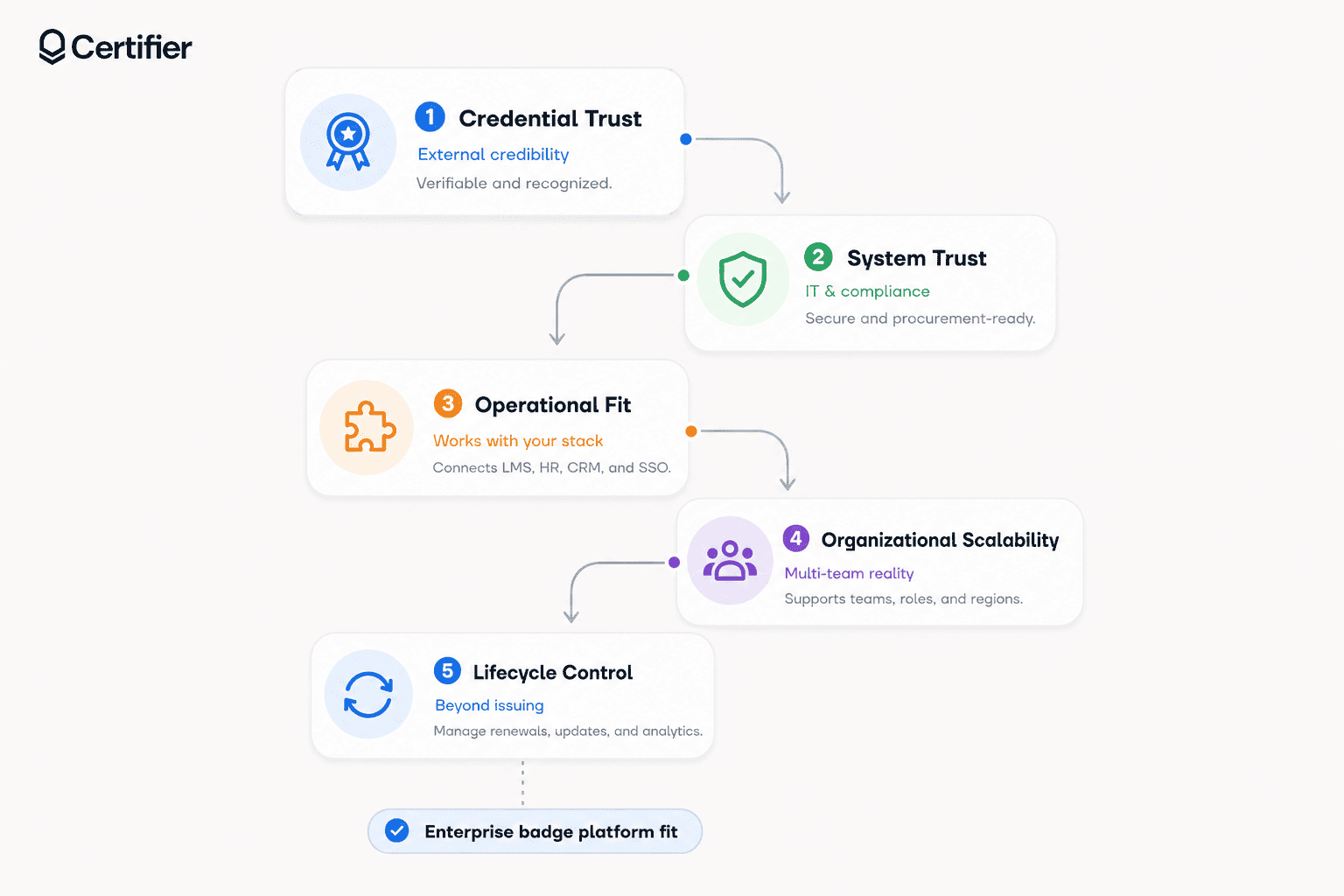
Let's explore them one by one.
Credential trust is the principle that any badge (or certificate) you issue should be independently verifiable outside of your organization without your team being in the loop.
Credential trust comes from three things:
01The data inside the badge. Enterprise-grade credentials should carry embedded metadata: issuer name, recipient information, skills assessed, evaluation criteria, issue and expiry dates, and unique ID. This is what allows the badge to stand on its own as a credential, not just as a pretty image.
02How that data can be verified. Working verification mechanisms for enterprises are a statutory requirement. Besides a unique ID, credentials should include a live verification link that anyone can follow to check authenticity in real time. The page pulls from the issuer's records and shows current status (active, expired, or revoked) alongside issue details. A QR code on the badge makes the same check possible offline – this’s especially useful for printed credentials and in-person events.
03How well it holds up outside the platform. Adherence to a recognized open standard keeps credential data portable across platforms, wallets, and verification tools, so the badge keeps its value if your platform ever changes. One of the most widely adopted standards is Open Badges 3.0 — an open framework maintained by 1EdTech that defines how credential data is structured and verified.
Can your organization approve the platform you chose? In our evaluation model, system trust is the layer that determines whether IT, security, and procurement approve the rollout or hold it in review for months. Usually, security approval comes down to documentation, and most enterprise badge programs stall here, simply because they can't produce what a security review demands.
Defensible system trust is built from these three areas:
This covers how recipient data is stored, encrypted, processed, and transferred. Enterprise vendors operate under recognized security requirements: ISO 27001 sets the bar for information security, and GDPR documentation where personal data is involved. Together, they give your security team a known standard to verify the platform against.
Two questions matter here: who can log in, and how is their access managed? The enterprise standard to look for in tools is SSO (Single Sign-On), which lets your team log in with the credentials they already use at work (Okta, Microsoft Entra ID, or Google). This way, IT manages access from one place and removes it automatically when someone leaves. Two-factor authentication (2FA) is another great mechanism to look for: it adds a second confirmation step at login, so accounts stay protected even if a password is stolen.
When your security team reviews the platform, they'll ask the vendor to provide specific documents. At a minimum, expect to review:

Signable DPA (Data Processing Agreement) for legal sign-off
Published subprocessor list showing every third-party tool the vendor relies on
Full audit logs that track every user, action, and device
99.9% uptime SLA — the vendor's contractual commitment to keeping the platform reliable.
Most enterprise vendors publish their security and compliance documentation in a dedicated hub, use it as part of your evaluation. Certifier's Security & Legal hub publishes information about GDPR practices, ISO 27001 and 9001 certification, subprocessors, encryption, AWS hosting in Europe, penetration testing, uptime commitments, and 2FA.
Operational fit is one of the most overlooked areas in enterprise badge platform evaluation… and one of the most consequential.
Here's why the mismatch happens: integrations are usually evaluated by reputation. A team spots their LMS, CRM, or HRIS logo on the vendor's site, assumes the connection is solid, and moves on.
What rarely gets tested is the true depth of integration:
whether the integration is built and maintained by the vendor;
whether it works in both directions or only send data in one direction;
if it triggers issuance automatically or just imports a list when someone asks it to;
if it can pass the fields your credentials need;
if you know exactly who maintains the workflow when the connected system changes.
This is where we come back to the first point of this guide: evaluating a platform only on bulk issuance and integration logos can leave you with a far more manual process than you paid for.
For a deeper look at this part of the evaluation, see our article on digital credentials integration. It explains which systems enterprise credentials need to connect to, which integration approach fits each use case, and how to check whether a vendor’s integration claims hold up.
When the connection between systems isn't real, someone on your team ends up exporting completion data from one tool, cleaning it, and uploading it into the badge platform every cycle — doing work the integration was supposed to remove.
To evaluate operational fit, let’s consider three key layers:
These are direct, vendor-built connections to the tools your team already uses, like an LMS, CRM, HRIS, or webinar platform. With a real native integration, badges are issued automatically the moment a credential-triggering event happens. For example, a webinar attendance threshold, course completion event, form submission, or CRM milestone could trigger credential delivery without anyone touching a spreadsheet.
Maintenance: The vendor builds and maintains the integration, so your team isn't responsible for keeping it working when one of the connected tools updates its software.
When a tool isn't natively supported, a documented REST API gives your engineers a way to connect it manually. For example, sending badge data from an internal HR system that no vendor offers a native integration with. Webhooks work the other way: they let your other systems react automatically when something happens in the badge platform, like notifying Salesforce the moment a certification is issued.
Maintenance: Together, the API and webhooks fill the gaps that native integrations don't cover. The trade-off: this layer requires engineering time to set up.
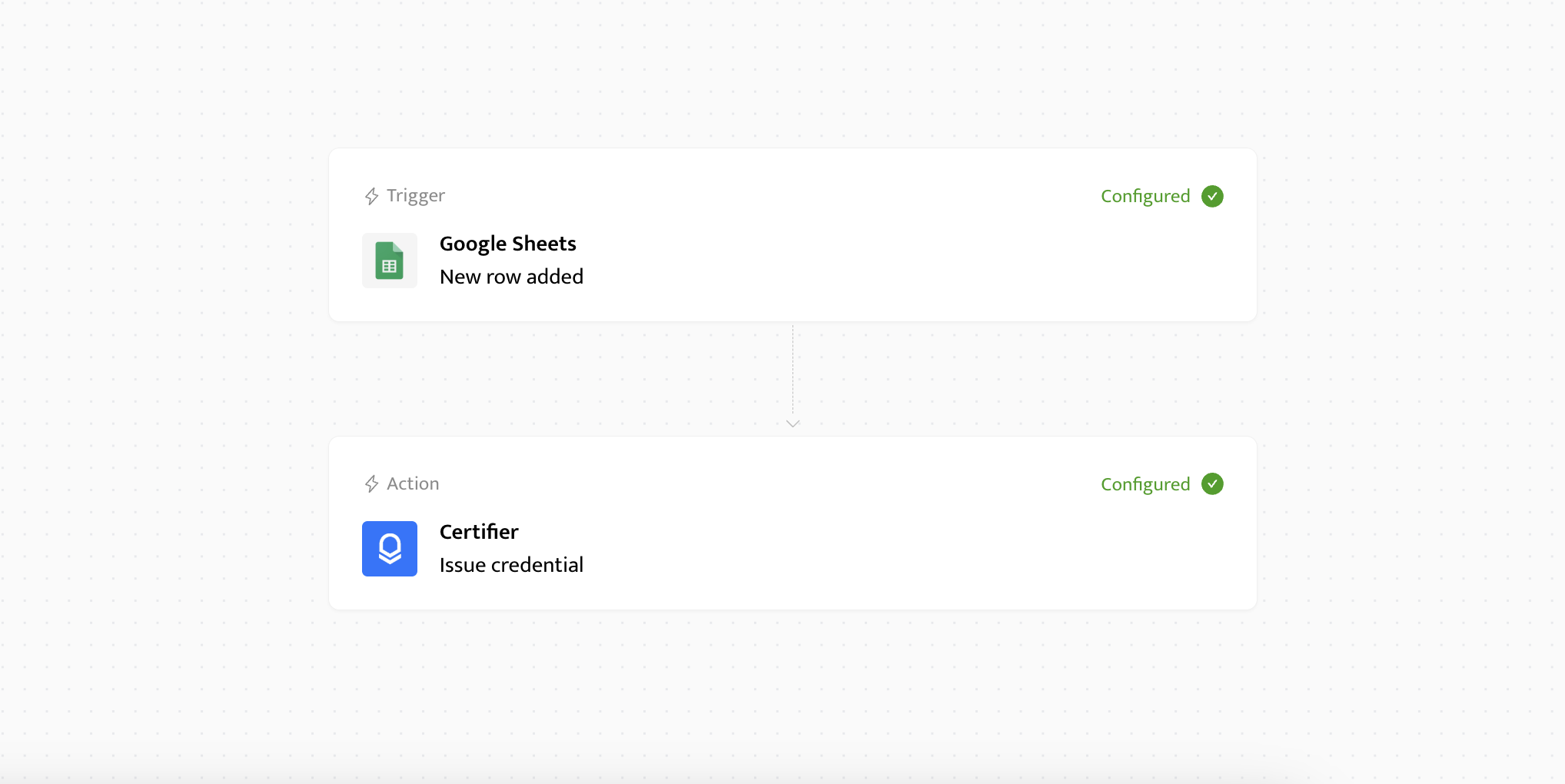
For long-tail apps that don't have a native integration and don't justify engineering time, automation tools like Zapier, Make, or Power Automate sit as the fallback layer. They let non-technical users build simple "if this happens, then do that" workflows between the badge platform and thousands of other apps.
For example, you can connect Microsoft Dynamics to Certifier via a Zapier workflow. Then, when a new custom entity is created, the automation can notify the connector app to trigger the badge platform to issue a credential.
Maintenance: It's the broadest layer in terms of coverage, but the most fragile: each workflow has to be set up and maintained by someone on your team.
Since no two enterprise stacks look the same, Certifier supports all three integration layers:
Native integrations for tools most enterprise teams already use (like Salesforce, HubSpot, Google Sheets, or Microsoft Excel);
A REST API and webhooks for systems that need custom connections;
Zapier as the fallback for long-tail apps.
And if a critical integration doesn't exist yet, our team can build it for you.
See an example of available connection methods compared for Microsoft Dynamics. Or browse the full integrations directory to see what's already supported.
A program that starts in L&D rarely stays in one department: sales enablement wants partner certifications; HR wants internal recognition badges; Customer success wants onboarding badges. Regional offices want their own brand and language.
The enterprise badge platform of your choice needs to be future-proof and prepared to serve five or six different teams, often at the same time, without any of them stepping on each other.
In our evaluation model, organizational scalability is the layer that decides whether a badge platform can grow with your organization or quietly forces every department into the same shared admin panel.
Organizational scalability is built on three key capabilities:
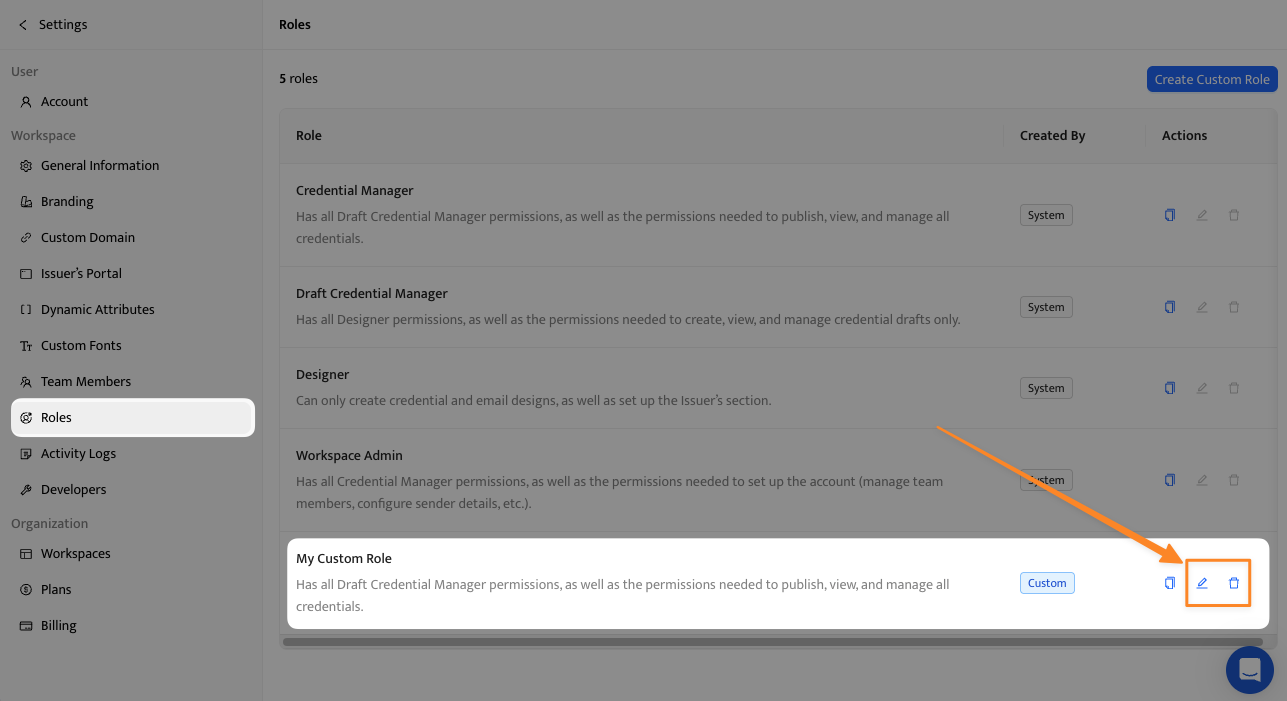
01Workspaces. Separate, isolated environments inside the platform for each brand, region, or business unit. A workspace gives each team its own templates, recipient data, and analytics without seeing what other teams are doing. This is what makes parallel programs possible without parallel accounts.
02Role-based access control (RBAC). Permissions are defined by what someone does, not just who they are: for example, a designer can edit templates, but not issue them, and a draft manager can prepare credentials, but not send them. This stops accidental edits and protects sensitive recipient data.
03Centralized governance. A layer above the workspaces where the program owner sees everything: total badges issued, who has access to what, brand compliance across workspaces, and billing in one place. Without these controls, the platform fragments into independent silos that nobody owns.
The last block of this model brings us back to where we started: the credentials themselves. After security, integrations, and governance, this layer is about what happens to a badge after it leaves your platform.

A badge that goes out today might need to be updated, expired, revoked, or reissued years later. The platform behind it has to support every one of those actions without forcing your team to recreate credentials from scratch or break the verification recipients are relying on.
Look for these three features to guarantee lifecycle control:

Updating issued credentials. Credentials change — names need correcting, issuer info shifts after a rebrand, and criteria evolve. A platform with real lifecycle control lets you update credentials in place, without re-issuing them or breaking verification links.
Expiration control. Some certifications expire on a fixed schedule. Others need to be invalidated when a recipient no longer meets the criteria or a credential was issued in error. A platform with real lifecycle control supports scheduled expiry, manual revocation, and renewal workflows — and every expired or revoked credential should clearly show its updated status on the verification page.
Tracking and analytics. Once credentials are issued, the platform should keep tracking how they perform. That means visibility into how often badges are opened, shared, and verified, and how engagement changes over time. Without that data, there's no way to tell which credentials create visibility and which aren't worth continuing.
Together, these five capabilities form the full evaluation model. None of them works in isolation: a platform that nails credential trust but misses on lifecycle control, or passes security review but stalls on integrations, will eventually expose the gap, usually months after signing, when the cost is hardest to undo.
The 5-Question Vendor Test
Use these questions to test any badge platform against this model:
How are your badges verified, and what standards do they follow? (Credential Trust)
What security certifications, compliance documentation, and contractual agreements do you offer for enterprise clients? (System Trust)
Which integrations are natively built and maintained by your team, and which rely on third-party tools? (Operational Fit)
How does the platform support multiple teams, brands, or regions operating in parallel? (Organizational Scalability )
What options exist for updating, revoking, or managing credentials after they've been issued? (Lifecycle Control)
Before you start evaluating vendors, the most useful question to answer is "what do I actually need?" The clearer the answer, the easier every demo, comparison, and contract negotiation becomes.
The prompts below are designed to help you establish that baseline — what your organization needs from a credentialing platform, and just as importantly, what you can't compromise on. Take a moment to go through them before stepping into any vendor conversation.
What constraints will IT, security, or legal bring to the table once they get involved? Common ones to think through:
Data residency — does the recipient data need to be stored in a specific region (EU, US, etc.)?
GDPR or other privacy regulations — what does your DPO (Data Protection Officer) require from any new vendor?
Internal procurement policies — minimum certifications (ISO 27001, SOC 2), DPA requirements, approved vendor lists?
Industry-specific compliance — HIPAA, FedRAMP, or other vertical-specific frameworks that apply to your sector?
Internal security prerequisites - will the security team need penetration testing summaries, audit logs, or SLA documentation?
Even surface-level answers here ("we'll need a signed DPA," "EU hosting only") help you filter vendors before the demo stage, instead of finding out at procurement that the platform isn't viable.
The platform that fits one use case may not fit another. Map out the use cases you know about today, and the ones that are likely in the next 12–18 months:

Employee training and internal upskilling
Partner certifications and channel enablement
Customer education and product training
Event participation and attendance credentials
Professional certifications and external recognition
Each of these has different requirements around branding, recipient experience, integration triggers, and verification. The more use cases on the list, the more important multi-team scalability becomes.
The platform's governance model needs to match how your organization actually works. Ask:
Is one team running the entire program, or will multiple teams issue independently?
Will credential management be centralized in L&D, HR, or distributed across departments?
Who has approval authority before a badge can be issued?
Who owns brand compliance across credentials?
The answer changes, which capabilities you weigh most heavily. A single-team program needs less workspace separation; a multi-team program needs strong RBAC and centralized governance from day one.
Map the systems where your data already lives, that's where the badge platform will need to integrate:
LMS / LXP — where course completion and training data live
CRM — for partner certifications, customer training, or sales enablement
HRIS — for internal skill tracking and employee credentials
Webinar and event tools — for attendance-based credentials
Forms and surveys — for assessment-driven badging
Spreadsheets — still the most common source for bulk issuance
Knowing this list before vendor demos lets you ask precise integration questions instead of generic ones like "What integrations do you have?"
Different success metrics demand different platform capabilities. Get aligned on which one matters most for your program:
Completion rates: How many recipients earn the badge?
Engagement: Opens, shares, downloads, social posts?
External recognition: How often are badges added to LinkedIn or verified by third parties?
Skill validation: Can the credential prove competency to a regulator, partner, or hiring manager?
Program ROI: Is the credentialing driving learner motivation, brand visibility, or business outcomes?
Your definition of success determines which analytics and reporting features matter most. To build a financial case around those metrics, use this framework for calculating the ROI of digital credentials, including total costs, hard savings, attributable value, and payback.
If the framework above feels close to what you're looking for, Certifier for enterprise is one example of how it can come together in practice.
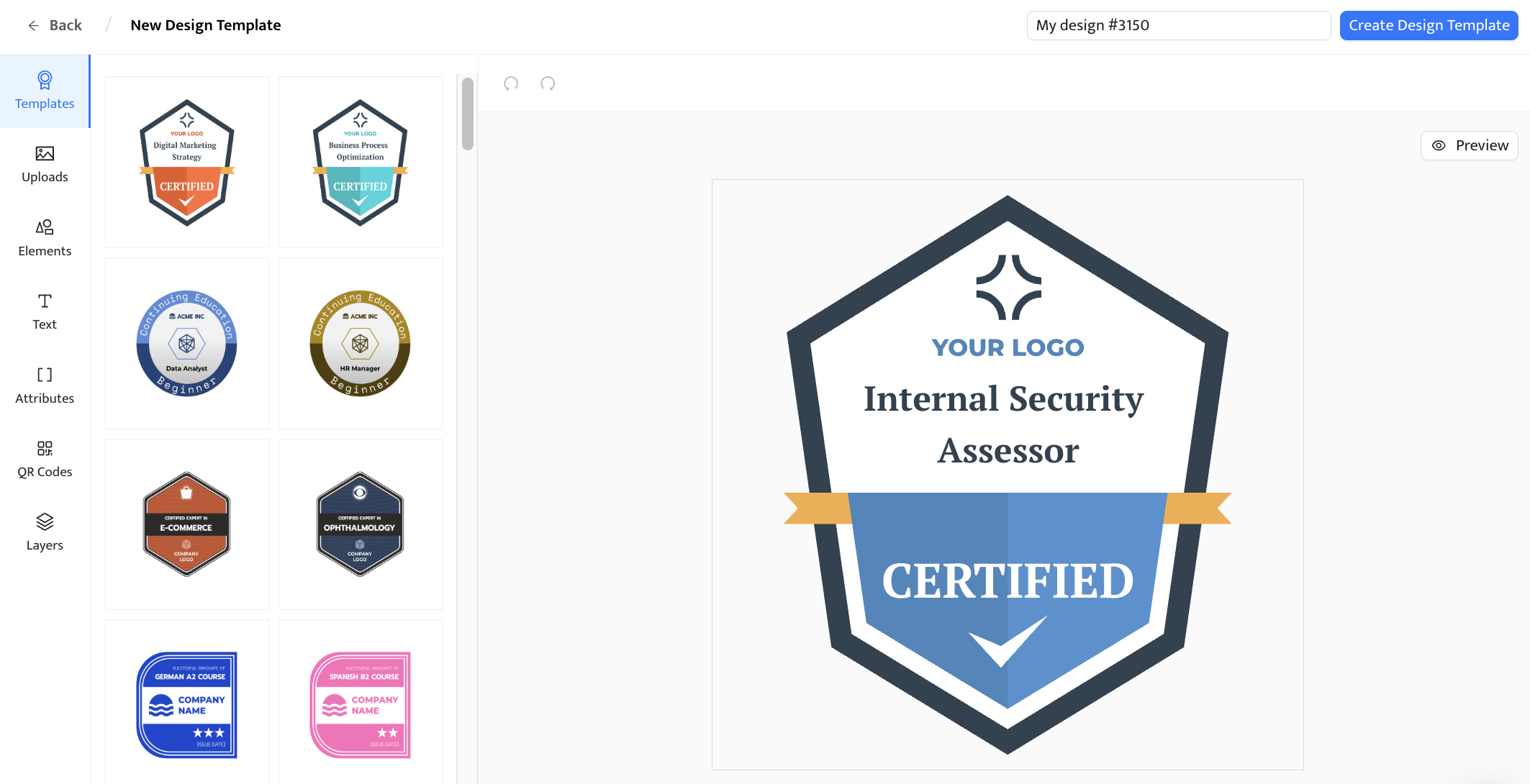
Every badge issued through Certifier follows the Open Badges 3.0 standard, with a unique ID, embedded metadata, and a live verification page anyone can check at the source. The credential keeps its value outside the platform: recipients can prove what they earned years later, on LinkedIn, in a wallet, or to a third-party verifier, without needing the issuer to confirm it.
Certifier is an EU-based platform and hosts its infrastructure on AWS in Europe. Our public security materials list GDPR compliance, ISO 27001 certification, and ISO 9001 certification, encryption in transit and at rest. That shows up in what enterprise security and procurement teams receive during review: a signable DPA, a published subprocessor list, audit logs, a 99.9% uptime SLA, and SSO and 2FA available from the start.
For multi-team programs, Certifier handles this with workspaces, role-based access, and centralized governance, so different departments, brands, or regions can operate in parallel without stepping on each other's work, while the program owner keeps full visibility across the organization.
And because credentials rarely stay static, issued badges remain editable, revocable, and trackable long after they're sent. Verification stays intact, the program keeps producing usable data, and the platform continues working as the organization changes.
Whether Certifier fits your organization depends on your requirements. But if the five-layer model captures what you're looking for, Certifier is built to support every layer of it. This solution is compatible with a wide range of enterprise business software, from all-in-one CRMs like Keap to basic survey and webinar platforms.
To see how Certifier's enterprise features map to your own requirements, book a tailored enterprise walkthrough.
The platform you choose becomes part of how your organization is recognized in the world. Every badge that goes out carries your name and your standards alongside the recipient's achievement, which is why this decision is worth making carefully.
If you'd like to keep exploring, our comparison of leading badge platforms or our guide to digital badge platforms by use case.
Yes, when the program is set up to measure it. Digital badges drive value across three areas:
brand visibility (every shared badge promotes the issuing organization);
learner engagement (recognition increases course completion and motivation);
skill verification (recipients can prove competencies to employers, partners, or regulators).
To measure the ROI of a digital badge program, track share rates and verification clicks (visibility), completion and renewal rates (engagement), and external recognition signals like LinkedIn additions or third-party verifications (validation). Together, these tell you whether the program is producing real business outcomes or just sending email
An enterprise digital badge platform is a credentialing tool built to handle the demands of large organizations. Which means not only designing and sending badges, but supporting trust, compliance, integrations, multi-team governance, and lifecycle control.
It needs to clear IT and procurement review, connect to the systems where data already lives, work for multiple departments operating in parallel, and keep credentials manageable long after they're issued.
They can be, however compliance depends on the platform issuing them, not the badge itself.
A GDPR-compliant digital badge platform handles recipient data under documented data processing terms, stores it securely (ideally with EU hosting options), provides a signable DPA, and discloses every subprocessor it uses. If the platform doesn't offer these, the badge may not be GDPR-compliant, regardless of how polished it looks.
Enterprise-grade vendors that publish a signable DPA, hold ISO 27001 certification, and provide a transparent subprocessor list are generally GDPR-aligned.
Certifier is one great example. It’s an EU-based platform with full GDPR compliance, ISO 27001 and ISO 9001 certification, and procurement-ready documentation available before contract signing. Its public materials also include subprocessors, encryptions, 2FA, SSO for enterprise, audit logs, and DPA/SLA support. Talk to our team to learn more.
Yes. The most suitable platforms for European organizations combine three things: adherence to the Open Badges 3.0 standard (so credentials stay portable and verifiable), full GDPR compliance (with a DPA and EU data residency options), and ISO 27001 certification (so security teams have a recognized standard to verify against).
Certifier supports Open Badges 3.0 and is an EU-based provider with GDPR and ISO documentation available through its public materials. .
Secure issuance and verification depend on the platform behind the badge. On the issuance side, look for SSO and 2FA to control who can issue credentials, role-based access to limit what each user can do, and audit logs that track every action.
On the verification side, every badge should carry a unique credential ID, embedded metadata (issuer, recipient, skills, dates), and a live verification page anyone can check at the source. A QR code makes the same check possible offline. Adherence to an open standard like Open Badges 3.0 ensures the credential stays portable and verifiable even if the platform behind it changes.
Certifier is one such provider, built specifically for organizations that need to issue credentials at scale without compromising on data protection.
As an EU-based platform, GDPR compliance is part of how Certifier operates day to day — backed by ISO 27001 certification, a signable DPA, and full subprocessor transparency.
For online course providers specifically, Certifier also connects natively to the tools you already use (Zoom, Google Sheets, HubSpot, Salesforce) and follows the Open Badges 3.0 standard, so every credential issued stays portable and verifiable outside the platform.

- Content Writing
- On-page SEO
- Localization
- Market Research
- Keyword Research
Content Specialist
Daria creates practical guides and templates that help training providers, educators, and event organizers solve digital credentialing challenges.
Gartner — Enterprise Resource Planning to Optimize Operations
https://www.gartner.com/en/information-technology/topics/enterprise-resource-planningOpen Badges 3.0
https://www.imsglobal.org/spec/ob/v3p0ISO 27001
https://www.iso.org/standard/27001GDPR (General Data Protection Regulation)
https://gdpr.eu/


