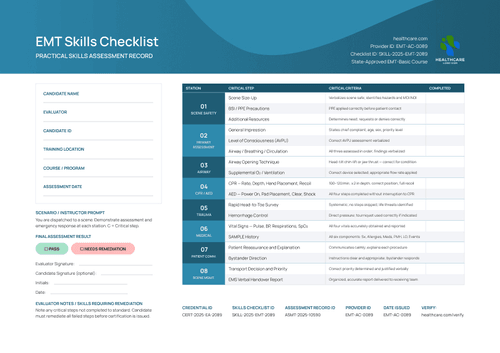
Blue EMT Competency Checklist Template
Customize a free blue emt competency checklist for approved records. Edit it online or receive editable Word files in the catalog package.
Customize this template for free
Email and export in bulk
Track recipient engagement
Download in
Don't have Certifier account? Sign up
Free blue EMT competency checklist template
This blue EMT competency checklist template gives EMS education providers a structured way to document workplace readiness across fifteen observable performance criteria. The five assessment domains cover professional conduct, clinical skills, safety, communication and reporting.
Status cells use C for Competent and NYC for Not Yet Competent. Evaluator Notes preserve supporting observations, while the remediation area records any skills that require further work.
Open the design in Certifier to replace the EMS provider identity and configure candidate-specific fields. Once the evaluator approves the competency decision, the checklist can accompany a related certificate.
What is an EMT competency checklist?
An EMT competency checklist is a workplace assessment record that documents whether a candidate performed each clinical and professional skill to standard. An evaluator scores fifteen competencies during a real or simulated shift, then attaches the finished record to the candidate's EMT certificate.
This design is built on standard A4 dimensions (21 x 29.7 cm), and also works in US Letter format (8.5 x 11 in). State-approved EMT education programs, program directors, EMS instructors, and approved skills evaluators use it to document competency beyond the classroom exam.
When issued through Certifier, the approved checklist can be connected to a live record using verifiable credentials. The EMS provider remains responsible for the assessment standard and the final competency decision.
What should this checklist include?
Before you customize the layout, it helps to know exactly which fields are fixed and which ones change with every candidate.
Static fields
- Provider logo and name: Labeled institutional graphic showing the issuing organization (e.g., EMS & Rescue Arizona Institute).
- Competency area headers: Fixed section labels grouping the fifteen rows (e.g., Technical and Clinical Skills, Safety and Risk Management).
- Performance criteria text: Fixed description under each competency explaining what counts as met (e.g., "100-120/min; ≥2 in depth; correct hand position; full chest recoil").
- Status legend: Fixed key defining the Competent (C) and Not Yet Competent (NYC) marks used across the checklist.
Dynamic fields (automatically populated after mapping in Certifier)
- Candidate Name & Candidate ID: Labeled space for the person being assessed.
- Evaluator, Training Location & Assessment Date: Labeled fields recording who ran the assessment, where, and when.
- Course / Program: The EMT program the candidate is enrolled in.
- Assessment Scenario / Instructor Prompt: Text block describing the situation every candidate is tested against.
- Competency Status Marks: A C or NYC mark entered against each of the fifteen rows.
- Evaluator Notes: Free-text field for any competency requiring remediation.
- Competency Decision: Competent or Not Yet Competent outcome field.
- Credential ID, Skills Checklist ID, Assessment Record ID & Provider ID: Verification tracking codes (e.g., SKILL-2025-EMT-0739).
- Verification link: A scannable or clickable link pointing to the live verification page.
These changing fields are visible in the supplied EMT checklist and are not guaranteed to be pre-mapped. Configure them in Certifier and use only candidate results approved by the responsible evaluator.
How to issue the blue EMT competency checklist
Use this four-step controlled workflow:
- Customize the design and your branding — Open the blue checklist in the online editor. Choose A4 or US Letter and select portrait or landscape. Add the EMS provider's name, logo and contact details, then adjust the five domain labels or criteria if needed.
- Bundle it with a matching companion document — Pair the checklist with the certificate it supports from the certificate template gallery. Check that both designs refer to the same Course / Program and Assessment Date before issuing them together.
- Connect your tools — Sync candidate rosters from Google Sheets or connect an education workflow through Moodle LMS. Review all integrations if the approved source is stored elsewhere.
- Issue, deliver, and verify — Score all fifteen criteria during the assessment and resolve anything marked Not Yet Competent. Complete the remediation notes and signatures, then issue the credential set. Open the QR destination before delivery.
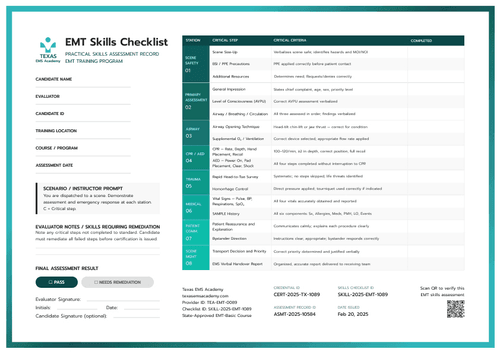
Available EMT competency checklist template formats to customize
Edit and issue the template online with Certifier
Open the design in Certifier if you want your competency checklist to carry candidate-specific data, deliver it directly to an evaluator's inbox, and publish it on a live credential page.
Download the template in Microsoft Word
Enter an email address to receive a ZIP with the editable Word files in both portrait and landscape orientation, A4 and US Letter size. The offline option suits teams that need to adapt or retain a Word version.
PDF document export
While you manage records online in your Certifier issuer dashboard, evaluators and candidates can export issued checklists as print-ready PDF files directly from their email or verification pages.
Who issues this checklist?
State-approved EMT education programs
Accredited programs use this checklist to document hands-on clinical and professional competencies alongside the certificates they already issue.
Program directors and training administrators
Administrators overseeing multiple cohorts use the record to standardize how every evaluator scores the same fifteen competencies.
EMS instructors and skills evaluators
Instructors running live or simulated shift evaluations use the checklist to give candidates a documented, shareable record of a passed assessment.
Frequently asked questions
Yes. Select "Edit this template," enter your email address in the pop-up, and receive the available Word package, or use a free Certifier account to customize the design online.
No. It's a supporting record that documents the competencies behind an EMT certificate you already issue; the issuing program remains responsible for meeting its state's certification requirements.
Yes. They're fully editable in the online editor and in the Word file.
NYC stands for Not Yet Competent. Your program should define what remediation is required before a candidate with an NYC mark can be reassessed.
Yes, Certifier-issued checklists can be edited post-issuance. Open the record in Credentials, edit the recipient information or status marks, and save; the change appears on the recipient page without resending. If the correction is to static wording or the visual design, editing the shared design updates all previously issued credentials that use it, so confirm the scope before saving.
Certifier templates are provided for general informational and design purposes only. They do not constitute legal, regulatory, accreditation, or licensing advice and are not guaranteed to satisfy the requirements of any institution, recognition body, regulator, or jurisdiction. Using this template does not by itself make a document an official skills assessment or prove a competency. The issuing organization is responsible for verifying the content, authority, approvals, and suitability of every document before use.