

Trusted by:
University of Southern California
Warner Bros.
Volvo
Amazon
Stanford University
Updated: October 20, 2026
6 min read
Dental CE providers can automate certificate creation, delivery, and access once attendance, assessment, and credit data are validated. Use this guide to connect that evidence to the issued credential and handle audit requests successfully.
Research with AI:
If you run continuing education for a dental association, academy, or conference, you probably have received your share of resend requests for a course certificate issued several years ago. In many cases, internal teams spend too much time matching records across platforms to find which certificate they need to resend.
The good news is you can automate dental CE certificate creation, delivery, and recipient access once attendance, assessment, and credit data are validated.
The harder work sits on either side of the certificate: confirming the right person earned the right credit before you issue, and finding the right record when someone asks for it later. When your webinar platform, LMS, member database, and spreadsheets don't agree, those gaps turn into resend, correction, and verification requests.
This guide shows you how to close those gaps, with a step-by-step workflow, exception rules, and an audit checklist.
Only one of the seven records behind a dental CE certificate is the certificate itself. Automating that alone leaves the other six links where requests start.
Auto-issue only the records that pass a written rule, such as an attendance threshold plus an evaluation. Send partials, duplicates, and missing emails to a named owner.
Keep your provider file separate from the hosted credential. ADA CERP requires six years of participation records, while AGD PACE requires seven years of attendance records.
Count requests by type before and after, then test the lost credential and audit retrieval.

Certificate recipient requests keep coming back because each type points to a different broken control. Sort your requests by type before you automate anything, as each type has its own root cause and fix.
Once you know which requests dominate your inbox, you know which link in the chain to fix first.
Request | Likely Root Cause | Preventive Control | Human Action That Remains |
|---|---|---|---|
"Please resend my certificate" | The delivery or access path isn't durable or easy to find | Hosted access plus a documented resend path | Confirm identity or contact details, then resend |
"My name is wrong" | Identity wasn't validated before issuance | Field validation from registration to recipient, plus a review state | Confirm correction authority, then update or replace |
"The credit hours are wrong" | Course and attendance logic diverged | A provider-approved credit rule and an exception gate | Recalculate and document the correction |
"I attended but received nothing" | The trigger, mapping, or delivery failed | Run log, failed-record queue, reconciliation | Investigate the source event and eligibility |
"Can you verify this for my board or employer?" | A static file offers no direct issuer check | A hosted issuer record or verification link | Explain what the record shows; provide more records if required |
"I need proof from years ago" | Your archive and the recipient's record are disconnected | A searchable credential ID plus retained source evidence | Produce the applicable evidence packet |
Automating dental CE certificates means keeping seven records connected, from registration to a possible audit years later. A request appears whenever one link breaks.
If you automate only certificate generation, the output may be faster, but the broken link stays in place.
Link | Source Input | Validation Gate | Owner | Common Break | Completion Check |
|---|---|---|---|---|---|
Identity | Registration or member record | Name, email, and ID match | Program admin | Typo, duplicate, shared email | A stable participant key exists |
Participation | Webinar, LMS, or event record | Attendance, assessment, required activity | Course owner | Partial attendance, failed quiz | The rule is satisfied and recorded |
Credit | Course record | Correct duration, category, or code | Education lead | Breaks counted, wrong unit | Credit matches the approved rule |
Issuance | Approved record | Required fields complete | Credential admin | Missing field, wrong template | Record and source ID reconcile |
Delivery and access | Recipient email or hosted URL | Delivery and access check | Operations or support | Bounce, lost email | The access path is tested |
Correction and verification | Request or reviewer check | Identity and change authority | Support or provider owner | Duplicate PDF, silent overwrite | The change and resulting state are inspectable |
Retention and audit | Provider archive and export | Applicable rule and retention schedule | Provider compliance owner | Missing roster or source proof | Requested records can be produced |
Edit in Certifier

Automation can't fix a missing license number, an ambiguous attendance log, or a credit value nobody approved. Decide what each field is, where it comes from, and who can change it before you connect any system.
Almost every dental CE workflow needs:

a stable participant ID, name, and contact route
course or activity ID, title, date, and delivery method
attendance or completion state
approved credit value and unit
issue date, credential ID, or URL
source record and record owner
The stable participant ID matters more than it looks. Email addresses change, get shared by front-desk staff, or bounce. So if you match records on email alone, you risk creating duplicates and lost records.
Here's how to document the fields that cause most requests:
Field | Source System | Required | Validator | Public Or Private | Correction Owner | Retention Owner |
|---|---|---|---|---|---|---|
Participant ID | Registration or member database | Required | Program admin | Private | Program admin | Provider archive |
Name | Registration | Required | Participant at registration | Public | Support, with identity check | Provider archive |
Registration | Required | Delivery check | Private | Support | Provider archive | |
Attendance or completion state | Webinar platform or LMS | Required | Course owner | Private | Course owner | Provider archive |
Credit value | Course record | Required | Education lead | Public | Education lead only | Provider archive |
Subject or subject code | Course record | Conditional | Education lead | Public | Education lead | Provider archive |
License or member number | Participant | Conditional | Program admin | Private by default | Program admin | Provider archive |
Recognition statement | Recognition program | Conditional | Compliance owner | Public | Compliance owner | Version history |
Some fields depend on your recognition program or the recipient's jurisdiction.
ADA CERP's Standards, Policies and Procedures mentions that the verification a provider issues must contain:
the provider name
the participant name
the activity title, including specific subjects if the title doesn't name them
the dates, hours, and location of a live activity, or the completion date for self-study
the educational format, such as an in-person lecture or live webinar
the number of credits awarded, with each session's title and credits listed for large conferences
the complete ADA CERP recognition statement, including information on filing complaints
According to standard XI of the AGD PACE Program Guidelines, verification of attendance must clearly indicate at least:
the provider's name and PACE provider ID
the date, location, and duration of the activity
the title and specific AGD subject codes
the educational methods used
the number of credit hours
the participant's name
the title and credits of each course attended at a large dental meeting
the provider's recognition status through the authorized statement, with the AGD PACE logo whenever space allows.
State boards set licensee expectations too. The New York State Board for Dentistry requires dental CE certificate verification to show the course title, hours completed, sponsor name, location, date, and the sponsor's verification of attendance.
If you're designing the certificate itself, start from a continuing education certificate template and add the fields above.
Keep license numbers, member IDs, assessment scores, and internal notes off the public view unless a recipient or regulator needs them displayed. Store them in your provider record instead.
Certifier gives you a few control options here. You can turn off search engine indexing for your issuer and credential pages. You can keep that detail on the same credential as a private page with multi-page credentials, so the certificate stays public while scores or license numbers stay private.
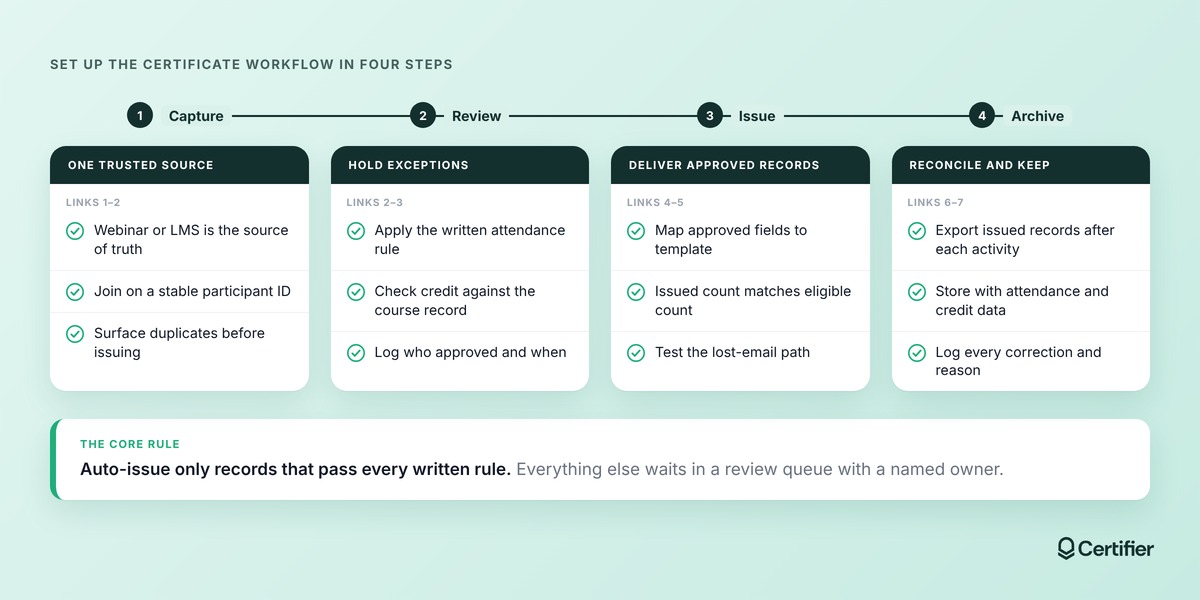
Pick one system as the source of truth for participation. For a live webinar, that's usually the webinar platform's attendance record. For a self-paced module, it's the LMS completion record. Join every participation record to a stable participant ID so duplicates surface before issuance.
Auto-issue only records that pass every written rule. Everything else goes to a queue with a named owner. This is the main control against requests to change credit hours. Write down who approved each batch and when.
Map each approved field to the credential template, then issue in a batch or from a connected trigger. Check that the issued count matches the eligible count. Test how a recipient gets back to the record after losing the email: through a self-service portal if you have one or through your resend process.
After each activity, export the issued records and store them with the attendance data, credit calculation, and approval note. Your archive should show whether a person completed this course for this credit without reopening the webinar platform. Log every later correction with its reason and approver.
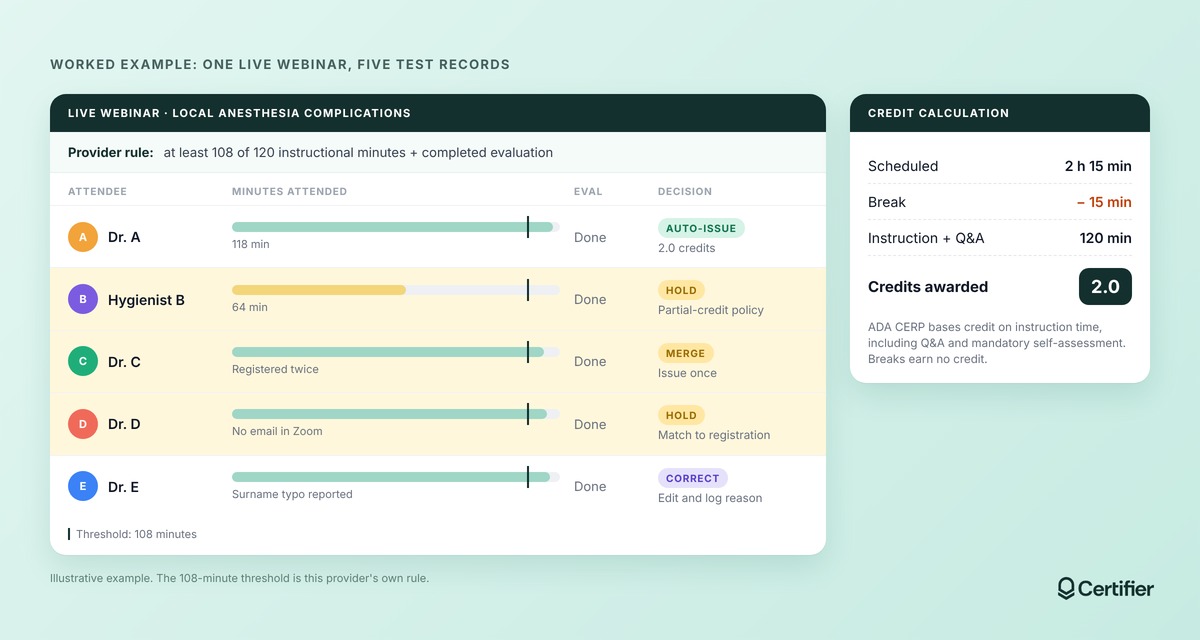
Here's how the workflow chain looks for one live webinar:
The activity: An ADA CERP-recognized provider runs a live Zoom webinar on local anesthesia complications. It's scheduled for 2 hours and 15 minutes, with a 15-minute break. ADA CERP credits are based on actual instruction time, including Q&A and mandatory self-assessment, with no credit for breaks. The approved credit is 2.0, not 2.25.
The provider's rule: The education lead writes the eligibility rule before the event: attend at least 108 of the 120 instructional minutes and complete the post-course evaluation. Webinar attendance alone doesn't establish eligibility unless the provider's rule says it does.
The source data: Registration holds a stable participant ID, name, email, and optional license number. Zoom records attendance. The evaluation form records completion. Because the rule needs both attendance and the evaluation, the provider joins the two on participant ID in a review sheet before issuing. A provider whose rule depends only on attendance could let the webinar integration apply the minute threshold directly.
Five records that test the workflow:
Attendee | What Happened | Workflow Decision |
|---|---|---|
Dr. A | Attended 118 minutes, completed evaluation | Eligible. Issue 2.0 credits automatically |
Hygienist B | Attended 64 minutes | Hold. If your recognition program and policy allow partial credit, recalculate in 0.25-credit increments and approve manually. Otherwise, close as ineligible |
Dr. C | Registered twice, with work and personal email | Merge on participant ID; issue once |
Dr. D | Attended and completed, but no email captured in Zoom | Hold. Match to registration and confirm the contact route |
Dr. E | Eligible and issued, then reports a misspelled surname a week later | Verify identity, correct the issued record, log the reason |
Draft or auto-issue: Dr. A's record goes out automatically while the other four route to review. After two or three cohorts, the provider can decide whether any exception type is predictable enough to automate.
Delivery and access: Each recipient gets an email linking to a hosted credential page with the activity title, date, format, location, credits, provider name, and the recognition statement. The page stays live if the email is lost. Without a recipient portal, the recipient can request a resend.
Archive and AGD reporting: The provider exports the issued records with the attendance report, credit calculation, and evaluation data, then stores the packet. If the provider is PACE-approved, it also submits credits for AGD member attendees through AGD's online roster within 30 days and documents non-members separately.
The retrieval test: Six months later, a team member plays auditor. They pick Dr. E at random and try to produce the issued record, correction history, attendance evidence, and credit calculation within a target time your team sets. If they can't, fix the archive step before you scale certificate issuance.
For every exception, write down a detection signal, an owner, an action, required evidence, and a closure state.
Attendance and assessment exceptions
Exception | Detection Signal | Owner | Action And Evidence | Closed When |
|---|---|---|---|---|
Partial or ambiguous attendance | Minutes below threshold or missing leave time | Course owner | Apply partial-credit policy or reject; attendance log | Approved, reduced, or rejected with reason |
Failed or missing assessment | No pass or no submission | Course owner | Hold; offer retake if policy allows; assessment record | Passed or closed as ineligible |
Credential issued before approval | Issue date earlier than approval date | Education lead | Review, correct, or revoke; approval log | Record matches approved state |
Identity and delivery exceptions
Exception | Detection Signal | Owner | Action And Evidence | Closed When |
|---|---|---|---|---|
Duplicate registration or shared email | Two IDs on one email, or one person twice | Program admin | Merge before issuance; registration records | One participant key |
Missing member or license ID | Required field blank | Program admin | Request from participant | Field complete or marked not required |
Wrong name or email | Change request or bounce | Support | Verify identity, then correct; identity check | Record updated and logged |
Bounced or suppressed delivery | Delivery status and bounce reason | Support | Confirm contact, resend; delivery log | Recipient opens the record |
Automation or mapping failure | Issued count below eligible count | Credential admin | Re-run for missing records; run log | Counts reconcile |
Non-AGD member on a PACE course | Membership check | Program admin | Exclude from AGD roster, document separately | Correct roster submitted |
Credit and late correction exceptions
Exception | Detection Signal | Owner | Action And Evidence | Closed When |
|---|---|---|---|---|
Unsupported credit value or category | Value not in approved course record | Education lead | Recalculate; course schedule and credit rule | Approved value issued |
Changed course or provider statement | Recognition wording or course data updated | Compliance owner | Decide whether past records change; version history | Old and new versions documented |
Late correction request | Request arrives after archiving | Provider owner | Verify against archived packet; correct or decline | Decision logged |
Record requested after a source system changed | Old platform no longer available | Compliance owner | Use archived export | Packet produced |
If you update a recognition statement or design element on a shared template, older credentials will display the new version too. In Certifier, design changes are reflected in all previously issued certificates.
If historical records should keep the wording that applied when they were issued, create a new design for the new wording and keep the old one unchanged.
Recipients should be able to find, share, and prove their record without emailing you. Four controls make that work:

A hosted record: A credential page with its own URL survives a deleted PDF, plus anyone with the link can check it. On all Certifier plans, credentials get a public credential page with one-click verification. On the Advanced plan, the Issuer Portal adds a branded microsite where recipients can look up and retrieve their own credentials.
A documented resend path: Support should know how to resend without reissuing. Without a recipient portal, this is how a recipient recovers a lost credential, so make sure support can find a record quickly by email or participant ID. In Certifier, resending works on every plan and doesn't count toward your credential limit.
Correction authority: Decide who can approve a name, email, or credit change, and which changes need a replacement instead of an edit. A name typo is a correction. A credit change after an audit question may need a documented amendment.
Verification with stated limits: A hosted verification page or a QR code linked to it (on Certifier's Professional and Advanced plans) lets a board, employer, or reviewer confirm that the issuer's current record exists. It doesn't prove the board will accept the credit or that the practitioner is competent today.
Party | Requirement | Retention | Source |
|---|---|---|---|
ADA CERP recognized provider | Keep accurate records of learners' participation in CE activities | At least six years | |
AGD PACE approved provider | Keep accurate records of individual attendance, accessible to attendees; submit AGD member credits within 30 days | At least seven years, or longer if local or national regulations require | |
California licensee | Retain certificates of CE course completion; the board runs random audits of active licensees each month | Three renewal periods | |
New York licensee | Keep verification of attendance; the board doesn't maintain CE records; random audits each month | Six years from completion |
Note: Sources checked October 5, 2026. Re-check these rules if publication slips by more than a few weeks. Other states set different hours, categories, and retention periods.
When a board, recognition body, or licensee asks for proof, follow the following steps:

Confirm the requester and scope. Who is asking, about which person, which activity, and which period?
Find the credential by stable participant ID, activity ID, or credential ID. Names alone produce false matches.
Reconcile the issued record with the attendance or completion data and the credit calculation.
Check current status and correction history. Has the record been edited, replaced, or expired?
Export only the records the request needs. Don't send a whole roster to answer a question about one person.
Record the response and any unresolved gap.
Certifier helps course providers create, issue, and manage dental continuing education credentials. It doesn't replace the rosters and source evidence your recognition program expects you to keep.
Your qualifying event and data quality decide the certificate automation route.
Source Situation | Default Route To Evaluate | Human Gate | What To Validate With Product Or Your Vendor |
|---|---|---|---|
One-off clean roster | Spreadsheet bulk issuing | Pre-issue review | Supported columns, formats, and draft behavior |
Recurring spreadsheet-fed program | Native spreadsheet automation | Exception review | Trigger rules, duplicate behavior, field mapping |
Live webinar, attendance-only rule | Webinar integration with an attendance threshold | Threshold set by the education lead | Trigger timing, threshold options, excluded roles |
Live webinar plus evaluation or test | Attendance and assessment joined in a review sheet, then issued | Eligibility review | Join key, duplicate handling |
LMS course | Native connector or API | Completion and assessment rule | Connector event, retry and error behavior |
Conference with multiple sessions | Event or registration source plus session reconciliation | Per-session credit approval | Multi-session IDs, duplicates, export |
No reliable qualifying event | Manual approval or draft workflow | Required | Don't automate final issuance until evidence exists |
Check trigger behavior before you rely on it. Certifier's Zoom integration issues when a meeting or webinar ends and lets you set a minimum number of minutes or percentage of the session an attendee must attend to qualify.
Spreadsheet automation has its own rules. Certifier's Google Sheets integration issues when a new row is added to a live sheet and maps columns by position. Inserting rows above processed entries or moving columns can cause duplicates or errors.
A dental CE certificate request is usually a delayed symptom of a broken link between identity, participation, credit, approval, the issued record, recipient access, and your evidence.
Start with one activity or cohort. Write the eligibility and credit rule before the event, keep a human gate on anything the rule doesn't cover, and run a retrieval test months later. Then decide whether the workflow and the tool fit your program.
Create a free Certifier account and do a small test workflow. You can issue up to 250 credentials a year, choose from dozens of app integrations, and customize up to five custom attributes on each certificate template.
Yes. Certifier's Zoom integration can issue credentials when a webinar ends, only to attendees who meet a minimum number of minutes or percentage you set. If eligibility also depends on an evaluation or test, join that data first and issue only records that pass both.
According to ADA CERP standards, a recognized provider's verification must show the provider name, participant name, activity title and subjects, dates, hours, and location (or completion date for self-study), educational format, credits awarded, and the complete recognition statement with complaint information.
AGD PACE also requires the PACE provider ID, AGD subject codes, and the provider's recognition statement, while state boards may ask for more. Confirm the current requirements with your recognition program.
ADA CERP requires recognized providers to keep participation records for at least six years. AGD PACE requires approved providers to keep attendance records, accessible to attendees, for at least seven years. Check your recognition program and any state rules that may apply.
They can if the provider offers a self-service lookup. In Certifier, that's the Issuer Portal on the Advanced plan, where recipients can find and retrieve their credentials on the provider's branded portal.
On other plans, each credential still has its own public page with one-click verification, but recipients reach it through the delivery email or can ask the provider to resend it. Resends work on every Certifier plan and don't count toward the credential limit.
Yes, Certifier allows you to change attribute values that were included when the credential was issued, such as the recipient name or a custom field. The change appears on the existing recipient page automatically.
Workspace admins can see who performed each action in Certifier's Activity Logs. Keep your own record of the old value, the new value, and who approved the change.
No, Certifier only issues and manages recipient-facing credentials. PACE providers submit AGD member credits through AGD's online roster, and licensees report or attest to their CE through their state board's process.
No, a verification link confirms that the issuer's current record exists and shows its details. Board acceptance depends on the board's rules, the provider's approval status, and the course content.

- copywriting
- B2B content marketing
- content strategy
- on-page SEO
- storytelling
Growth Marketer (Freelance)
Anita Coltuneac is a freelance B2B SaaS marketer with 5+ years helping tech companies grow organic visibility, build authority, and support pipeline. She uses storytelling to turn product expertise into useful content.


