

Trusted by:
University of Southern California

Warner Bros.

Volvo

Amazon

Stanford University

Updated: November 21, 2026
5 min read
Turn finished product training into a record everyone can check, with one credential per product version, a clear expiry rule, and a verification page that works outside your LMS.
Research with AI:
Who has trained on the latest version of a product and whose certificate expires next month? At many banks, insurers, and wealth firms, the answer sits in an LMS export, a renewal spreadsheet, and PDF files nobody outside the LMS can verify.
Product training teaches employees and partners how your products work before they sell, support, and recommend them. Yet, managing product training certificates issued when a session ends can often prove more difficult than it has to be.
A credential platform for finance training programs bridges that gap by using data from your LMS system to issue verifiable digital credentials for each product version. This guide shows you step-by-step how to set it up and how to handle renewals and product changes later on.

A training record has to hold up when someone outside the training team asks for it.
For insurers' distribution teams, the reason can be regulatory. For example, in US states that have adopted the NAIC Suitability in Annuity Transactions Model Regulation, insurers must provide product-specific training to producers and verify that a producer has completed the required training before selling an annuity product for that insurer.
For bank staff, fintech partners, and most other product training, no regulation asks for a credential, but similar questions come up for practical reasons. Managers want to know who can support a new account, while partner programs need something partners can share.
Even where a regulation applies, it asks for verified training and leaves the certification format up to you. The usual default, which is a PDF exported from the LMS, has three disadvantages:

Nobody outside the LMS can check it: A supervisor, a partner firm or an auditor usually has no way to match a downloaded PDF against the issuer's record.
It's easy to imitate: People can recreate the certificate designs in a free design tool.
It rarely carries the product version: A PDF that says "Annuity Training, completed" can't tell you whether someone took the old training or the new one.
The first gap is the main difference between a digital certificate and a PDF certificate. A digital certificate has its own verification page, where anyone can check the credential ID and issue date.
Financial institutions train three groups on their own products. So, it helps to decide which group a program serves before designing anything, since that choice affects who sees the credential and what it needs to record.
What that training covers depends on the institution:
Institution | Typical Product Training | Who Takes It |
|---|---|---|
Banks and credit unions | Core-system workflows for accounts, deposits, and lending | Branch bankers, lenders, service teams |
Fintechs | Banking or payments software operations and support | Implementation, customer support, and partner teams |
Insurers | Carrier-specific annuities, policies, and product requirements | Agents and sales teams |
Payments providers | Merchant platform setup, payment processing, and integrations | Merchant onboarding, support, and integration partners |
Wealth and advisory firms | Portfolio management, trading, and risk analysis platforms | Advisors, relationship managers, support teams |
Brokerages and investment firms | Firm-specific trading and order management products | Brokers, traders, operations staff |
Across all of these training activities, learners fall into the following three groups:
Audience | Typical Example | What The Credential Records | Who Sees It |
|---|---|---|---|
Internal staff | Branch, contact-center, and relationship teams learning a new account, card, or lending product | That the employee completed training on a specific product version | Mostly internal. Sharing and downloads are often switched off. |
Distribution teams | Agents, producers, brokers, and advisors selling an annuity, insurance, or investment product | Completion of product training, which your own process checks before allowing sales | Your sales operations, supervisors, and partner firms. Social sharing is optional. |
Customers and B2B partners | Accountants, bank clients, or channel partners trained on a fintech's or banking-technology vendor's platform | That the partner completed your program | Public and branded, built to be added to LinkedIn |
Internal and distribution credentials are mostly operational records, while partner credentials also work as marketing. If you're building customer product training or channel partner training from scratch, start with our guide on how to make a certification program.
Create one credential template per product version, such as "Fixed Index Annuity Product Training, v2026.2." When the product or its training changes in a meaningful way, create a new template instead of editing the old one.
The reason is how Certifier handles edits. Changing a credential template or its design updates every credential already issued from it, so editing last year's template for this year's product would make last year's credentials describe training that those learners never took.
You don't have to design each template from scratch. Start from one of the training certificate templates or compliance certificate templates, then add your entity branding and the product name.
Attributes are the fields that fill in automatically for each recipient. For product training, you can use these eight custom attributes:
Attribute | Example | Why Its There |
|---|---|---|
Product name | Fixed Index Annuity | Lets you filter by product |
Product or training version | 2026.2 | Separates old and new training |
Riders or modules covered | Income rider, death benefit rider | Shows exactly what the training included |
Entity or business unit | Subsidiary or region | Supports reporting and branding by entity |
Audience | Employee, producer or partner | Drives visibility settings in step 5 |
Completion date | Issue date | Standard record |
Expiry date | 12 months after issue | Drives renewal in step 4 |
Source record ID | LMS course or attestation ID | Ties the credential back to your system of record |
The free Starter plan allows 5 custom attributes, while the Professional plan extends that limit to 25. To see how attributes fill in from a spreadsheet, check our guide on how to create a training certificate.
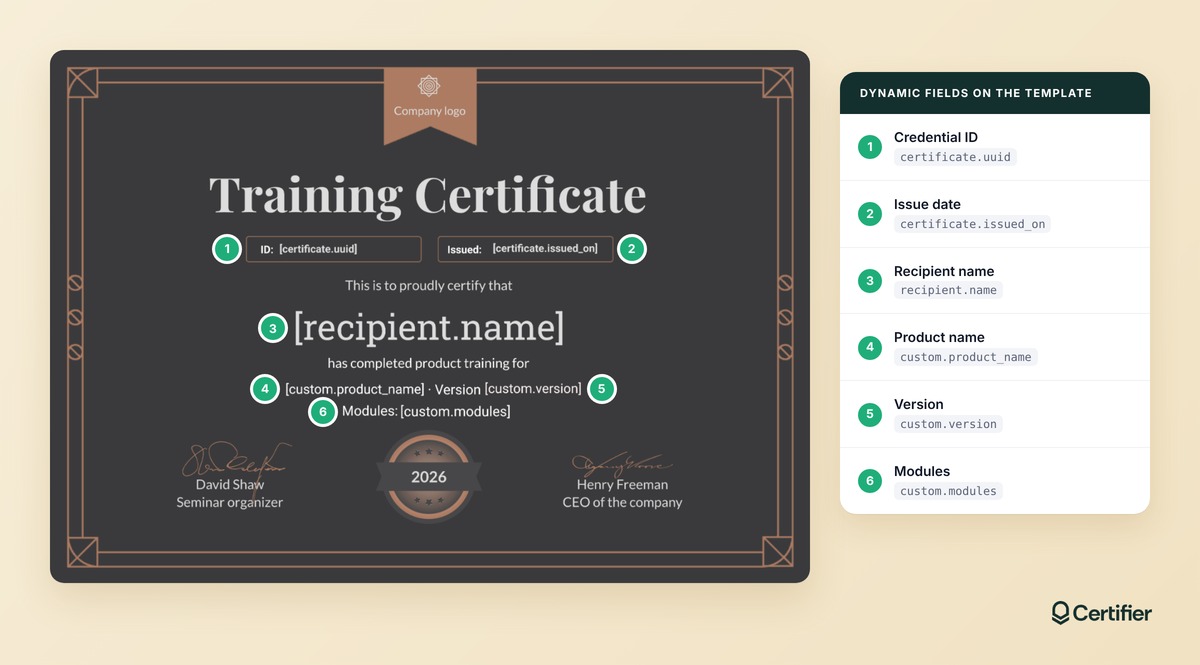
Issue credentials from the system that already knows who has finished, so when a completion action happens in a connected tool, a Certifier automation issues the credential. Native Certifier integrations include:

Learning platforms: Canvas, Moodle, LearnDash, Docebo, Teachable, Kajabi, Thinkific, and LearnWorlds. LearnWorlds and Thinkific issue a credential when a learner completes the selected course, while Thinkific can also trigger on a completed lesson.
CRMs: Salesforce, HubSpot, and ActiveCampaign.
Spreadsheets: Google Sheets, Microsoft Excel, and Smartsheet.
Other LMSs, including the enterprise platforms many banks use, can connect through Zapier or Make if the platform has a connector there or through a spreadsheet export that Certifier reads.
In the issue action, you can choose whether credentials go out as soon as the trigger fires or wait as drafts for someone to review and publish. Either way, set the trigger on a result your training team has already approved, such as a passed assessment.
A dated certificate can stand as a permanent record that someone completed a program at a point in time. ICBA's bank-wide certificate programs, for example, don’t require continuing education, unlike its professional certifications.
Add an expiry date only when the program has a real validity or renewal rule, like annual refresher training. In Certifier, you can set an expiry on the template or map a date per recipient. Once expiry is set, reminder emails go out to recipients two weeks before the date and again on the day.
Anti-money laundering training is a common case: many firms run it on a yearly cycle and issue a fresh certificate each time. Our AML training certificate templates come with a valid-until date built into the design.
Every credential has a verification page with a credential ID and issue date that a supervisor, partner firm, or auditor can check without logging in. You can also add a QR code to the certificate design, which links printed copies back to that page.
To help you keep track of recipient interactions, Certifier shows whether each delivery email was opened or bounced and whether the certificate was viewed and shared on social media.
After issuing, two kinds of change tend to come up, which need different handling despite looking similar.
A correction fixes an error in an existing record, such as a misspelled name. Editing an old credential to reflect new training, however, blurs the line between what someone completed then and what they completed later.
Event | Question For The Training Team | Usual Action |
|---|---|---|
Recipient name entered incorrectly | Is this an error in the existing record? | Correct the existing credential |
Delivery email bounced | Can the address be fixed? | Correct the email and resend |
Product wording changes slightly | Does the old credential still describe what was completed? | Usually no action |
Training changes materially | Does the affected audience need new training? | Create a new template for the new version |
Learner completes the new program | Should this be a new issued record? | Issue a new credential and keep the old one |
Program has a validity period | When should the existing record expire? | Set the expiry date |
Editing an issued credential's recipient details or attribute values updates its verification page straight away and records changes in the History tab.
Certifier holds the live credential, which is the one people share, the page others verify, and its status as it renews or expires. Your archive holds the long-term training record that your retention policy covers.
Export credentials as CSV on a regular schedule so the two stay in sync. If you need a simple format for your records, start from Certifier’s training record templates.
A credentialing layer is the system that issues, delivers, and verifies credentials after another system records completion. It sits between your LMS or assessment and the people who need to check the result.
System | Owns | Doesnt Own |
|---|---|---|
Your LMS or assessment | Course content, completion, scores, and attestations | A record that people outside the LMS can check |
Certifier | The issued credential (who, which product version, when, valid until), its verification page, delivery, and reminders | Whether someone is competent or licensed, and long-term record retention |
Your archive or compliance system | Record retention, supervision, and any checks before a sale | Recipient-facing credentials |
Certifier doesn't train, assess, or license anyone. Your program decides who completed the training, while the digital credentialing platform records that result and delivers it in a form that other people can check.
The same boundary applies to the certificate itself: a product training certificate doesn't make anyone a licensed or professionally certified practitioner.
Pick the product your teams sell or support most, build its template with the attributes above, and run it from LMS completion to a verification page. Test it on Certifier’s free Starter plan (up to 250 credentials a year), then move to Professional for expiry rules, visibility controls, and the full attribute set.
Sign up for a free Certifier account or see how our platform simplifies digital credential issuance and management for finance training programs.
A product training certificate should include: the recipient's name, the issuing organization, the training or program name, and the completion or issue date. Add the product, version, track, or level when your program has more than one.
A credential ID, a verification link or QR code, and an expiry date are useful when your program uses them. Add training hours, an assessment result, or an instructor only when they help explain the achievement.
No. It only records the completion of training your organization runs or approves. Professional certifications and continuing education credits follow eligibility, assessment, and renewal rules set by the certifying body. If you also issue continuing education credits, see CPD certificates.
Not always. A certificate can be a permanent record that someone completed the training on a specific date. Add an expiry date only when your program has a real renewal rule, such as annual refresher training.
If the change is material, issue new credentials from a new template for the new version and keep the old ones as they are. Editing the old template would change every credential already issued from it, so last year's records would no longer match what people actually completed.

- copywriting
- B2B content marketing
- content strategy
- on-page SEO
- storytelling
Growth Marketer (Freelance)
Anita Coltuneac is a freelance B2B SaaS marketer with 5+ years helping tech companies grow organic visibility, build authority, and support pipeline. She uses storytelling to turn product expertise into useful content.


