Professional navy workshop attendance letter template
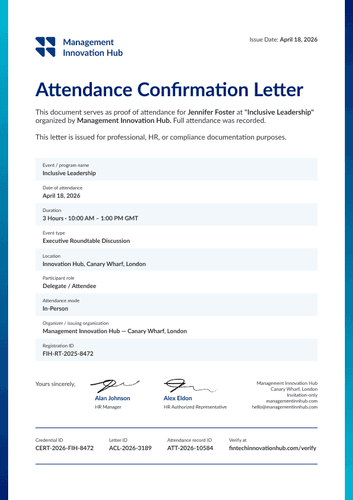
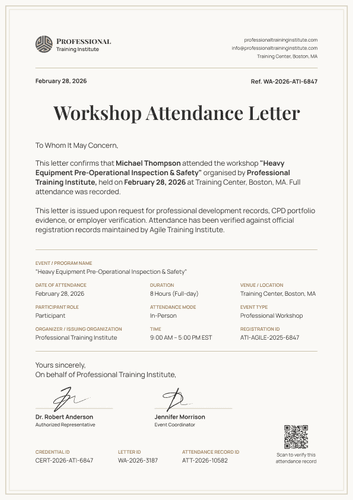
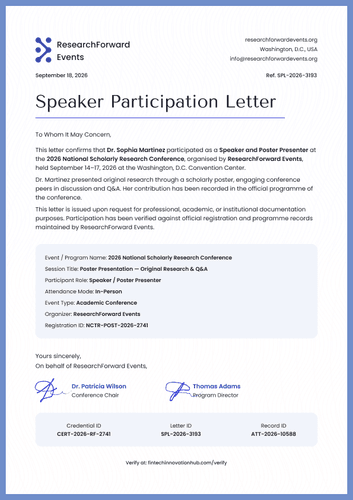
Confirm who attended an event, on which dates, and in what role. This workshop attendance letter template includes a ten-cell data grid stating the facts and a verifiable QR code.
Customize this template for free
Email and export in bulk
Track recipient engagement
Download in
Don't have Certifier account? Sign up
Free professional navy workshop attendance letter template
Someone has asked an attendee to prove they were there. A name on a delegate list will not settle it, and a certificate says they were recognized without saying when or in what capacity. This free attendance letter template states both in a grid that a reader can check in seconds.
Event organizers, workshop providers, conference teams, training institutes, and learning administrators issue it when attendance itself is the issue.
The simple yet professional layout comes with a thin navy frame on pale paper and ten data cells arranged in a grid rather than a paragraph.
Running an event with hundreds of delegates? Pull the attendance data from a spreadsheet or connect your LMS and every letter is ready the week the event closes. Each attendee receives a personal verification link they can forward to an employer or a registration board.
What is a workshop attendance letter?
An attendance letter confirms that a named person was present at a named event, on stated dates, in a stated role. It answers a request rather than marking an achievement, which is why the facts sit in a table.
The design covers one event on one page, from the organizer's header block down to the three tracking IDs at the foot. The document is available in portrait orientation, in A4 (21 x 29.7 cm) and US Letter (8.5 x 11 in) sizes.
Issue it alongside the matching certificate of participation so that an attendee holds both the certificate for a profile and the letter for a file. Create a free Certifier account to open the design and start customizing it according to your needs.
What should a workshop attendance letter include?
A reader should be able to check every claim without having to write back. The following elements are included in the design and can be edited in the online builder:
Static fields
- Confirmation Text: The standing sentences naming the attendee, the event, and the organizer.
- Purpose Statement: The paragraph explaining that the letter was issued on request and checked against registration records.
- Data Grid Labels: The ten cell headings, from dates of attendance through to registration ID.
- Signature Areas: Two signing spaces under a "Yours sincerely" line.
- Footer ID Labels: Fixed headings for the credential, letter, and attendance record IDs.
Dynamic fields (automatically populated by Certifier)
- Attendee Name: Labeled field for the person the letter concerns (e.g., Dr. Michael Carter).
- Event Name: Field naming the workshop or program attended (e.g., Advancing Sustainable Technologies).
- Organizer Header Block: Organization name, website, email, and street address.
- Dates of Attendance: The days the attendee was present (e.g., April 18-19, 2026).
- Location: Where the event was held.
- Event Type: Classification field for the format (e.g., Science Fair / STEM Event).
- Participant Role: What the attendee did there (e.g., Judge & STEM Mentor).
- Judging Category: Subject field for events that assign one (e.g., Environmental & Applied Engineering).
- Attendance Mode: In-person, online, or hybrid.
- Completion Date: The day the attendee finished (e.g., April 19, 2026).
- Date Issued: When the letter was produced.
- Registration ID: The attendee's booking reference (e.g., MRSF-JM-2026-1128).
- Credential, Letter & Attendance Record IDs: Three footer codes tracking the credential, this letter, and the attendance entry.
- Signatory Names and Titles: Both signing lines (e.g., Compliance Officer, Training Manager).
- QR Code: Printed square that opens the hosted record.
Take the list as a map of the sample design rather than a required format. Fields can be renamed, moved, or disappear in Certifier's design builder. Two things sit above the free Starter plan: the QR square and the number of custom attributes a ten-cell grid supports, both covered by the Professional plan.
How to issue a workshop attendance letter
Before you begin, confirm your organization ran or hosted the event and that your registration records support what the letter states. To issue the workshop attendance letter, follow these five steps:
- Set up the design for your event — Choose the size and orientation, drop in your organization header and both signatures, and mark the dynamic blocks for attendee details and the data grid.
- Attach the matching participation certificate — Link the letter to the certificate of participation so both documents reach an attendee in a single delivery.
- Bring in your delegate list — Import it from your registration system, or lift it from Canvas, Moodle, or LearnDash, all of which connect natively. The design takes your data in under a minute.
- Issue, deliver, and verify — Every attendee is emailed their own letter. Anyone checking it scans the QR square or opens the verification link, so the query never reaches your inbox.
- Track engagement and correct records — Opens, views, downloads, and shares are listed per letter in the Credential Repository. A wrong role or date can be corrected without reissuing, and the public record is updated immediately.
Available attendance letter template formats to customize
Edit and issue the template online with Certifier
Building the letter in Certifier gives every attendee their own data, an emailed copy, and a live record that a third party can open without your help.
Download the attendance letter template in Word
Keeping event files on your own drive or circulating a draft before sign-off? Email yourself the ZIP file so the Word documents are yours to edit locally, in portrait and landscape orientations, in A4 and US Letter sizes.
PDF document export
Attendees pull a print-ready PDF from their delivery email while your events team takes the same file from the credential page.
Who issues workshop attendance letters?
Event organizers and conference teams
The role and category cells matter here because a judge, a delegate, and a volunteer all attended the same event, but in different capacities.
Workshop and training providers
Attendance mode is a useful cell, since employers increasingly ask whether a session was in the room or on a screen.
Training institutes and learning administrators
Issued in volume after each cohort, so a request months later already has an answer waiting.
Frequently asked questions
The certificate recognizes someone publicly. The letter documents them formally, with dates, roles, and a mode for a reader to check. Most organizers issue both, which is why the two designs are built to pair.
Whatever is true: in-person, online, or hybrid. It reads like a small detail, yet it is often the deciding factor, because some employers and CPD schemes only count hours spent in the room.
Yes, and it’s better to say so plainly. Adjust the dates cell to reflect the days actually attended, and edit the confirmation sentence rather than leaving "full participation was recorded" in place.
The credential ID identifies the record in Certifier, the letter ID identifies this document, and the attendance record ID points to your own registration entry. Keep the last one matched to your system and any audit reconciles quickly.
Yes. QR codes come with the Professional plan and above. On the free plan, the letter still verifies through its link, so the design works without one, just with the square removed.
Certifier templates are provided for general informational and design purposes only. They do not constitute legal, regulatory, accreditation, or academic-recognition advice and are not guaranteed to satisfy the requirements of any institution, recognition body, regulator, or jurisdiction. Using this template does not by itself make a document an official diploma supplement or prove a qualification. The issuing organization is responsible for verifying the content, authority, approvals, and suitability of every document before use. This template is not an official Europass document and does not guarantee recognition of a qualification.