Formal cerulean speaker participation letter template
Document what a speaker actually contributed, not just that they showed up. This speaker participation letter template names the session, the role, and the program record against which it was checked.
Customize this template for free
Email and export in bulk
Track recipient engagement
Download in
Don't have Certifier account? Sign up
Free formal cerulean speaker participation letter template
Speakers get asked for this letter months after the event, usually by a university, a funder, or a promotions panel. What those readers want is specific: which session, what role, whose program it appeared in. This free participation letter template puts all three on the page and names the record they were checked against.
Conference teams, event organizers, workshop providers, training institutes, and learning administrators use it when a presenter needs documentation rather than recognition.
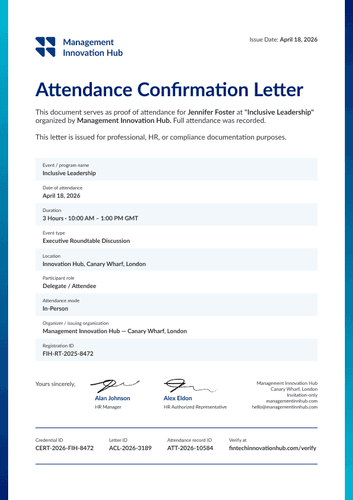
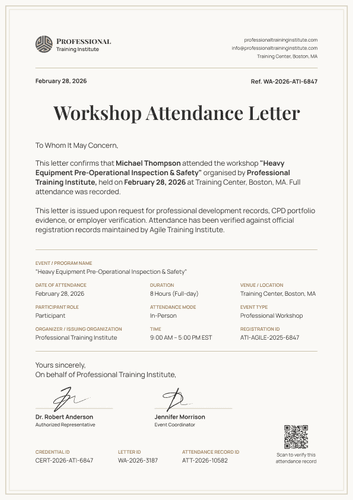
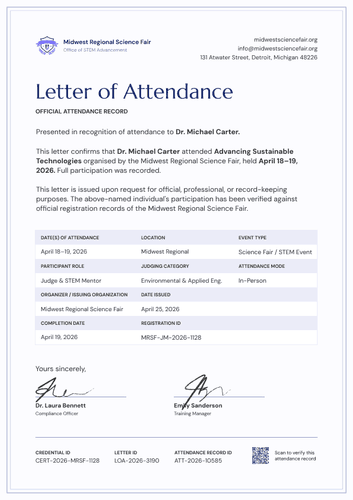
The layout opens "To Whom It May Concern" and closes with two authorized signatures. Session details are displayed in a tinted panel, and a reference number in the top corner links the letter to your files.
Closing out a multi-day program? Import the speaker list from a spreadsheet or connect your LMS so every presenter has their letter before the session records are archived. Each one carries a personal verification link that a panel or a funder can open directly.
What is a speaker participation letter?
A participation letter confirms that a named person contributed to a named event in a defined capacity. Where an attendance record says a person was present, this one says what they did: presented, chaired, ran a workshop, or sat on a panel.
Everything fits on one page, from the dated header through the contribution paragraph to the three footer IDs. The template is available in portrait orientation, in A4 (21 x 29.7 cm) or US Letter (8.5 x 11 in), whichever your files are set to.
Pair it with the matching conference participation certificate so a speaker has something to display and something to file. Create a free Certifier account to start customizing this template.
What should a speaker participation letter include?
This document should include enough for a stranger to assess the contribution without contacting your office. That is what the editable elements below cover:
Static fields
- Salutation: The "To Whom It May Concern" opening.
- Confirmation Sentence: The standing text naming the participant, the role, the event, and the organizer.
- Purpose Statement: The paragraph explaining the letter was issued on request and checked against registration and program records.
- Details Panel Labels: The seven labels inside the tinted block, from event name through to registration ID.
- Signature Areas: Two signing spaces under the "on behalf of" line.
- Footer ID Labels: Fixed headings for credential ID, letter ID, and record ID.
Dynamic fields (automatically populated by Certifier)
- Participant Name: Labeled field for the speaker (e.g., Dr. Sophia Martinez).
- Organizer Header Block: Organization name, logo, website, city, and contact email.
- Letter Date: The date printed at the top left (e.g., September 18, 2026).
- Reference Number: Your own filing reference, shown top right (e.g., SPL-2026-3193).
- Event or Program Name: The full event title (e.g., 2026 National Scholarly Research Conference).
- Session Title: The specific session the speaker delivered (e.g., Poster Presentation, Original Research & Q&A).
- Participant Role: The capacity in which they took part (e.g., Speaker / Poster Presenter).
- Event Dates and Venue: When and where the event ran.
- Contribution Paragraph: Editable text describing what the speaker actually did.
- Attendance Mode: Whether the contribution was delivered in person, online, or hybrid.
- Event Type: Classification field for the format (e.g., Academic Conference).
- Registration ID: The speaker's entry in your registration system (e.g., NCTR-POST-2026-2741).
- Credential, Letter & Record IDs: Three footer codes tracking the credential, this letter, and the underlying record.
- Signatory Names and Titles: Both signing lines (e.g., Conference Chair, Program Director).
- Verify-at Address: Printed link a reader follows to confirm the letter.
Read the list above as a description of this design, not a fixed standard. Rename, add, or drop fields in Certifier's design builder until it matches how your program records sessions.
How to issue a speaker participation letter
Before you begin, confirm the session ran as recorded and that your program records support the contribution described. Here’s how you can issue the participation letter using Certifier:
- Prepare the design for your program — Pick the size and orientation, add your organization header and both signatures, and mark the dynamic blocks for the speaker details, the panel, and the contribution paragraph.
- Pair it with the participation certificate — Attach the matching participation certificate to it so the display piece and the documentation are issued as a single credential.
- Load your speaker records — Bring them across from your registration platform. Canvas, Moodle, and LearnDash each have a native connection too, so your records reach the design in under a minute.
- Issue, deliver, and verify — Letters are sent to each speaker by email as soon as they are issued. A university or funder that needs confirmation follows the verification link instead of writing to your team.
- Monitor engagement and amend records — Track opens, views, downloads, and shares per letter in the Credential Repository. Correcting a session title or a role requires no reissue, and the live record reflects it immediately.
Available participation letter template formats to customize
Edit and issue the template online with Certifier
Working in Certifier means each speaker gets their own session details, an emailed letter, and a hosted record that stays checkable long after the event closes.
Download the participation letter template in Word
Archiving the program in your own files or sending a draft to a chair for approval? Mail yourself the ZIP file and edit the Word documents offline: in portrait and landscape, in A4 and US Letter.
PDF document export
A print-ready PDF can be exported straight from the delivery email, while organizers can pull the same file from the credential page for the event archive.
Who issues speaker participation letters?
Conference and program teams
The session title field carries the weight, because a panel appearance and a keynote are not the same contribution.
Event organizers and workshop providers
Useful when speakers are external and need something on your letterhead to show their own employer.
Training institutes and learning administrators
The reference number keeps each letter tied to a program record, so a request two years later is still traceable.
Frequently asked questions
An attendance letter confirms presence. This one confirms a contribution, with a session title and a role attached. A speaker asked to provide evidence of their professional activity needs the second, not the first.
One or two sentences on what was delivered and how, in your own words. The sample describes original research presented through a poster with peer discussion. Keep it factual, because a reviewer will read it as a claim that your organization stands behind.
It’s your filing reference, not Certifier's. Matching it to your program records means a speaker can quote it years later and your team can find the session without a search.
Yes. The role field is free text, so chair, panelist, facilitator, and moderator all work. Edit the confirmation sentence to match it, since the standing text describes a presenter.
That is the normal case. Issue it whenever the request arrives, as long as your program records still support it. Any letter issued later carries its own IDs and verification link, and the original event details stay as recorded.
Certifier templates are provided for general informational and design purposes only. They do not constitute legal, regulatory, accreditation, or academic-recognition advice and are not guaranteed to satisfy the requirements of any institution, recognition body, regulator, or jurisdiction. Using this template does not by itself make a document an official diploma supplement or prove a qualification. The issuing organization is responsible for verifying the content, authority, approvals, and suitability of every document before use. This template is not an official Europass document and does not guarantee recognition of a qualification.