Trusted by:
University of Southern California
Warner Bros.
Volvo
Amazon
Stanford University
Updated: September 11, 2026
11 min read
CYPHER Learning can issue certificates on its own. Popular alternatives like Accredible and Certifier add more credential customization and control, but also require extra setup and cost. Compare all three to find the best fit for your program.
Research with AI:
CYPHER Learning can automatically award certificates when learners complete a course or milestone and meet your passing criteria. If your program mainly uses certificates to document course completion, such as for internal training, CYPHER’s built-in workflow may already be enough.
Customer, partner, or external-facing programs have broader requirements. This is where specialized credential platforms can help with more advanced capabilities like public verification and live updates after issuance.
Certifier and Accredible are two common integrations used to extend CYPHER’s certificate workflow, but they differ in setup effort, added costs, feature depth, and room to scale.
Read on to see how these options compare and what trade-offs to expect.

Specialized certificate platforms maximize your brand visibility and trust with several attractive features going beyond Cypher's native tools — like easier online sharing, validation, and credential usage analytics.
The question is whether your program actually needs these additions.
Compared to other Learning Management System (LMS) platforms, CYPHER already covers much more than just basic certificate generation:

Automatic issuance: You set rules to instantly award learners who complete courses, modules, or assessments. Certificates can also require a minimum score or use filters to limit who qualifies. Dynamic fields fill in learner names, course details, and other records automatically.
Certificate customization: You can create the certificate design in your preferred design tool, then upload it to CYPHER as a PDF. This gives you full control over the layout, graphics, and overall branding.
Full white-labeling: CYPHER lets you remove vendor branding and customize the learner-facing portal with your own domain, colors, and login pages. The platform supports custom HTML and CSS for fine control over the interface and visual styling.
Built-in expiry: For time-limited or yearly programs, you can set an expiry period with reminder emails for learners and managers.
Multi-portal setup: You can create separate portals for clients, departments, or other organizations while managing them from one account. Each portal can have its own domain, branding, and catalog.
This means that CYPHER’s native certificate workflow is already a strong fit for internal employee courses, recurring compliance programs, and branded partner training.
In such cases, the main job is to confirm that the right learner completed the right program and give them a clear record of their activity. The built-in tools can handle eligibility, issuance, and internal reporting without extra overhead.
💡 Use a certificate platform for public-facing credential programs.
Common examples include professional and continuing education credentials, industry certifications, vendor or product qualifications, and third-party safety and compliance credentials.
These use cases often need easy external access and more control after issuance than CYPHER’s native certificate workflow provides.
Recipients may need employers, clients, or other third parties to verify a credential’s validity directly, rather than just view a static PDF. Public-facing credentials may also sometimes require renewals or corrections.
Live certificate updates let teams make those changes without issuing and redistributing a replacement certificate, improving the user experience for recipients.
Instead of only tracking who earned them, teams may also want to see whether recipients actually open, share, or use certificates to measure a program’s reach and success.
CYPHER Learning, Accredible, and Certifier can all generate and host white-label certificates from learner activity, so core design and automation features aren’t going to be a deciding factor for most programs.
However, the three diverge in terms of setup complexity, user convenience, and credential management scope.
Scope | Cypher | Accredible | Certifier |
|---|---|---|---|
Setup | ✅ Auto-issuing for completions & passing scores | ✅ Auto-issuing for completions | ✅ Auto-issuing for completions, enrollments, payments |
✅ Custom fields | ✅ Custom fields | ✅ Custom fields | |
❌ No ready-to-use templates | ✅ Editable certificate & badge templates | ✅ Editable certificate & badge templates | |
Access | ❌ In-app access only | ✅ Email distribution | ✅ Email distribution |
❌ Manual downloads | ✅ One-click sharing | ✅ One-click sharing | |
❌ No login-free viewing | ✅ Loginless wallet page | ✅ Loginless wallet page | |
❌ No public verification | ✅ Public verification | ✅ Public verification | |
Control | ✅ Certificate expiry | ✅ Certificate expiry | ✅ Certificate expiry |
❌ No live updates | ✅ Live updates | ✅ Live updates | |
❌ No deletion | ✅ Deletion after issuing | ✅ Deletion after issuing | |
❌ No usage analytics | ✅ Open rates & sharing analytics | ✅ Open rates & sharing analytics |
Note that both Accredible and Certifier integrate with CYPHER Learning rather than replace it. Each adds a separate account for hosting and managing issued credentials, along with new subscription costs.
Native CYPHER Learning certificates are easy to set up from the course or class admin menu. You can award them automatically after a course or assessment is completed.
Once someone qualifies, CYPHER adds the certificate to their account using your selected design.
Because CYPHER Learning is an LMS first, the certificate design process is less user-friendly than with a dedicated credential platform.
You must create the template by hand (often in PowerPoint, Illustrator, or another tool), convert it to PDF, and add form fields for details like learner names, courses, and dates before uploading to CYPHER.
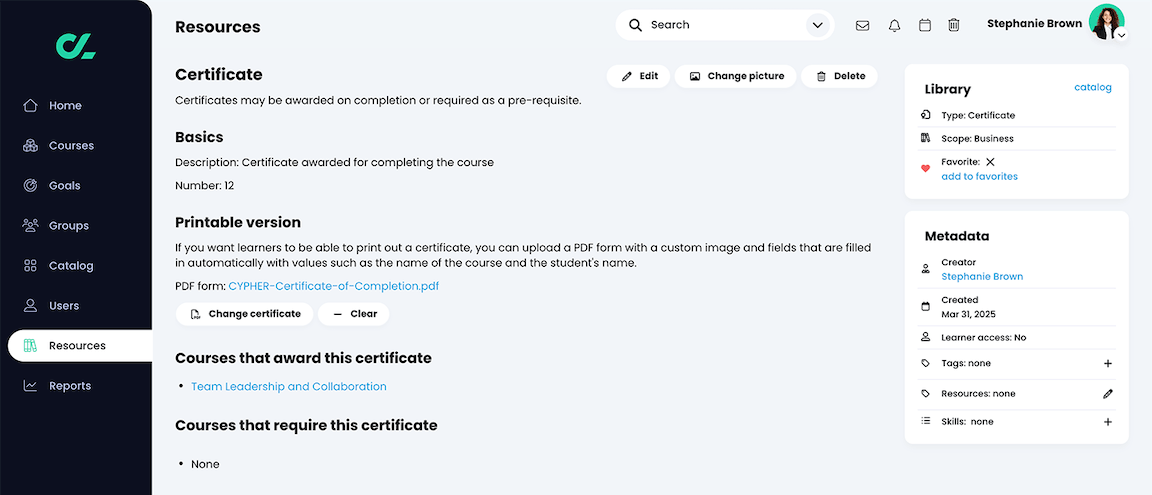
The recipient experience is also LMS-centered. Learners receive an in-app notification and access certificates from their profile. They can download the PDF, but sharing outside CYPHER requires sending the file manually.
There’s also no accessible verification link to share, where a third party could confirm a certificate’s current status. This can make post-issuance changes inconvenient.
While you can edit a learner’s award in CYPHER, any PDF they already downloaded or shared stays unchanged. You must resend the corrected version. Removing the certificate rule or reversing course completion won’t retract already awarded certificates either.
Accredible is a specialized digital credential platform that connects directly with CYPHER Learning.
You won’t need extra software or coding. You just open “Integrations” in your admin dashboard and connect an Accredible account.
CYPHER still manages courses and learner records, while certificate design and management move to Accredible. Its design studio lets you customize layouts, fonts, colors, and logos, or start from one of several dozen templates.
CYPHER then fills the credential with learner and course data and issues it automatically to qualifying learners.

Recipients will receive an email linking to a hosted credential page, where they can download the certificate, add it to LinkedIn, or share it through other social platforms without an Accredible account.
The same page provides verification. Employers, clients, and other third parties can open the credential URL or scan its QR code to check the issuer, recipient, achievement details, and current status.
Changes made in Accredible update this live page without reissuing the certificate, so recipients always have the latest version. Accredible also tracks downloads and shares, showing whether recipients actually use and promote their credentials.
To get started, you’ll need an active Accredible subscription. The lowest plan starts at $45/month and includes unlimited certificates for up to 50 recipients per year, plus basic design and verification features. Analytics and portal white labeling require a higher-tier plan.
Certifier offers the same core features as Accredible. You can design fully white-label certificates and badges in a drag-and-drop editor, upload logos, use custom fonts, or start from hundreds of free editable templates.
It also uses a live, login-free credential page. Recipients get the link by email, then can verify, download, or share their credential on multiple social media platforms. Learners can request corrections directly from here, and approved changes appear on the same live credential without reissuing.
The main differences between Certifier and Accredible are pricing and connectivity. Certifier has a free-forever plan with up to 250 credentials per year, including basic design and verification features.

Professional starts at $76/month (when billed annually) and includes 1,000 yearly credentials plus advanced analytics, expirable credentials, QR-code verification, and fully white-label emails using your own domain.
Certifier doesn’t currently integrate with CYPHER Learning directly.
Instead, you can connect the two through Zapier, which supports various CYPHER triggers. You can automate more versatile workflows, combining completion certificates for learners, welcome certificates for new enrollments, and loyalty badges for new subscribers.
However, you may need an extra subscription. Zapier's free plan includes 100 tasks per month, with one successful workflow run counting as one task. The Professional plan starts at $19.99/month with 750 monthly tasks.
Alternatively, you can connect through Certifier’s API. This removes the recurring monthly cost but requires more upfront development work.
Create and Send Digital Credentials
Choosing a certificate platform takes more than comparing features. The right fit will also depend on your resources, how your program works today, and how you expect it to grow.
Consider the following checks to compare your options or evaluate other platforms on your shortlist.
Factor in both setup and ongoing upkeep. Does your team have the time and resources to build, monitor, and fix the chosen workflow when needed?
CYPHER’s native certificates require the least work. Course records, learner data, award rules, and certificates all stay in one platform, which keeps maintenance simple.
Accredible connects directly with CYPHER, so setup is still light. But the learner data and issued credentials are separate. Retroactive changes, like correcting learner details or reversing a completion, could create conflicting records unless you update the credential too.
Certifier demands the same two-platform maintenance, plus the middleware work. Zapier keeps it no-code, but someone needs to configure the connection, monitor the workflow, and keep an eye on monthly task limits. An API also adds coding, hosting, and ongoing upkeep.
Think about how recipients need to use the certificate and what information it should show. Do you want to include details like assessment scores, training hours, or instructor names?
CYPHER’s native certificates already support rich data. Accredible’s direct integration, on the other hand, accepts fewer CYPHER fields. If you need to include more information, you’ll need Zapier or an API instead.
Zapier connects both Accredible and Certifier to CYPHER and gives you more field and trigger options. You can map much of the same certificate data CYPHER already uses, then issue credentials from additional available events.
Also consider the course itself. Are you certifying professionals who need employers to verify their qualifications? Are you building a public certification program where recipients will share their credentials? These programs need public-facing, easy-to-update credentials and stronger custom branding.
Do you need to issue a couple of hundred certificates a year to internal teams, or are you running a public course with thousands of participants? Your expected recipient volume can influence subscription costs.
Some platforms, like Accredible, charge based on the number of unique recipients. This can become expensive for large public programs with many first-time learners.
Also consider how many extra tools your workflow needs. With Certifier, you’ll need a separate subscription. The same applies to Accredible when you need Zapier for more advanced field mapping. Zapier charges by monthly task usage, so this plan also needs to cover your expected issuance volume.
Account for long-term growth. Will you add more credential types, partners, or departments? Will you eventually issue credentials from CRM, marketing, events, or other tools too?
A setup that works for your CYPHER program now may become limiting once more teams and systems are involved.
Check whether the credential platform supports your wider tool stack and gives administrators enough control to separate programs as they scale.
For larger organizations, enterprise requirements matter too. Separate workspaces and role-based access let different teams manage their own programs with the right permissions.
SSO and audit logs can support IT and security needs, while custom DPA or SLA terms may come up during procurement.
Yes. In your course or class, go to Admin > Configure > Completion and remove the “Award certificate” action. CYPHER will still record the completion and trigger a certificate through your connected credential platform.
One limitation is that external certificates can’t satisfy CYPHER enrollment prerequisites that require a certificate. In such cases, you’ll have to use a course completion prerequisite instead.
Yes. CYPHER configures completion actions at the course level, so one course can use a native certificate while another uses an external credential action. This can save external credits when only selected programs need externally verifiable or shareable credentials.
No. CYPHER Learning integrates directly with Accredible. You only need an active Accredible account and API key to connect the platforms.
But you can still use Zapier if you want a more flexible workflow with additional CYPHER triggers, filters, or custom certificate fields beyond the direct integration.
Use the Certifier API when Zapier doesn’t support the trigger or credential action you need. Zapier covers course or path completion and new credential issuance.
With CYPHER webhooks, the API can start from more granular events like module completion and also find, update, or delete existing credentials. It can also eliminate Zapier task fees for high-volume programs.

- Content Strategy
- SEO & AEO/GEO strategy
- Conversion Rate Optimization
- Organic Growth
- Buyer Psychology
Head of Content
Vlad Melnic leads content at Certifier, bringing 10+ years of experience in SEO content marketing and conversion-focused content. His focus is turning complex product value into clear benefits.