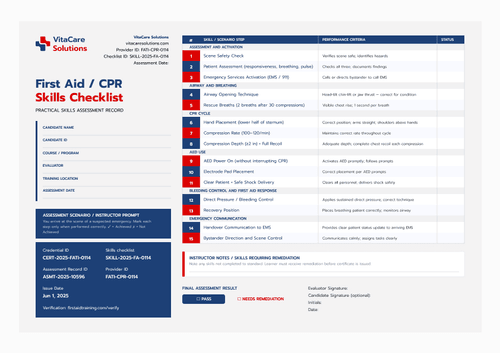
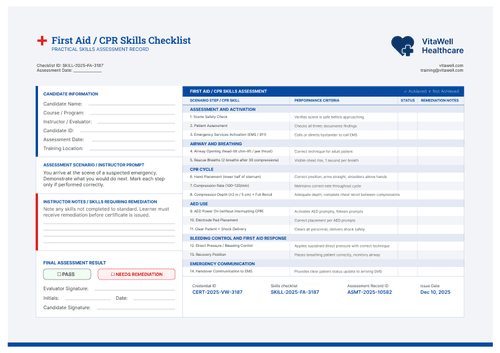
Mariner blue CPR skills checklist template
This CPR skill checklist covers 15 steps from the patient to the scene, culminating in bystander direction and handover. The template includes a QR code for verifying the assessment.
Customize this template for free
Email and export in bulk
Track recipient engagement
Download in
Don't have Certifier account? Sign up
Free mariner blue CPR skills checklist template
Resuscitation rarely happens in an empty room. Someone is calling for help, someone else is standing too close, and a responder who cannot direct them is only doing half the job. This free skills checklist template scores across fifteen steps, ending with bystander direction and scene control.
Authorized instructors, assessors, training centers, employers, EMS education programs, and competency program administrators use it to assess and record CPR and advanced first-aid skills.
Set in a serif title with mariner blue section marks, the layout keeps the scored table to the right and everything administrative in a left rail: provider details at the top, record IDs, and a QR square at the bottom.
Certifying a community program? Bring the candidates in from a spreadsheet or connect your LMS so that every assessment gets issues cleanly. Each candidate receives a personal verification link that an employer or a volunteer coordinator can check without contacting you.
What is a CPR skills checklist?
A CPR skills checklist is a record of a candidate working through a scripted emergency, with an assessor scoring each step against a written criterion. It documents competence observed on a day, but it doesn’t grant any clinical standing.
One assessment fits one page, from the scenario prompt to the signatures at the foot. Once passed, the matching first-aid training certificate records the outcome. The skills checklist is available in both orientations, in A4 (21 x 29.7 cm) and US Letter (8.5 x 11 in) sizes.
Create a free Certifier account to start customizing the CPR skills checklist template.
What should a CPR skills checklist include?
This checklist includes whatever an assessor needs on the day and a reviewer needs afterward. Every field on the template is listed below:
Static fields
- Candidate Detail Labels: Six headings laid out in two columns, from candidate name through to assessment date.
- Scenario Prompt: The standing instruction placing the candidate at the scene of a suspected emergency.
- Section Bands: Six groupings, from assessment and activation through to emergency communication.
- Step and Criteria Text: Fifteen numbered steps, each paired with the criterion it is judged against.
- Status Column Header: The heading above the scoring column.
- Evaluator Notes Heading: The label and rule for skills requiring remediation.
- Final Result Options: Pass, or needs remediation.
- Signature Lines: Evaluator signature with initials and date, plus an optional candidate signature.
Dynamic fields (automatically populated by Certifier)
- Candidate Name: Field for the person being assessed.
- Candidate ID: Your own learner reference.
- Evaluator: The assessor running the scenario.
- Training Location: Where the assessment happened.
- Course or Program: The training or program the assessment sits within.
- Assessment Date: The day it was carried out.
- Provider Block: Organization name, logo, website, and course descriptor line.
- Provider ID: Your training organization's reference (e.g., HTI-CPR-0118).
- Checklist ID: The document's own number (e.g., SKILL-2025-FA-4118).
- Step Status Marks: The result recorded against each of the fifteen steps.
- Evaluator Notes: Written observations and anything requiring remediation.
- Credential ID: Certifier's reference for the record (e.g., CERT-2025-HTI-4118).
- Assessment Record ID: The pointer back to your own assessment file.
- Issue Date: When the record was released (e.g., Mar 15, 2025).
- QR Code: Square in the left rail that opens the hosted assessment.
This list describes the sample artwork, but they’re not a fixed standard. The steps, criteria, and labels are all reconfigurable in Certifier's design builder to match your protocol. The QR square and expiration dates on the companion certificate are available with the Professional plan.
How to issue a CPR skills checklist
Before you begin, confirm the assessor is authorized under your program and that the criteria reflect the guidelines you teach. Then follow these five steps to issue a CPR skills checklist using Certifier:
- Adapt the design to your program — Pick the size and orientation, fill the provider rail, and mark the dynamic fields for candidate details, step results, and evaluator notes.
- Pair it with the training certificate — Attach the matching training certificate so that a candidate who passes leaves with the assessment and the credential.
- Import your candidate records — Pull them from your enrolment system or from Canvas, Moodle, or LearnDash through our native integrations. Your records are in place in under a minute.
- Issue, deliver, and verify — Emails go out one per candidate as the record issues. Anyone confirming it scans the QR square in the rail, which is faster than sending a message to your office.
- Monitor engagement and amend records — Candidate-level opens, views, downloads, and shares are visible in the Credential Repository. A wrong date or a misrecorded step is corrected in place and the live record is updated at once.
Available skills checklist template formats to customize
Edit and issue the template online with Certifier
Assembled in Certifier, the skills checklist is populated from your data, each candidate gets their own scored record, and the QR code points to a verification page that stays live.
Download the skills checklist template in Word
Running assessments somewhere with no signal or want a printed pack for a moderation visit? Send yourself the ZIP file with the print blanks in portrait and landscape orientations, in A4 and US Letter sizes.
PDF document export
Copies for print come from the delivery email or the credential page, which covers what most quality systems file.
Who issues CPR skills checklists?
Authorized instructors and assessors
Fifteen steps let a scenario run to its natural end, including the handover, rather than stopping when the patient is stable.
Training centers and EMS education programs
The scenario prompt sets the same starting point for every candidate, so results across a cohort stay comparable.
Employers and competency program administrators
A QR square on the record means a workplace first aider can be checked at the point where the question arises.
Frequently asked questions
A responder who cannot organize the people around them loses time and control. Directing a bystander to call for help or fetch an AED is a skill in its own right and this design scores it rather than assuming it.
They overlap heavily. This one runs one step longer and closes on scene control and handover, which suits advanced first aid and community responder programs where the responder is often first and alone.
The status column carries whatever your program uses. If you need more than a binary, add a middle value in the design builder. However, most awarding bodies prefer a clear 'achieved/not achieved' format, with details in the notes.
It’s marked as optional on the design. Many centers still take it, since it records that the candidate saw the result. Where your process doesn’t need one, remove the line rather than leaving it blank on every record.
That depends on your program and the body behind it, as many run on an annual or two-year cycle. Set an expiration date on the companion certificate so the credential stops reading as current on schedule, with no manual tracking.
Certifier templates are provided for general informational and design purposes only. They do not constitute legal, regulatory, accreditation, or academic-recognition advice and are not guaranteed to satisfy the requirements of any institution, recognition body, regulator, or jurisdiction. Using this template does not by itself make a document an official diploma supplement or prove a qualification. The issuing organization is responsible for verifying the content, authority, approvals, and suitability of every document before use. This template is not an official Europass document and does not guarantee recognition of a qualification.