Violet practical assessment checklist template
Personalize this violet practical assessment checklist online or receive the editable Word package. Record observed EMS skills and connect the approved checklist to its related credential.
Customize this template for free
Email and export in bulk
Track recipient engagement
Download in
Don't have Certifier account? Sign up
Free violet practical assessment checklist template
This free practical assessment checklist template gives you a detailed, multi-domain record to pair with a competency certificate. It suits training centers, assessors, and program administrators who score candidates across a wider set of practical skills than a single pass/fail line can capture.
The violet-bordered layout groups twenty-four skills into six labeled domains, so evaluators can rate scene safety, trauma response, and documentation separately instead of folding them into one overall score.
Open the design in Certifier's online editor to update colors, add your logo, and map the candidate and evaluator fields. Then attach a certificate template so both designs are issued as one credential bundle.
To issue in bulk, upload a spreadsheet or connect Certifier to your training platform. Each candidate gets a personal verification link they can share with an employer or licensing board.
What is a practical assessment checklist?
A practical assessment checklist proves exactly which skills a candidate reached, not just that they attended a session. Evaluators score twenty-four rows across six skill domains, marking each one achieved, not yet achieved, or not applicable.
This design is built on standard A4 dimensions (21 x 29.7 cm), and also works in US Letter format (8.5 x 11 in). Training centers, assessors, and competency program administrators use the record to back up a certificate with detail a simple pass/fail line can't provide on its own.
Use Certifier to issue this checklist with a matching certificate as part of one complete competency credential. All you need is a free Certifier account to customize, edit, and issue documents in this design.
What should this checklist include?
Every field on this checklist falls into one of two groups: fixed design elements, and details that change per candidate. Here's how they break down:
Static fields
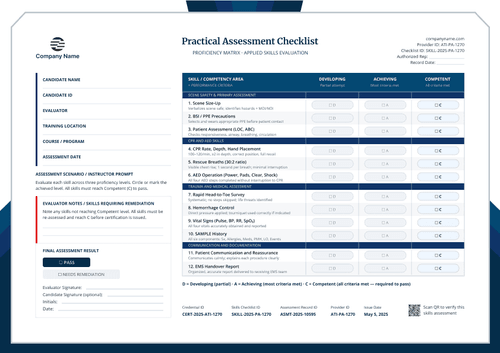
- Provider and assessment header: Fixed positions hold the Company Name, page and day references. The header also organizes Provider ID, Checklist ID, Assessment Date and Authorized Rep beneath the Practical Assessment Checklist title.
- Candidate and session layout: Labeled lines arrange Candidate Name, Candidate ID and Course / Program. Evaluator, Training Location and Assessment Date appear in the same identity block for quick cross-checking.
- Skills evaluation structure: Six fixed sections organize Core Practical Skills, CPR & AED Skills, Trauma Assessment, Medical Assessment, Communication and Documentation. Numbered criteria run from Scene Safety Verification through Times + Interventions Noted.
- Status, remediation and approval areas: The instructor prompt defines A as Achieved, NYA as Not Yet Achieved and N/A as Not Applicable. Reserved areas hold evaluator notes, Pass or Needs Remediation, signatures, initials and the assessment date.
- Credential verification footer: A fixed footer groups Credential ID, Skills Checklist ID and Assessment Record ID. Provider ID, Date Issued and a Verify address give reviewers a route back to the issued record.
Dynamic fields (automatically populated after mapping in Certifier)
- Candidate and assessment identity: Candidate Name and Candidate ID connect the checklist to one participant. Course / Program, Evaluator, Training Location and Assessment Date define the assessment event covered by the record.
- Core, CPR and AED results: Changing status values record Scene Safety Verification, Patient Primary Assessment and PPE Application. They also capture Emergency Activation, Airway Management and the five CPR & AED Skills shown in the design.
- Trauma and medical results: Separate A, NYA or N/A values record Head-to-Toe Survey, Hemorrhage Control and Wound Dressing. Spinal Precautions and the four Medical Assessment criteria preserve the remaining clinical evidence.
- Communication, documentation and final result: Status values cover Patient Reassurance, Bystander Direction and EMS Handover Report. Incident Report Accuracy, Patient Care Record and Times + Interventions Noted support the final Pass or Needs Remediation decision.
- Approval and verification data: Evaluator notes identify skills requiring remediation. Evaluator Signature, optional Candidate Signature, Initials and Date record review. Credential ID, Skills Checklist ID, Assessment Record ID, Provider ID, Date Issued and Verify address support retrieval.
These changing fields are visible in the supplied violet checklist. They are not guaranteed to be pre-mapped. Configure each required value in Certifier and use only evidence approved by the authorized evaluator.
The Verify address should open the record associated with the displayed IDs. Check Certifier's verification features before publishing the review route.
How to issue the violet practical assessment checklist
Use this four-step controlled workflow:
- Customize the design and your branding - Open the template in the online editor. Choose your size (A4 or US Letter) and orientation. Add your organization's name, logo, and colors, and adjust the six domain labels if your program groups skills under different names.
- Bundle it with a matching companion document - Pair the checklist with the certificate it supports, so both designs are issued together as one credential.
- Connect your tools - Sync candidate rosters and course data from Google Sheets, HubSpot, or Salesforce rather than re-entering them for every cohort.
- Issue, deliver, and verify - Score each domain during the assessment, resolve anything marked not yet achieved, then issue with a verifiable credential link attached.
Available skills checklist template formats to customize
Edit and issue the template online with Certifier
Open the design in Certifier if you want the checklist to carry candidate-specific data, deliver it directly to an evaluator's inbox, and publish it on a live credential page.
Download the template in Microsoft Word
Enter an email address to receive a ZIP with the editable Word files in both portrait and landscape orientation, A4 and US Letter size. The offline option suits teams that need to adapt or retain a Word version.
PDF document export
While you manage records online in your Certifier issuer dashboard, evaluators and candidates can export issued checklists as print-ready PDF files directly from their email or verification pages.
Who issues this checklist?
Training centers and assessors
Programs that run staged, multi-domain evaluations use this checklist to give every skill domain its own documented rating, not just a single overall score.
Employers and competency program administrators
Organizations that need a detailed audit trail behind a certificate use the record to show exactly which skills were met, and which weren't yet.
Independent evaluators
Assessors running one-off practical evaluations use the checklist to produce a shareable, verifiable record without building a rating system from scratch.
Frequently asked questions
Yes. Select "Edit this template," enter your email address in the pop-up, and receive the available Word package, or use a free Certifier account to customize the design online.
No. It documents the skills behind a certificate or badge you already issue.
Yes, though it takes a bit more editing than relabeling. Both the online editor and the Word file support it.
It's for skills that don't apply to a given candidate or scenario. Your program should define when to use it before evaluators start scoring.
Yes, Certifier-issued checklists can be edited post-issuance. Open the record in Credentials, edit the recipient information or status marks, and save; the change appears on the recipient page without resending. If the correction is to static wording or the visual design, editing the shared design updates all previously issued credentials that use it, so confirm the scope before saving.
Certifier templates are provided for general informational and design purposes only. They do not constitute legal, regulatory, accreditation, or academic-recognition advice and are not guaranteed to satisfy the requirements of any institution, recognition body, regulator, or jurisdiction. Using this template does not by itself make a document an official diploma supplement or prove a qualification. The issuing organization is responsible for verifying the content, authority, approvals, and suitability of every document before use. This template is not an official Europass document and does not guarantee recognition of a qualification.