
Trusted by:
University of Southern California
Warner Bros.
Volvo
Amazon
Stanford University
Updated: September 15, 2026
12 min read
The moment your credentialing pilot hits IT's security review, most platforms stall. Here's why Certifier's enterprise features are built to clear that hurdle for IT and procurement teams.
Research with AI:
The moment a credentialing pilot gets handed to IT for a security review is where most platforms fail. The security team doesn’t ask if the certificates look polished or if they are affordable, they ask for an SSO documentation link, a subprocessor list, proof of audit logging and GDPR compliance documentation.
Then procurement and legal move the review into contract territory. Procurement checks if the integration depends on Zapier, a third-party connector that may need a separate vendor approval cycle. Legal needs a custom DPA before any data agreement can move forward.
Most credentialing platforms, built primarily for small teams and fast issuance, don't have clean answers to any of those questions.
Certifier’s enterprise features are designed to answer the questions from IT, legal, security, and procurement when approving a vendor.
The Enterprise plan includes SAML 2.0 SSO, granular role-based access control, full audit logging, native HubSpot and Salesforce integrations, white-labeling and compliant data processing without a five-figure setup fee or a mandatory multi-year contract.
If your team is currently evaluating digital credentialing platforms or looking for a cost-effective alternative to Credly or Accredible, this article maps each capability to the specific procurement requirement it addresses.
Enterprise IT teams require SSO, audit logs, native CRM integrations and identity directory compatibility before signing off. Zapier-dependent workflows are typically a hard blocker at the procurement stage.
Certifier enterprise features include SAML 2.0 SSO compatible with Okta, Microsoft Entra ID, Google Workspace and any SAML 2.0-compliant identity provider.
Teams can automate credentialing through webhooks, API, Zapier, Make, Pipedream, native CRM integrations, or tailored integrations based on their workflow needs.
The platform is ISO 27001 and ISO 9001 certified, GDPR compliant, and offers custom DPA and SLA support on the Enterprise tier.
Unlike Credly, Certifier has no setup fee and no mandatory long-term contract–and it supports full post-issuance credential editing.
Certifier’s Enterprise plan helps organizations issue, manage, verify, and track credentials with the controls IT and procurement ask for first.

Most platforms describe themselves as enterprise-ready. In practice, that usually means they have a sales team and a “contact us for pricing” page.
Enterprise Requirement What The Team Needs To Prove Certifier Feature Identity and access contro Users can log in through the organization’s existing identity directory, with no separate password process. SAML 2.0 SSO compatible with Okta, Microsoft Entra ID, Google Workspace and other SAML 2.0 identity providers. Operational separation The right people can issue, edit, manage, or review credentials without access to areas outside their role. Custom roles, granular permissions and multi-workspace governance. Auditability Every admin action has a clear record: who did what, when, from where and with what result. Full activity logs across workspaces, web actions and API actions. Data protection Credential data is processed under clear security, privacy and compliance terms. ISO 27001, ISO 9001, GDPR compliance, custom DPA and SLA support. Procurement readiness The vendor can pass legal, security and procurement review without extra blockers. Security documentation, subprocessor list on request, enterprise onboarding support and no mandatory long-term contract. Brand control Recipients see the organization’s brand across emails, credential pages, verification pages and wallets. Full white-labeling, custom domains, custom sender addresses and branded recipient wallet. Lifecycle management Credentials can be issued, updated, revoked, verified, exported and tracked after delivery. Bulk issuance, API/webhook automation, CRM integrations, post-issuance editing, revocation, verification and analytics.
They're procurement requirements rather than features. A platform missing any single one of them stalls at the IT sign-off stage, regardless of how well it performed in a demo.
According to Verizon's 2026 Data Breach Investigations Report, 68% of breaches involve the human element, which is exactly why enterprise IT teams treat SSO and access controls as non-negotiable.
They reduce the attack surface by removing individual password management from the equation entirely, and most digital credential management software doesn't address this gap.
Certifier enterprise features are designed specifically around this checklist, not as an add-on layer built after the fact, but as core infrastructure. Let’s take a closer look at how Certifier passes enterprise review for digital credentialing in each of these areas.
Enterprise credentialing rarely starts inside the credentialing platform. For many teams, the source of truth sits elsewhere: in HubSpot, Salesforce, an LMS, a spreadsheet, or an internal database. That makes integration architecture one of the first things IT and procurement review.
Connector-based integrations, like Zapier, Make, or Pipedream, work well for smaller teams. At enterprise scale, each new connector vendor must pass a security assessment, sign its own DPA and be approved by IT procurement before it can access any workflow data.
That process typically takes two months or more. For a team trying to automate Salesforce-triggered credential issuance, that delay kills the rollout before it starts.
Beyond the timeline, enterprise procurement teams evaluate each connector on its own merits: security posture, data residency, support terms and compliance documentation.
A connector that doesn't meet those standards is rejected outright, regardless of how technically useful it would be.
Certifier supports multiple integration paths, so teams can choose the setup that fits their workflow, security requirements, and internal approval process:
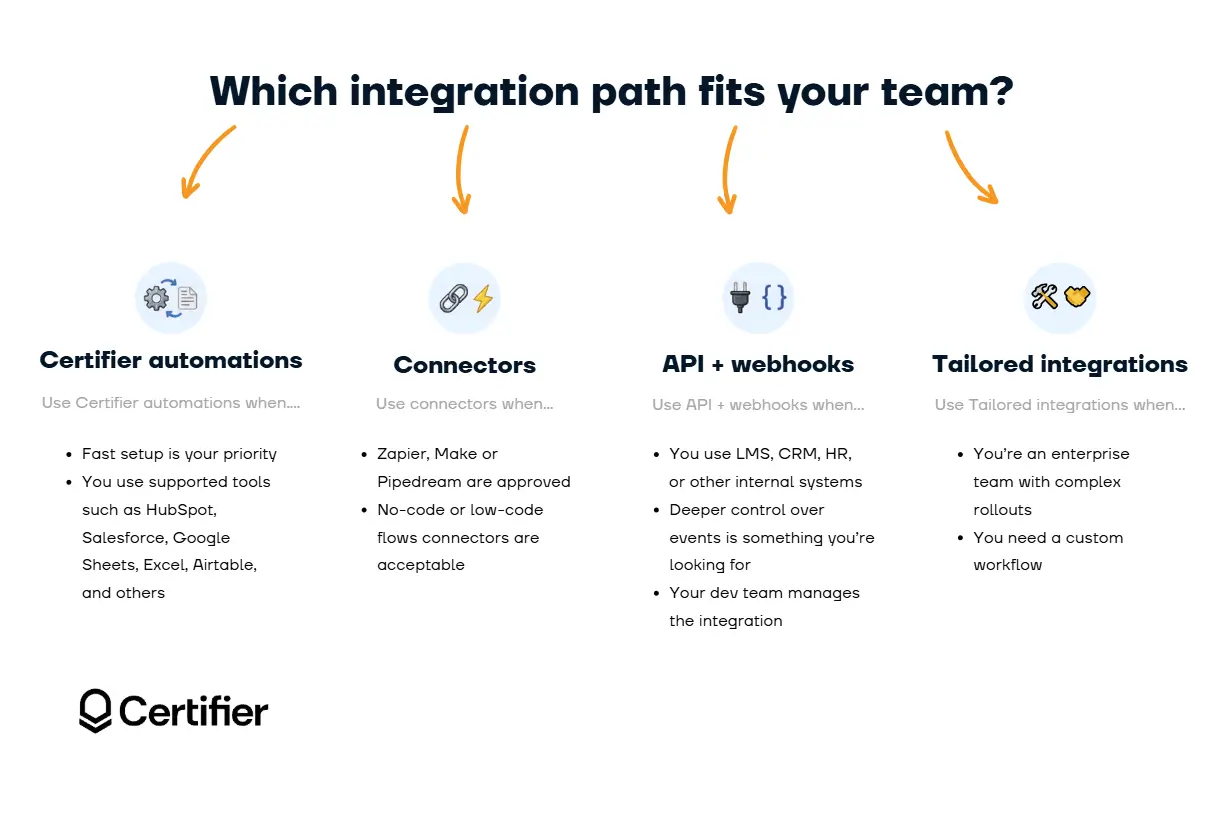
For a broader breakdown of enterprise integration options, see our guide to digital credentials integration. It explains when to use native integrations, workflow automation, APIs, webhooks, or custom setups across LMS, CRM, HRIS, event, and data tools.
Certifier's HubSpot integration connects directly to your CRM using OAuth clients with reduced permission scopes. You can trigger HubSpot digital credentials issuance from CRM events: a contact completing a course or a deal reaching a specific stage.
For teams running customer education or partner certification programs through HubSpot, credentials become part of the existing CRM workflow rather than a parallel manual process.
Certifier uses OAuth with reduced permission scopes, so the integration only requests the access needed to support credential automation.
Example: a contact completes a partner enablement milestone, which makes HubSpot update the relevant property, which makes Certifier issue a credential and send it to the recipient automatically.
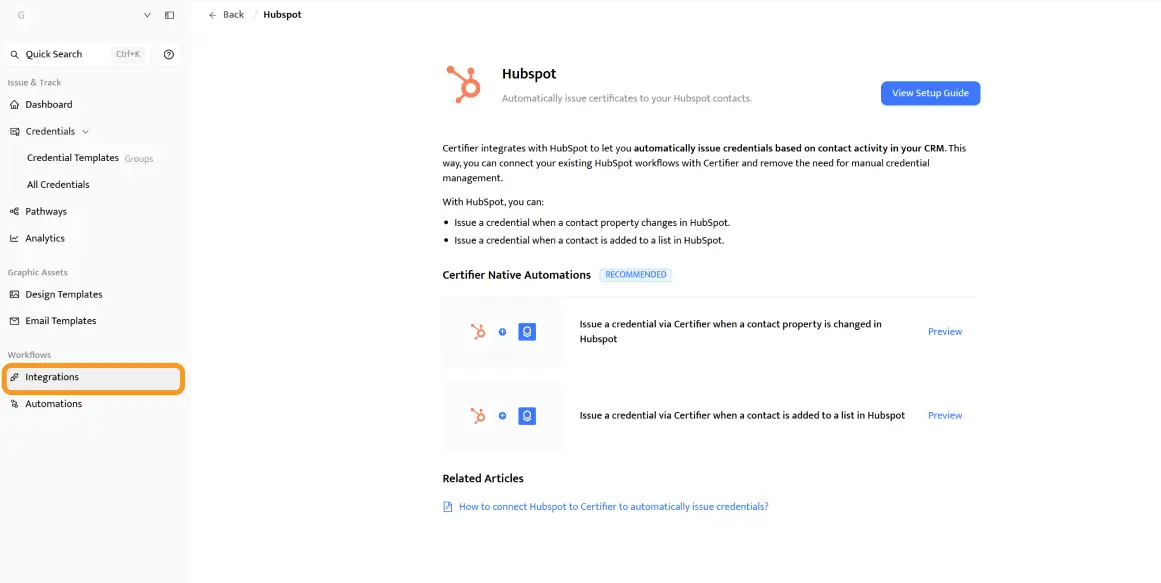
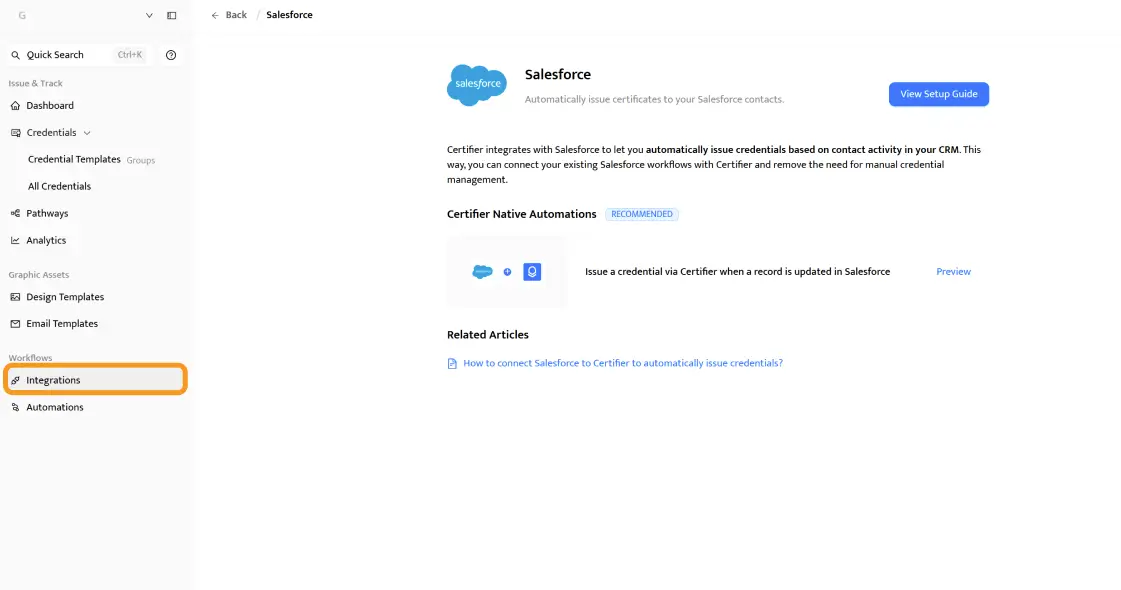
The Salesforce connector follows the same architecture. Credential issuance triggers directly from Salesforce events or status changes, making it a deterministic, auditable step in your CRM workflow rather than a manual task that depends on someone remembering to act.
The Salesforce certificate integration is built for the buyers who need it most: mid-market and enterprise organizations – professional bodies, large nonprofits, regulated organizations and SaaS companies – that already use Salesforce as their system of record for member, learner, or partner data.
These teams aren't looking for a standalone credentialing tool. They need credential issuance embedded in core Salesforce workflows so that a status change, membership renewal, or training completion automatically generates a verifiable credential.
They also need credentials to feed back into Salesforce–updating records, triggering downstream automations and providing the reporting data compliance teams require.
What that means in practice:

Mapped Salesforce events: Certifier can trigger credential issuance from Salesforce record changes, such as certification status updates, membership renewals, course completion fields, partner milestones, or other custom CRM events set during the rollout.
Mapped recipient fields: Recipient data can come directly from Salesforce fields, such as name, email address, organization, role, membership ID, learner ID, region, or program segment.
Mapped credential fields: Credential details can also map from Salesforce, including credential name, issue date, expiration date, certificate ID, program name, modality, certification level, or custom attributes.
Data returned to Salesforce: Depending on the workflow, Certifier can send credential status, issue date, expiration date, credential URL, verification URL, and delivery status back to Salesforce.
OAuth permission scope: The integration uses OAuth with reduced permission scopes, so Certifier requests only the access needed for the approved credential automation workflow.
Email deliverability setup: Certifier supports custom sender domains, so enterprise teams can align credential emails with their own authenticated domain setup. That matters because Google’s email sender guidelines require SPF or DKIM authentication for all senders, while bulk senders must use SPF, DKIM and DMARC. A properly authenticated sender domain makes credential emails less likely to appear to be third-party or spoofed messages.
Full audit trail: Each issuance event is logged with a timestamp and source, so compliance teams can review what triggered the credential and when it was issued.
Programs typically start as a pilot–a single credential type for one segment–then scale rapidly once the integration is running. Professional bodies often end up running several parallel automations because the business logic for each credential type lives in Salesforce and varies by program.
No-login recipient access, white-labeling, role-based access control and revocation are all available within the same workflow. The entire program, from Salesforce trigger to issued credential to verified proof, runs through a single platform.
For organizations running Moodle, Canvas, or Adobe Learning Management, connector-based integrations aren't viable. Adobe Learning Management isn't even listed in Zapier's integration directory.
Moodle and Canvas do appear there, but their available triggers cover basic actions (user creation, course enrollment), not the specific events credential issuance requires, such as a passing assessment result or completion of a learning pathway.
Certifier's API and OpenAPI spec is the reliable path for direct integration with such environments. Your development team gets a full API reference and can connect Certifier directly to the LMS event model: course completion, assessment pass, enrollment status change, or learning path completion.
Certifier webhooks will then allow your devs to receive real-time event notifications.
For organizations with highly customized LMS setups, Certifier also offers tailored integration builds as part of the enterprise engagement. Your team describes the workflow and Certifier's team handles the development and ongoing support.
Zapier is available for non-enterprise workflows via Certifier's Zapier integration, but it's not always the optimal path for enterprise procurement, especially when deeper control over event logic or data flow is required. For the full picture of available connectors, see the Certifier integrations overview.
Enterprise credentialing programs span multiple teams, departments and user types.
The same person shouldn't have unrestricted access across credential issuance, data exports, billing and user management simultaneously. And your IT team will expect you to have that separation in place before any agreement is signed.
Certifier handles access control on two distinct levels: authentication (who can log in) and authorization (what they're allowed to do once they're in).
Certifier supports SAML 2.0-based SSO, making it compatible with Okta, Microsoft Entra ID (formerly Azure AD), Google Workspace and any other SAML 2.0-compliant identity provider your organization already uses.
The operational impact is straightforward: users are managed through the directory you already control. When an employee leaves, their access to Certifier is revoked as part of your standard offboarding workflow. It's the same process that cuts off access to every other connected system.
Enabling SSO for digital badges and certificates at the enterprise level also means your IT team gets full visibility into who has platform access at any given time. That visibility is usually a prerequisite for security sign-off.
According to a Gartner 2024 report on identity infrastructure, organizations using specialized identity services reduce time-to-market for enterprise features by approximately 40%, partly because SSO removes the bottleneck of managing access across disconnected systems.
The Enterprise plan supports unlimited custom roles. Each role can be configured at the level of specific actions–create, read, update, delete–per functional area, including design, issuance, data export and administration.

Predefined roles cover the most common configurations: Designer, Draft Manager, Credential Manager and Workspace Admin. For organizations with more complex governance structures, every permission can be set independently, so each role maps to your actual internal program model.
In practice: a training coordinator can issue credentials and resend them to recipients, but can't access analytics exports. A compliance officer can review logs and run reports without being able to modify credential designs. Each role reflects operational reality.
Large organizations often run credential programs across divisions or regional entities that need to stay operationally separated.
Certifier's multi-workspace structure lets you configure independent workspaces for each unit, with separate user lists, credential libraries, branding and program settings per workspace. Everything stays separate and no wires get crossed
When an enterprise security team reviews a new vendor, they want a DPA they can sign, evidence of ISO certification, an audit log that answers "what happened and who did it," and a subprocessor list before procurement can close.
Certifier covers each of those review needs.
The audit log captures every admin action across your workspaces:
User identity
Operation type
Source (web or API)
Result status
Actions are expandable, so your security team can pull full technical context for any event.
This matters during compliance reviews for the same reason financial audit trails do. It creates a documented record of what happened, when and who was responsible.
If a credential was revoked, edited or exported outside normal workflow, the log shows it.
Certifier's Enterprise and Advanced plans include a custom Data Processing Agreement and Service Level Agreement. The DPA covers security terms and data handling. It’s the document your legal team needs to countersign before procurement can finalize.
The subprocessor list is available on request, with advance notice given before any changes. This level of supply chain transparency is what most enterprise procurement teams require before approving a data vendor.
Certifier is ISO 27001, ISO 9001, GDPR compliant and procurement-ready. Two-factor authentication is available for all users and security review assistance is part of the enterprise onboarding process, so your IT team isn't navigating documentation alone.
The platform maintains a 99.9% application uptime, which means when you issue certificates, they stay live and verifiable around the clock, including during peak issuance periods.
Learn all about enterprise security requirements for digital credentials in our in-depth guide!
For enterprise programs, platform branding in the recipient experience can weaken trust. A recipient clicking through to verify a credential shouldn't see a third-party platform's name. They should see yours.
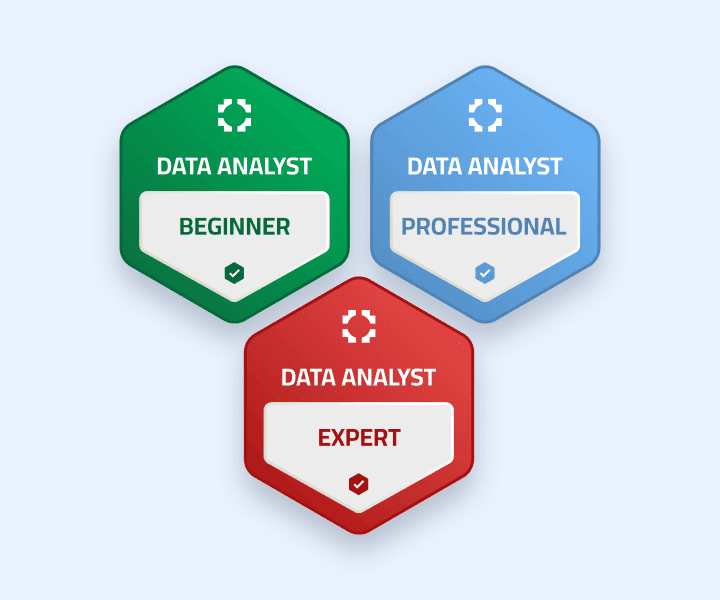
Certifier's enterprise white-labeling covers the full recipient journey. Custom domains place credentials and verification pages on your own URL. You can send credentials via email from your domain with your visual identity. It’s fully customizable.
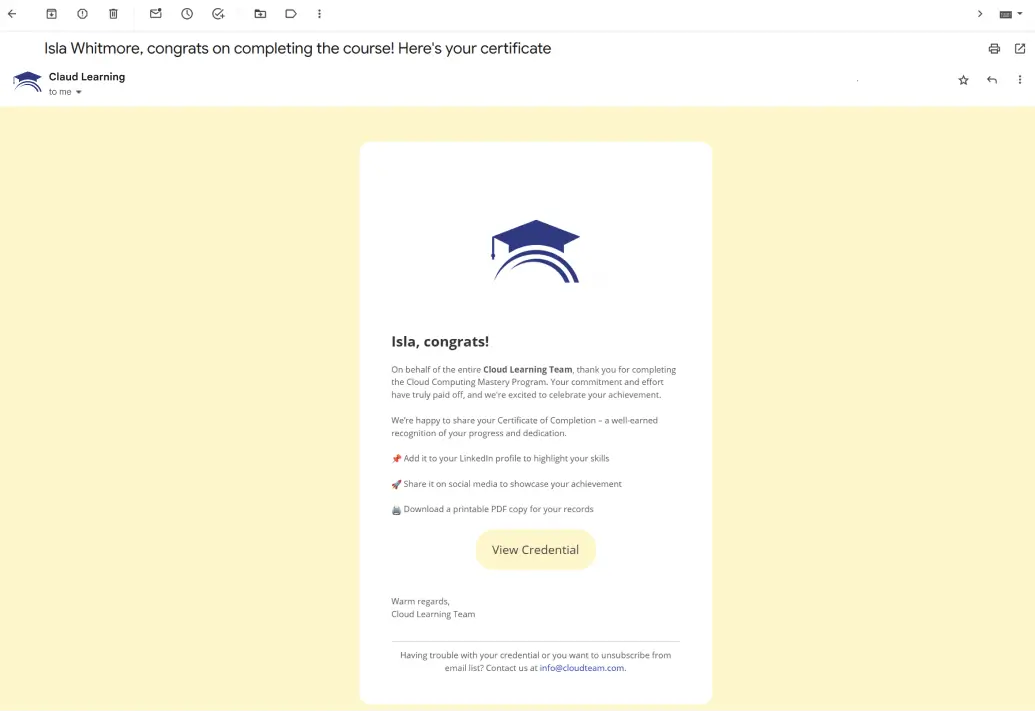
Custom fonts match your organization's standards across every credential and communication touchpoint.
This matters most for partner certification programs and external-facing compliance credentials where your organization's credibility is directly tied to how the credential looks, where it lives, and who appears to stand behind it.
Did you know that companies and organizations such as Stanford, UC Berkeley, Volvo and Warner Bros issue digital credentials through Certifier?
Recipients access their credentials through a branded wallet–a personalized recipient page that carries your visual identity with no Certifier branding visible.
They can view, download, share and manage all credentials issued to them from one place. On top of that, they don’t need to create an account.
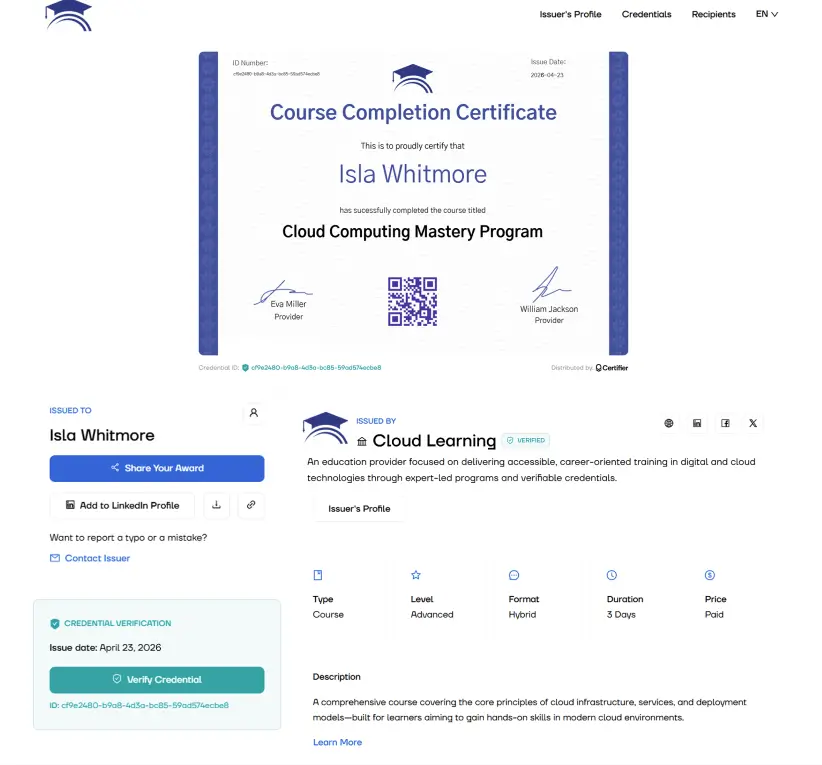
The no-login access model matters for enterprise programs at scale. Requiring recipients to register with a third-party platform creates friction, reducing adoption and increasing the support load.
With Certifier, the credential lands in the recipient's inbox and they can act on it immediately.
You can turn the issuer's portal into a searchable, public-facing directory of all credentials your organization has issued. Employers and auditors can find and verify credentials directly.

For professional certification bodies in particular, maintaining a public portal serves as evidence of their certification ecosystem. It’s a searchable directory of all certified members or graduates that gives each credential weight beyond the individual recipient's claim.
Your team controls what's visible and recipients' permission levels can be configured per program, so if you don’t want to go the directory route you don’t have to.
Check the Issuer’s Demo Portal and let us know what you think!
Certifier supports scheduled email delivery and follow-up sequences, so credential programs don't end with a single send. Recipients who haven't claimed or shared their credentials can receive automated reminders. Renewal nudges can be scheduled ahead of expiration dates.
Outbound emails are sent from your custom domain and sender address, which matters for deliverability to corporate, .edu and government inboxes where external senders face stricter filtering.
Multiple email senders can be configured per workspace, giving program managers control over which address a specific audience receives mail from.
Certifier manages the full credential lifecycle. That distinction matters operationally. Enterprise certificate management programs break down when a credential status changes after issuance, a recipient needs an update, or an auditor asks for proof that a specific certificate is still valid.
Certifier gives teams a central place to issue, update, revoke, verify and track credentials across programs.
Bulk issuance runs via CSV upload, API automation, or direct CRM event triggers. For programs with predictable volume that need monthly compliance renewals, course completion batches, annual certification cycles, or event-triggered issuance, the entire workflow can run fully automated from trigger to delivery.
The Enterprise plan supports a custom credential limit, with the Advanced tier covering up to 50,000 credentials per year before moving to enterprise custom volume.
Workflow automation includes last-run timestamps and manual refresh controls, giving program administrators full visibility into when each issuance run is executed and whether it completed successfully.
Post-issuance editing is fully supported. If a recipient's name changes, a credential date needs to be corrected, or program details need to be updated, changes can be made without reissuing, generating a new credential URL or having to send an email.
This is a capability Credly doesn't fully support; you need to reissue the Credly badges after making some changes. It may become a genuine operational burden for enterprise certificate management programs running at scale, where hundreds of manual reissue requests accumulate over time.
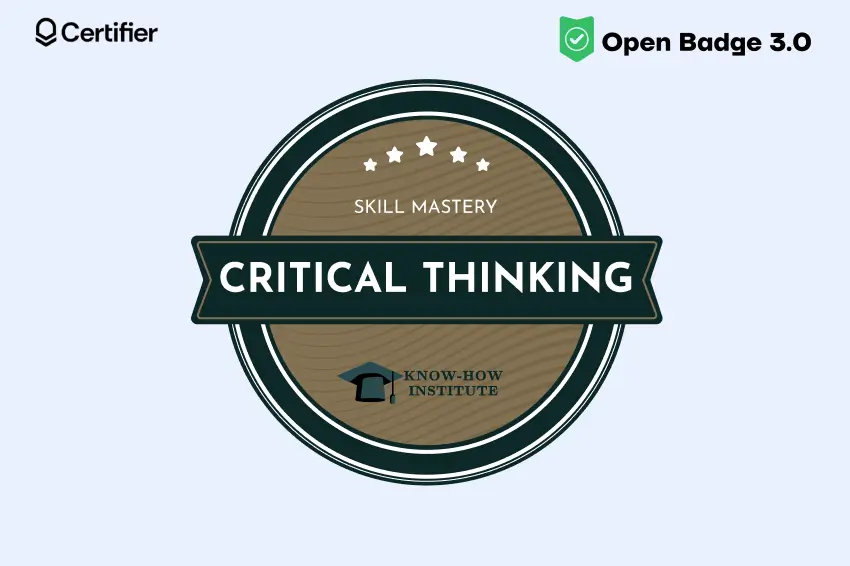
All credentials are Open Badge 3.0 compliant, which gives organizations a more portable and interoperable credential format. That matters for higher education, professional certification programs, and enterprise teams that need credentials to work beyond one closed platform.
Recipients can share credentials directly to LinkedIn and embed them on websites or portfolios.
Data export and filtering are available across the platform. Program managers can export credential records, filter by status, recipient, date range, or program and deliver exports to third-party reporting systems.
For compliance teams, this is the operational layer that turns credential data into audit-ready documentation.
Analytics is one of the most underestimated deal-closers in enterprise credentialing. Procurement teams want to issue credentials. Marketing and customer success teams want to know whether those credentials are being used.

Certifier tracks credential engagement across the full recipient lifecycle. Every credential record shows opens, downloads, shares by platform, verification clicks and third-party traffic.
Program managers can see which credentials drive the most LinkedIn profile additions and which ones generate the most verification traffic from employers or auditors.
The Enterprise plan builds on every feature in the Advanced plan. The table below covers the features enterprise evaluators typically ask about first–the full comparison is on the Certifier pricing page.
Feature Advanced Sectors SSO (SAML 2.0) Not included Included Audit and activity log Not included Included Custom roles Up to 7 users with roles Unlimited Custom users and teams 7 (extra by request) Custom Credential volume Up to 50,000/year Custom Tailored integrations Paid add-on Included Multiple workspaces Add-on Included Full white-labeling Partial (custom domain, premium branding) Full Custom DPA and SLA Included Included Dedicated account manager Included Included (Premier support)
The Advanced plan is a strong fit for mid-size organizations that need branded credentials and dedicated account management.
The Enterprise tier adds the identity and audit layer, the infrastructure that makes compliance and IT sign-off achievable for large-scale programs.
If you're still mapping your requirements to the right plan, the digital credential management software comparison gives a broader view of where Certifier sits in the market.
Enterprise credentialing isn't one use case. Here's where Certifier's feature set is most directly applicable.
Member certification programs need issuance to be deterministic and auditable. A member passes an assessment, their Salesforce record updates and verifiable credential issues automatically via the Salesforce certificate integration.
The audit log serves as the compliance record for future reviews. These programs often run several parallel automations, one per certification type or modality, because the business logic for each lives in Salesforce and varies by program.
Nonprofits managing programs across large staff or volunteer populations need role separation, so regional teams can handle enterprise certificate management for their programs.
Custom workspaces keep programs separate and the credentials portal provides participants with searchable, self-service access to their own records.
Customer education credentials need to carry the SaaS company's brand. White-labeling covers the full recipient experience, from the email they receive to the verification page their manager visits.
Credential analytics track sharing and verification activity, giving customer success teams a clearer view of how recipients engage with partner or customer education credentials.
Contract renewal is the most common trigger for evaluation. Credly's reported pricing, around $7,500 for 2,500 credentials with a $5,000 setup fee, is often the trigger for credentialing-platform evaluation.
Certifier offers monthly contracts with no setup fee and full post-issuance editing, which addresses the core operational frustrations teams typically flag after years on Credly.
For a direct side-by-side breakdown, compare Certifier and Credly. If you want to get an even broader view of where Credly is positioned in the market, check out the Accredible vs. Credly comparison.
Universities and colleges use Certifier for continuing education credentials and micro-credentials that need to be shareable to LinkedIn and verifiable by employers.
Open Badge 3.0 compliance matters for institutions whose credentials must interoperate with external systems or partner platforms.
Certifier's enterprise team can walk your IT and L&D stakeholders through a live demo of the Certifier enterprise features covered in this article. The team can also help map a custom rollout plan and integration setup from day one.
Ready for an upgrade? Book a demo with Certifier's enterprise team.
Read the most frequently asked questions about Certifier enterprise features.
Certifier Enterprise features cover SAML 2.0 SSO, unlimited custom roles with granular permissions, full audit logging, native HubSpot and Salesforce integrations, custom workspaces, full white-labeling, credential analytics and email sequence management.
The plan builds on everything in the Advanced tier, with custom credential volume and tailored integration support added at the enterprise level.
Yes. Certifier supports SAML 2.0-based SSO digital badges and all credential types, compatible with Okta, Microsoft Entra ID (Azure AD), Google Workspace and any other SAML 2.0-compliant identity provider. SSO is available exclusively on the Enterprise plan.
Yes. Certifier's Salesforce certificate integration and HubSpot digital credentials connector are both native, not Zapier-dependent.
They use owned OAuth clients with reduced permission scopes and connect directly to CRM events to trigger issuance. For enterprise procurement, this removes the additional vendor approval cycle that connector-based integrations would otherwise require.
Yes. The Enterprise plan includes a fully customizable Data Processing Agreement and a Service Level Agreement. The subprocessor list is available on request, with advance notice before any changes.
The Enterprise plan supports unlimited custom roles. Each role can be configured at the level of specific actions per functional area, including design, issuance, export and administration. Predefined roles are also available for standard configurations.
Certifier is ISO 27001, ISO 9001, GDPR compliant and procurement-ready. The enterprise credentialing software includes SAML SSO, full audit logging, two-factor authentication for all users and a custom DPA and SLA. Security review assistance is included in the enterprise onboarding process to support procurement in regulated environments.

- Product Management
- Customer Research
- Digital Credentials
- Product Strategy
- Design Systems
Product Manager
Uliana leads product management at Certifier, using her UI/UX background to explain platform features and help organizations maximize their credentialing capabilities.
Changelog
https://certifier.io/changelogGoogle Support
https://support.google.com/a/answer/81126?hl