Professional blue CPD log template
Record a practitioner's CPD period with the hours, topics, and reflection a regulator expects. Issue it with the matching certificate of achievement as a single verified credential.
Customize this template for free
Email and export in bulk
Track recipient engagement
Download in
Don't have Certifier account? Sign up
Free professional blue CPD log template
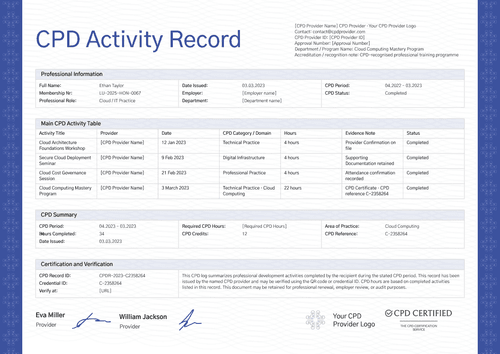
Regulators rarely ask how much learning happened, but they ask what it was, how long it took, and what changed as a result. This free CPD record template answers all three. Each row contains the date, hours, learning topic, reflection, and the provider who delivered it.
It’s built for professional associations, training providers, employers, and credential administrators who already approve the activities.
A soft blue chevron border frames the page and the wide table gives the reflection column room to breathe.
Need to issue CPD logs in bulk? Import the records from a spreadsheet or connect your LMS so every practitioner has their log before the CPD period closes. Each recipient receives a personal verification link they can send to a regulator or an employer.
What is a CPD log?
Continuing professional development, or CPD, is the learning a qualified professional undertakes after qualifying. A CPD log is the record of it: each activity, the time it took, and what the professional took away.
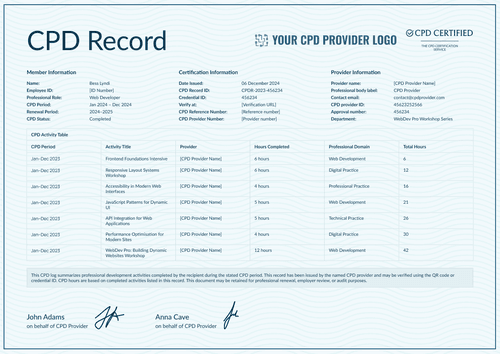
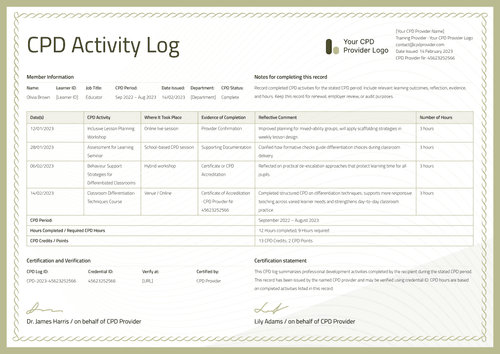
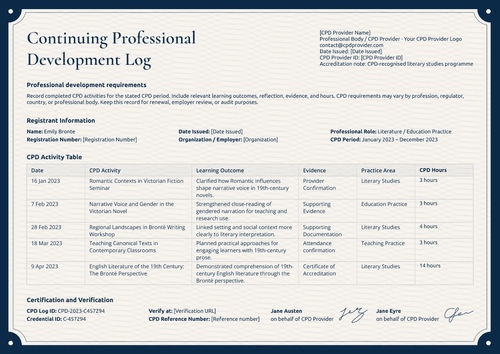
This design covers one CPD period on a single page, from the practitioner's registration details through the activity table to the totals and the issuing signature. It comes in A4 (21 x 29.7 cm) and US Letter (8.5 x 11 in), in landscape orientation.
Pair it with the matching certificate of achievement and the two documents work together. The certificate marks the main course while the log accounts for the whole period.
Create a free Certifier account to customize the design and start issuing CPD logs.
What should a CPD log include?
A regulator reading this record shouldn’t need to ask a follow-up question. Each element below can be edited in the online builder:
Static fields
- Guide Text: The standing note telling the reader to record activities for the stated period, including outcomes, reflection, evidence, and hours.
- Activity Table Headers: Date, duration and hours, learning topic, learning outcomes and reflection, and provider.
- Summary Row Labels: Fixed labels for the CPD period, total hours, main activity hours, credits, and date issued.
- Signature Area: One signing space with the "on behalf of CPD Provider" line (e.g., Dr. Frederica Blair).
Dynamic fields (automatically populated by Certifier)
- Practitioner Name: Labeled field for the recipient's full name (e.g., Amelia Aster).
- Registration Number: Field linking the log to the practitioner's entry on a professional register.
- Custom Regulator Number: Extra identity field for bodies that issue their own numbering (e.g., a GOC number).
- Job Title: Role field naming the practice area (e.g., Practitioner, Ophthalmology).
- CPD Period: The window of learning the log accounts for (e.g., April 2022 – March 2023).
- Provider Details: Provider name, contact email, provider ID, and logo area.
- Activity Date & Duration: Row-level fields recording when each activity happened and how long it ran (e.g., 14 Jan 2023, 4 hours).
- Learning Topic per Row: Text field naming the activity (e.g., Clinical Decision-Making in Ophthalmic Practice).
- Learning Outcomes and Reflection: The longest field on the record, holding what the practitioner took from each activity.
- Provider per Row: Field allowing activities from different providers to sit in one log.
- Total Hours Completed: Summary value for the period (e.g., 28).
- Main Activity Hours: Value separating the largest single activity from the rest (e.g., 16).
- CPD Credits: Value field for the credits awarded (e.g., 4).
- CPD Log ID & Credential ID: Paired tracking codes unique to this log (e.g., CPD-2023-C6765765).
- Verify-at Address: The live link a regulator follows to confirm the record.
The list describes this sample artwork rather than a universal CPD standard. Rename, add, or remove fields in Certifier's design builder until the layout matches what your body requires. A record this detailed uses more custom attributes than the free plan's three text fields, which is what the Professional plan allowance is for.
How to issue a CPD log
Before you begin, confirm your organization is authorized to record these activities and that the hours are approved. Then follow these five steps to issue a CPD log in Certifier:
- Edit the design to match your requirements — Set the size and orientation, then upload your provider logo and signature. Choose the dynamic text blocks, including the practitioner details, activity rows, and totals.
- Bundle it with the matching certificate — Link the log to the certificate of achievement so the course award and the period record are generated in the same run.
- Upload practitioner data — Whether you connect your CRM or use our native integrations with LMS apps like Canvas, Moodle, and LearnDash, populating the design with your data takes less than a minute.
- Issue, deliver, and verify — Logs are automatically sent out, one email per practitioner. From there, a recipient can download the file or share the verification link with their regulator.
- Review credential engagement and fix errors — Use the Credential Repository to monitor email opens, credential views, downloads, and shares for each log. You can also correct a practitioner's details without reissuing, and the public record updates right away.
Available CPD log template formats to customize
Edit and issue the template online with Certifier
Editing the design in Certifier gives you practitioner-specific data, direct inbox delivery, and a live credential page for every log issued.
Download the CPD log template in Word
Prefer working in your own files or keeping a copy in the provider's records? Email the Word files to yourself as a ZIP, then edit them locally: portrait and landscape documents in A4 and US Letter sizes.
PDF document export
Practitioners take a print-ready PDF from their delivery email, and your CPD team pulls the same file from the credential page.
Who issues CPD logs?
Professional associations
The reflection column carries the detail that a regulator asks about.
Training providers and CPD bodies
Issued beside a course certificate, it gives a practitioner both the award and the accounting.
Employers and credential administrators
Useful when a register wants evidence of learning, not just a total.
Frequently asked questions
A short account of what changed: a technique used differently, a decision approached another way. Two or three sentences are plenty. Regulators read this column closely, because it is where learning shows.
One long course usually sits alongside several shorter activities. Showing 16 hours of a main course inside a 28-hour total lets a reviewer see the shape of the period at a glance, rather than adding rows themselves.
Yes. The provider column is set per row, so a course you delivered can sit beside a webinar someone else ran. Whether an outside activity counts toward a requirement is your body's decision, made before the data reaches the template.
No, and the design keeps them apart on purpose. Hours record time spent, while credits record what your scheme awards for it. Some bodies use one, some use both. Relabel or remove either field to match the scheme you report under.
Yes. The record states the period as it stood on the issue date, so a mid-period log shows the activities completed so far. Issue again at close if your body wants a final version.
Certifier templates are provided for general informational and design purposes only. They do not constitute legal, regulatory, accreditation, or academic-recognition advice and are not guaranteed to satisfy the requirements of any institution, recognition body, regulator, or jurisdiction. Using this template does not by itself make a document an official diploma supplement or prove a qualification. The issuing organization is responsible for verifying the content, authority, approvals, and suitability of every document before use. This template is not an official Europass document and does not guarantee recognition of a qualification.