Professional cerulean CPD record template
Tailor a free professional cerulean CPD record for approved records. Edit it online or receive editable Word files in the catalog package.
Customize this template for free
Email and export in bulk
Track recipient engagement
Download in
Don't have Certifier account? Sign up
Free professional cerulean CPD record template
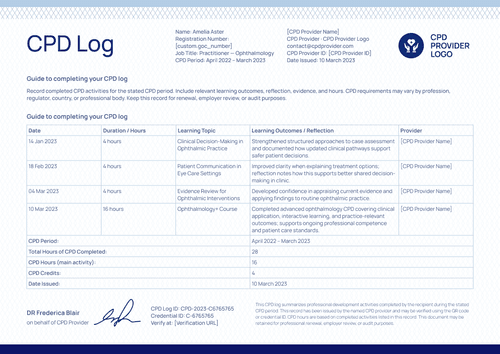
This professional cerulean CPD record gives professional associations and training providers a full-year log of a member's continuing professional development activities, with a running total of hours. The light cerulean border and wave pattern keep the design calm and easy to scan across a longer activity table than a single-event record.
Open the design in Certifier's online editor to add your provider name, logo, and activity rows, then map each field to your real member records. Bundle it with a matching Certificate of Achievement so both are issued as one credential set.
Issue credentials in bulk by uploading a spreadsheet or integrating Certifier with your LMS. Each participant receives an individual verification link to share with an employer or another educational institution.
What is a CPD record?
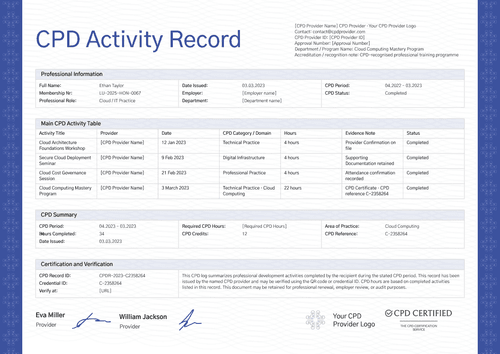
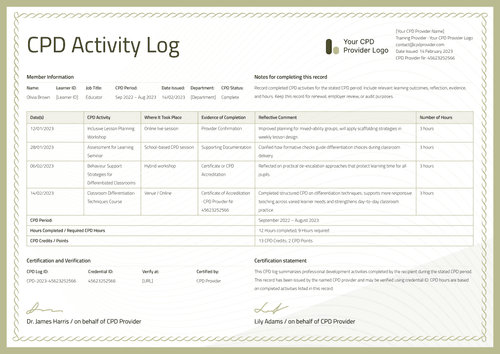
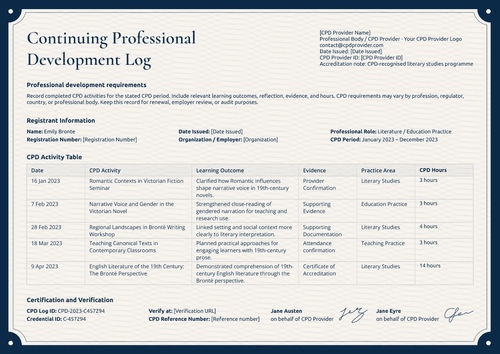
A CPD record is a log of the continuing professional development activities a member has completed over a set period, with hours that add up as the list grows. This cerulean design lists member information, certification information, provider information, and a running activity table with a cumulative hours column. All you need is a free Certifier account to customize, edit, and issue this design online.
This record pairs with a matching Certificate of Achievement, so a member gets one certificate for a specific workshop and one year-long log covering everything they completed. The layout is A4 and US Letter, landscape, single page.
What should this CPD record include?
These are the fields shown in this design, not a fixed standard. You can map, add, or remove fields in Certifier's design builder to match your own CPD scheme.
Static fields
- CPD provider logo & certification badge: Space for your provider logo and a CPD-certified badge, showing your accreditation at a glance.
- Verification explanatory text: Fixed paragraph explaining that the log summarizes activities completed during the stated period and can be checked by QR code or credential ID–keep this line as-is.
- Activity table header row: Fixed column labels (CPD Period, Activity Title, Provider, Hours Completed, Professional Domain, Total Hours) that structure every logged activity the same way.
- Section labels: Fixed headings–Member Information, Certification Information, Provider Information, CPD Activity Table–that split the record into checkable blocks.
- Signature lines: Space for two provider representatives to sign the record on behalf of the CPD provider.
Dynamic fields (automatically populated by Certifier)
- Member name & employee/membership ID: The member's name and a unique identifier, so the record can't be mixed up with someone else's.
- Professional role & CPD/renewal period: The member's job role and the dates the record and renewal period cover.
- Activity log rows with running total: Each activity's period, title, provider, hours, and professional domain, plus a Total Hours column that adds up as activities are logged; the field most reviewers check to confirm the member hit their target.
- Provider details: The CPD provider's name, professional body label, contact email, provider ID, approval number, and department or program name.
- CPD record ID & verification: A unique record ID, credential ID, and a verification link tying the record back to Certifier's issued credential.
Before you issue, double-check that the running Total Hours column adds up correctly across every row before you send the record out. Because it's a cumulative field, a missed or reordered activity throws off every total after it.
How to issue this CPD record
To automate the delivery of your transcripts and supplements, follow this simple, 4-step workflow:
- Customize the design and your branding - Open the cerulean design, add your provider logo, CPD-certified badge, and signature block.
- Bundle it with a matching companion document - Attach a Certificate of Achievement template so the record and the certificate for a specific workshop issue together as one credential set.
- Connect your tools - Upload a spreadsheet of members and activities with Google Sheets, or connect Certifier to your member system with a tool like HubSpot or Salesforce.
- Review, issue, and verify - Have your CPD office confirm every activity, hour, and running total, then approve and deliver the record by email. Members can share it using their verifiable credential link or QR code.
Available CPD record template formats to customize
Edit and issue the cerulean CPD record template online with Certifier
Open the design in Certifier's editor if you want member-specific data, direct email delivery, and a live credential page. The online editor does not export Word files.
Download the cerulean CPD record template in Microsoft Word
Enter your email address to receive a ZIP with the editable Word file in A4 and US Letter, plus the fonts used in the design. This offline copy is for review or local editing.
PDF document export
Once a record is issued through Certifier, members can download a print-ready PDF from their email or verification page. Your office can also bulk-export issued records as PDFs from the dashboard, within your plan's limits.
Who issues a CPD record?
Only issue this design if you are the CPD provider named on the record, the one that can confirm every activity, hour, and domain listed.
Professional associations and industry bodies
Associations issue CPD records so members can show a full year of development activity in one place, not a stack of separate certificates.
Employers and internal learning and development teams
Employers running structured upskilling, like the web development workshop series shown in this design, issue CPD records to document staff training for performance or compliance reviews.
Independent CPD training providers
Providers running recurring workshop series issue this design so each member gets a running log that updates as they complete more activities.
Frequently asked questions
Yes. Select “Edit this template” and use a free Certifier account to customize the design online, or enter your email address to receive the Word package. The Word files are intended for offline editing, while Certifier supports online issuance and verification.
No. It logs completed activities and calculates the total number of hours. The relevant professional body still decides whether the recorded activities satisfy its CPD requirements. Reviewers should therefore treat the document as supporting evidence rather than automatic confirmation of compliance.
Yes. The activity table is designed to accommodate additional entries. Add a row whenever a new activity is completed, then update the running total. Verify each entry against the relevant attendance or completion evidence before issuing the revised record.
Paid plans offer higher issuing limits and access to features such as private design templates. Visit Certifier’s pricing page to compare the features available with each plan. The right option depends on your issuing volume and whether CPD records require restricted access.
Certifier templates are provided for general informational and design purposes only. They do not constitute legal, regulatory, licensing, or accreditation advice and are not guaranteed to satisfy the requirements of any professional body, employer, or regulator. Using this template does not by itself make a document an official CPD record. The issuing CPD provider is responsible for verifying every activity, hour, and credit before use, and for confirming the record meets the requirements of the relevant professional body.