Professional olive CPD activity log template
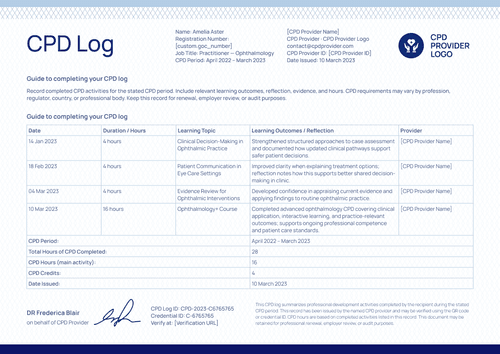
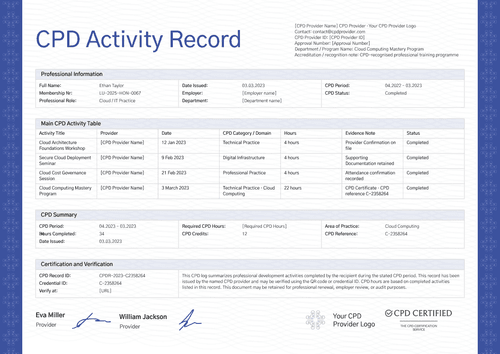
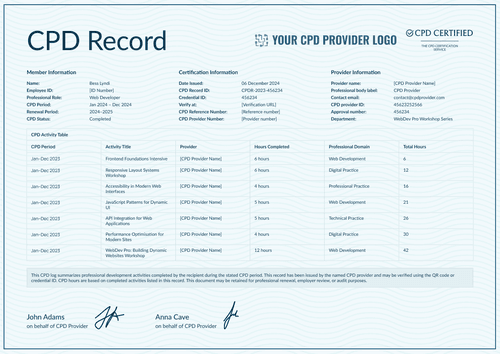
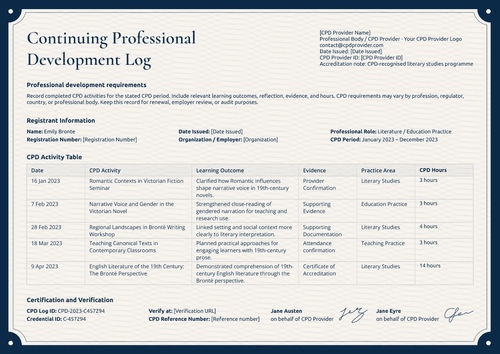
Log every CPD activity with where it happened and what proves it. Track hours completed against hours required and issue it with the matching certificate of accreditation.
Customize this template for free
Email and export in bulk
Track recipient engagement
Download in
Don't have Certifier account? Sign up
Free professional olive CPD activity log template
Two questions determine whether a CPD record survives review: whether the activity occurred and whether the member is on track. This free CPD record template answers both. Every row lists where the activity took place and the evidence supporting it, and the summary shows hours completed against hours required.
Professional associations, training providers, regulated professionals, employers, and credential administrators use it when a member's word alone is not the standard.
A sage rope border surrounds the page, and six columns sit across the table without crowding. That matters because the evidence column is doing real work and needs to be readable.
Have a full membership to log? Bring the activities in from a spreadsheet or connect your LMS and every record is ready before the CPD year closes. Each member receives a personal verification link they can share with a professional body or a line manager.
What is a CPD activity log?
A CPD activity log lists the professional development a member completed across a defined period, activity by activity. Where a summary gives a total, a log shows the working: what was done, where, and what proves it.
This design fits the whole period on one page, opening with the member's details and closing with two authorized signatures. Choose between A4 (21 x 29.7 cm) or US Letter (8.5 x 11 in) sizes in landscape orientation.
Issue it with the matching certificate of accreditation so that a member holds both the award for their main course and the record of all other activities. Sign up for a free Certifier account to customize the log and issue it to your members.
What should a CPD activity log include?
The test is whether an assessor can verify a row without contacting you. Everything below supports that and can be edited in the online builder:
Static fields
- Notes Text: The standing guidance on recording activities, outcomes, reflection, evidence, and hours for the stated period.
- Activity Table Headers: Date, CPD activity, where it took place, evidence of completion, reflective comment, and number of hours.
- Summary Row Labels: Fixed labels for the CPD period, hours completed against hours required, and credits and points.
- Certification Block Labels: Headings for the CPD log ID, credential ID, verify-at address, and certified-by line.
- Signature Areas: Two signing spaces for a provider representative and an accreditation lead.
Dynamic fields (automatically populated by Certifier)
- Member Name & Learner ID: Identity fields for the recipient (e.g., Olivia Brown).
- Job Title: Role field naming the member's practice (e.g., Educator).
- Department: Organizational field placing the member inside a larger employer.
- CPD Period: The learning year the log reports on (e.g., Sep 2022 – Aug 2023).
- CPD Status: Status field summarizing the period at a glance (e.g., Complete).
- Date Issued: The day the log was generated (e.g., 14/02/2023).
- Activity Date & Name per Row: Fields naming each activity and when it ran (e.g., 12/01/2023, Inclusive Lesson Planning Workshop).
- Where It Took Place: Delivery-mode field distinguishing an online live session from a venue (e.g., Hybrid workshop).
- Evidence of Completion: The field that carries the proof (e.g., Provider Confirmation, Certificate of CPD Accreditation).
- Reflective Comment per Row: Short text on what the activity changed in practice.
- Number of Hours per Row: Value field recording time spent on each activity (e.g., 3 hours).
- Hours Completed and Required: Paired summary values showing progress against the target (e.g., 12 completed, 9 required).
- CPD Credits and Points: Summary values in both currencies (e.g., 13 credits, 2 points).
- CPD Log ID & Credential ID: Codes identifying this log and the credential behind it (e.g., CPD-2023-45623252566).
- Certified-by Line: Field naming the body standing behind the record.
Treat the list as a description of this design rather than a required format. Every field can be renamed, moved, or removed in Certifier's design builder.
How to issue a CPD activity log
Before you begin, confirm the activities and evidence are approved under your scheme. Then, follow these five steps to issue a CPD activity log using Certifier:
- Adapt the design to your scheme — Pick the size and orientation, add your provider logo and both signatures, and mark the dynamic blocks for member details, activity rows, and the summary.
- Pair it with the matching certificate of accreditation — Attach the accreditation certificate so the course award and the activity log are generated together.
- Import member records — Pull them from your membership system, or straight out of Canvas, Moodle, or LearnDash, each of which connects natively. The design fills with your data in under a minute.
- Issue, deliver, and verify — Each member's log is emailed the moment it is issued. Downloading it or forwarding the verification link takes one step on their side.
- Track engagement and correct records — See which members opened, downloaded, and shared their log from the Credential Repository. If a detail needs fixing later, update the record in place and the live credential page reflects it at once.
Available CPD activity log template formats to customize
Edit and issue the template online with Certifier
Customize the design in Certifier and each member receives their own data, an emailed log, and a live credential page that an assessor can open at any time.
Download the CPD activity log template in Word
Some schemes keep an internal copy alongside their approvals. Mail yourself the ZIP file and download the Word documents on your device in portrait and landscape orientations, in A4 and US Letter sizes.
PDF document export
Members export a print-ready PDF from their delivery email, and scheme administrators take the same file from the credential page.
Who issues CPD activity logs?
Professional associations
Built for schemes that require evidence per activity, not a self-declared total.
Training providers with accredited programs
The evidence column shows which activities carry formal accreditation and which don’t.
Employers and credential administrators
The completed-against-required line turns a table of activities into a status.
Frequently asked questions
Whatever your scheme accepts: a provider confirmation, an attendance record, or a certificate of accreditation. The field is free text, so use the terms your assessors recognize.
From you. The template displays the target your scheme sets, but it doesn’t calculate or enforce it. Update the value when a member's requirement changes and the live record follows.
The delivery mode often affects whether an activity qualifies. Some schemes cap online hours or require a proportion of in-person learning. Recording it per row means an assessor can apply that rule without having to ask.
Yes, and showing it honestly is usually better than waiting. A log that reads 12 completed against 9 required indicates a member is clear. Yet, one that reads 5 against 9 tells them what is left while there is still time.
Many schemes want a provider representative and an accreditation lead to stand behind the record together. Both names and roles are editable. You can leave one blank if your process requires only a single signature.
Certifier templates are provided for general informational and design purposes only. They do not constitute legal, regulatory, accreditation, or academic-recognition advice and are not guaranteed to satisfy the requirements of any institution, recognition body, regulator, or jurisdiction. Using this template does not by itself make a document an official diploma supplement or prove a qualification. The issuing organization is responsible for verifying the content, authority, approvals, and suitability of every document before use. This template is not an official Europass document and does not guarantee recognition of a qualification.