
Trusted by:
University of Southern California
Warner Bros.
Volvo
Amazon
Stanford University
Updated: September 04, 2026
14 min read
Enterprise digital credentials integrations decide how much manual work stays after launch. This guide shows what to connect, which approach fits, and when to skip integration.
Research with AI:
Scoping the integration architecture for a digital credentialing program might be where enterprise rollouts lose momentum.
The core credentialing platform decision often gets made on feature comparisons and demo experience, and the integration layer gets evaluated on logo coverage–a screenshot of 40 tool icons and an assumption that connections work as advertised.
Enterprise digital credentials integrations are an architecture problem. The questions that matter are which internal systems need to connect to the credentialing platform, which integration approach fits each use case, and whether a vendor's integration claims hold up under procurement scrutiny.
This article covers all of it: the six system categories to map, the four-approach decision framework, the vendor evaluation criteria, and an honest take on when building an integration isn't worth the engineering cost.
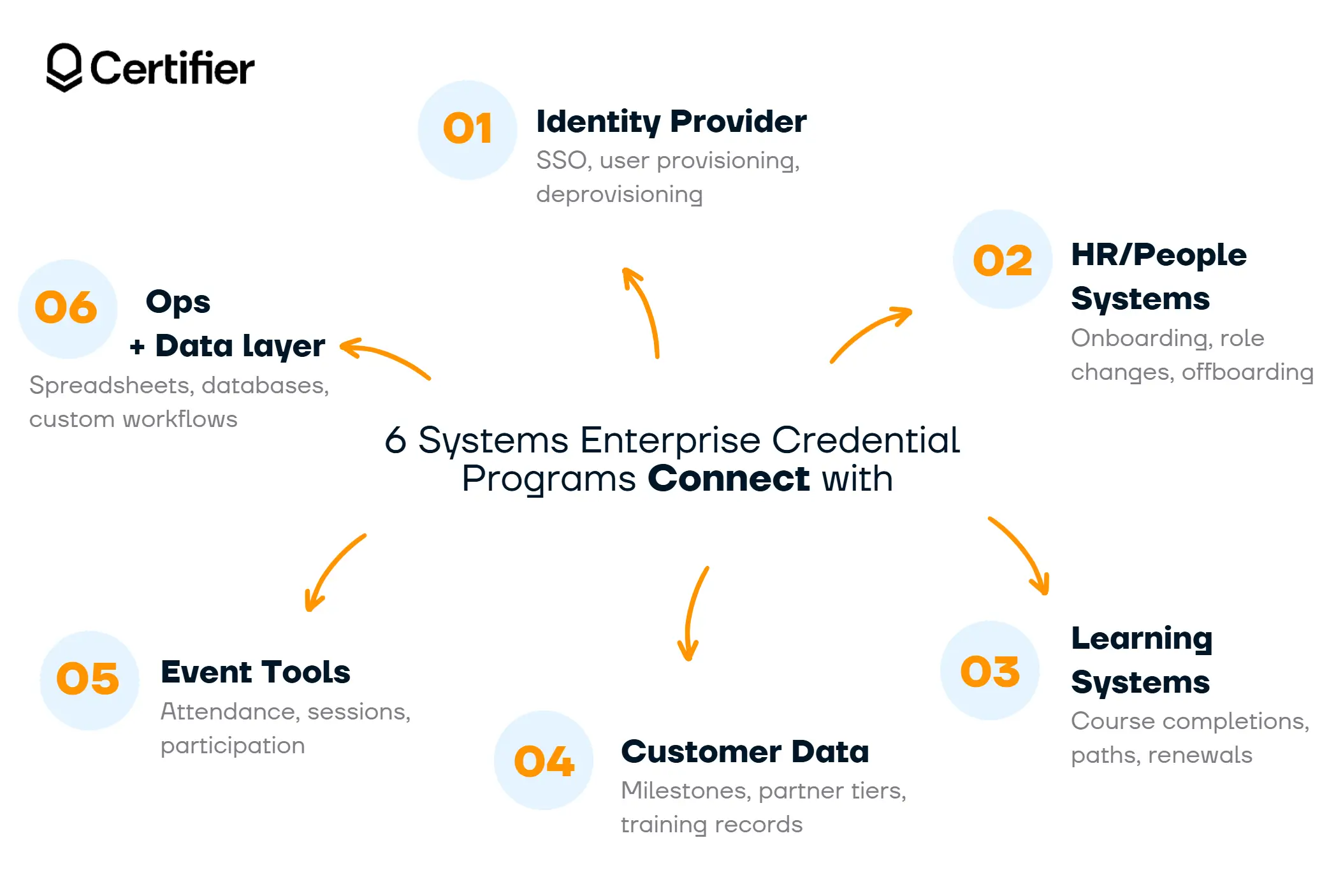
Enterprise digital credentials integration covers six system categories–identity provider, HRIS, LMS/LXP, CRM, event tools, and ops/data layer.
Four integration approaches exist–native, workflow automation, API + webhooks, and custom–and the right one depends on the use case.
Time savings concentrate in four roles–HR/L&D admin, IT, recipient support, and audit prep; the approach you choose determines how much of that saving you capture.
Some workflows don't justify integration; knowing when to skip it prevents over-engineering.

Each category below represents a system where credential-issuance events originate. Mapping these before selecting a platform determines which integration approach each use case requires and surfaces gaps in vendor coverage early.

Common tools: Okta, Microsoft Entra ID, Google Workspace, any SAML 2.0–compatible IdP.
Credential-trigger events: User provisioning (new hire credentials issued when accounts are created), deprovisioning (credentials archived or revoked when access is removed).
SSO via your existing IdP is non-negotiable at enterprise scale. It keeps access management centralized in IT, ensures that staff who leave the organization automatically lose platform access, and satisfies the access-control requirements most security reviews will ask for.
Certifier's enterprise capabilities support SAML 2.0 SSO via Okta, Entra ID, and Google Workspace, as well as any compatible IdP.
This category almost always calls for a native integration. Handling SSO through a workflow automation tool introduces fragility and audit exposure that enterprise security teams won't accept.
Common tools: Workday, BambooHR, SAP SuccessFactors, Personio.
Credential-trigger events: Onboarding milestone credentials (issued when a new hire completes orientation), role-change credentials (issued when a promotion or role transition is recorded), separation workflows (credentials revoked or archived on exit).
HRIS is where the employee lifecycle lives. Connecting it to the credentialing platform means credential issuance tracks employment events automatically, without manual exports from HR systems.
For major HRIS vendors, native connectors are the most reliable path. For less common HRIS tools, workflow automation or a direct API connection fills the gap.
Common tools: Cornerstone OnDemand, Docebo, TalentLMS, LearnUpon, Kajabi, Teachable.
Credential-trigger events: Course completion, certification path completion, recurring compliance training renewals.
For corporate L&D programs, the LMS is often the highest-frequency integration point. Credentials need to be issued the moment a completion event is recorded, at any volume, without a manual step in between.
The integration approach depends on which LMS the organization runs: TalentLMS is among the tools Certifier connects to via its API and integrations layer. For Teachable or Kajabi, you can use Certifier's native connector as a no-code automation option. LearnUpon integrates with Certifier via Zapier.
For LMS tools without a dedicated native connector, workflow automation or the REST API can still support automated credential issuance. That matters in corporate training, where buyers often compare platforms based on how reliably they can trigger certificates or badges after course completion.
Common tools: Salesforce, HubSpot, ActiveCampaign.
Credential-trigger events: Customer milestone credentials (issued when an account reaches a defined stage), partner tier achievements (issued when a partner moves up a certification tier), account-based training completions.
CRM is the integration category most relevant to customer education and partner enablement programs. Credential delivery triggered by CRM events–a deal stage change, a contact field update, a custom milestone–keeps recognition automatic and consistent.
Given how central CRM data is to most enterprise revenue workflows, native integration or direct API connection is the standard approach here. Certifier, for example, has native integration support for ActiveCampaign and HubSpot.
Common tools: Zoom, Eventbrite, Hopin, ClickMeeting, Webex, Cvent.
Credential-trigger events: Webinar attendance above a defined threshold (e.g., 60–80% of session time), in-person conference attendance, virtual session completion.
Event credential programs tend to run at high volume with straightforward trigger logic. An attendee meets the threshold; a credential is issued.
That simplicity makes workflow automation the most practical approach for most event tool integrations–Certifier connects to Zoom and Eventbrite via Certifier's Zapier and Make, so a non-technical team can configure the workflow without engineering involvement.
Certifier also has native event integrations for Zoom and Eventbrite directly within its Automations feature. Hopin and ClickMeeting are among the additional event tools reachable via the 5,000+ app connections Certifier supports through Zapier.
Common tools: Google Sheets, Microsoft Excel, internal databases, custom apps.
Credential-trigger events: Batch issuance from recipient lists, custom workflow logic for programs that don't fit a named tool category, ad hoc credential runs.
Spreadsheets remain the most common source of bulk issuance data at enterprise scale–even in organizations with mature LMS and HRIS stacks.
Native integrations for Google Sheets and Microsoft Excel handle the structured, recurring batch use case without code. For internal systems not covered by any named integration, the REST API is the connection path.
Certifier's Automations include direct, native connectors for Google Sheets, Microsoft Excel, and several data layer tools (like integrations for Smartsheet, Airtable, and Supabase), reducing the workflow automation step for these use cases.
Certifier covers each of these categories — browse Certifier's full integration directory.
Not every integration belongs in the same approach. Native connectors work well for standard, high-frequency workflows, but they may not cover custom logic.
APIs offer more control, but they can add engineering effort when workflow automation would suffice.
Picking the wrong path is one of the most common cost drivers in enterprise credentialing rollouts. The table below maps each approach to the use cases it fits best.
Approach | How It Works | Best For | Engineering And Maintenance Cost | Maintained By |
|---|---|---|---|---|
Native integration | Pre-built connector inside the credentialing platform; configure and go | High-frequency, well-defined use cases: HRIS sync, CRM triggers, common LMS connectors, SSO | Low–typically configuration only | Vendor |
Workflow automation (Zapier, Make, Pipedream) | The credentialing platform connects to a low-code workflow builder that links it to other tools | One-off workflows, edge cases, quick proofs of concept, long-tail apps with no native connector | Low to medium–depends on workflow complexity | Customer |
API + webhooks | Direct integration via the credentialing platform's REST API and incoming webhooks | Custom product integrations, high-volume programs requiring full control, any system not covered by the above | High–requires engineering time and ongoing maintenance | Customer |
Custom integration | Vendor-built integration tailored to the customer's specific stack | Complex multi-system orchestration, regulated environments, large rollouts where no standard approach fits | Highest cost and timeline, but lowest internal engineering burden | Vendor |
Most enterprise programs use a mix of approaches across their six system categories.
The category map above is the input for this decision. IdP almost always goes native, event tools frequently fit workflow automation, internal systems with no vendor support go to the API, unusually complex orchestration requirements go to a custom build.
Vendors will claim broad integration coverage across every category above. The following questions separate claims that hold up from those that don't.

01 Who built and maintains this integration?
A strong answer names the vendor's own engineering team, with a dedicated integration landing page and help-center setup documentation.
A weak answer points to a community-built Zap on the automation tool's marketplace–which means the vendor doesn't own the connection and won't fix it when the connected system updates.
02 Show me the help-center setup guide.
A strong answer produces a step-by-step article with screenshots, field-mapping details, and troubleshooting steps.
A weak answer points to a generic "connect via Zapier" mention with no specifics. If a vendor can't show you the documentation before the sale, it doesn't exist in a form that's useful during rollout.
03 What does the audit log actually capture for this integration?
A strong answer covers API calls, webhook deliveries, and integration-triggered issuance events with timestamps and operation details–the level of detail a security review or an internal audit will require. A weak answer logs only user-level login events.
04 What happens when the integrated system changes its API?
A strong answer states that the vendor monitors connected systems and maintains the connector under a defined SLA. A weak answer tells you to reconfigure on your end when a third-party tool updates.
05 How is data flowing through workflow automation tools covered in your DPA and subprocessor list?
A strong answer explicitly names coverage for data passing through middleware tools. A weak answer uses generic credential-issuance language that doesn't address what happens to recipient data inside a third-party workflow builder.
Vendors that can't give specific answers to these questions are giving marketing answers. Note it, weight it accordingly in scoring, and keep it in the evaluation record.
Enterprise digital credentials integrations generate time savings in four operational areas. The integration approach chosen for each category determines how much of that saving is captured.
HR / L&D admin time. Manual credential issuance requires someone to export completion data, format it, upload it to the credentialing platform, and verify delivery for each cycle. Native and workflow automation integrations remove that loop entirely. For high-frequency programs, recurring compliance training, continuous onboarding, the saving compounds weekly.
IT involvement. Every manual workaround your admin team runs is an IT support surface. Native integrations that handle SSO provisioning automatically, and workflow automation connections that don't require engineering setup, reduce the IT touchpoints required to keep the program running. IT's involvement concentrates at setup, not at every issuance cycle.
Recipient support requests. The most common recipient support request in any credential program is "I didn't receive my credential" or "can you resend it?" A self-serve credential portal–where recipients retrieve, verify, and share their credentials without contacting anyone–eliminates most of these. This isn't an integration decision, but it compounds the time savings from automated issuance: when delivery is reliable and access is self-serve, the support queue shrinks.
Audit prep. Compliance reviews and security audits require documentation of who issued what, when, and from which system event. A credentialing platform with a full audit log that captures integration, triggered issuance events, including which API call or webhook delivery triggered each credential–produces that documentation automatically. Without it, audit prep is a manual reconstruction exercise.
Enterprise digital credentials integrations add value when the issuance volume or frequency justifies the setup. They don't always do that.
Skip the integration and use direct upload or manual issuance when:
The credential program runs once or twice a year with a fixed recipient list. A CSV upload is faster to set up than a workflow automation connection.
The tool you need to integrate with changes frequently or has an unstable API. Building against an unstable system creates maintenance debt that exceeds the time saved.
Your recipient list comes from a one-off data source–a conference attendee export, a single assessment result–that won't repeat. A spreadsheet upload accomplishes the same result with no ongoing maintenance.
The use case is exploratory or a pilot. Integrate at scale after the program design is stable, not before it is.
Building an integration that doesn't serve a recurring, high-volume use case adds complexity without a proportionate return. Enterprise programs are better served by matching integration depth to actual workflow frequency.
Certifier is a digital credential platform–certificates and badges–that integrates with the systems enterprise programs already run on.
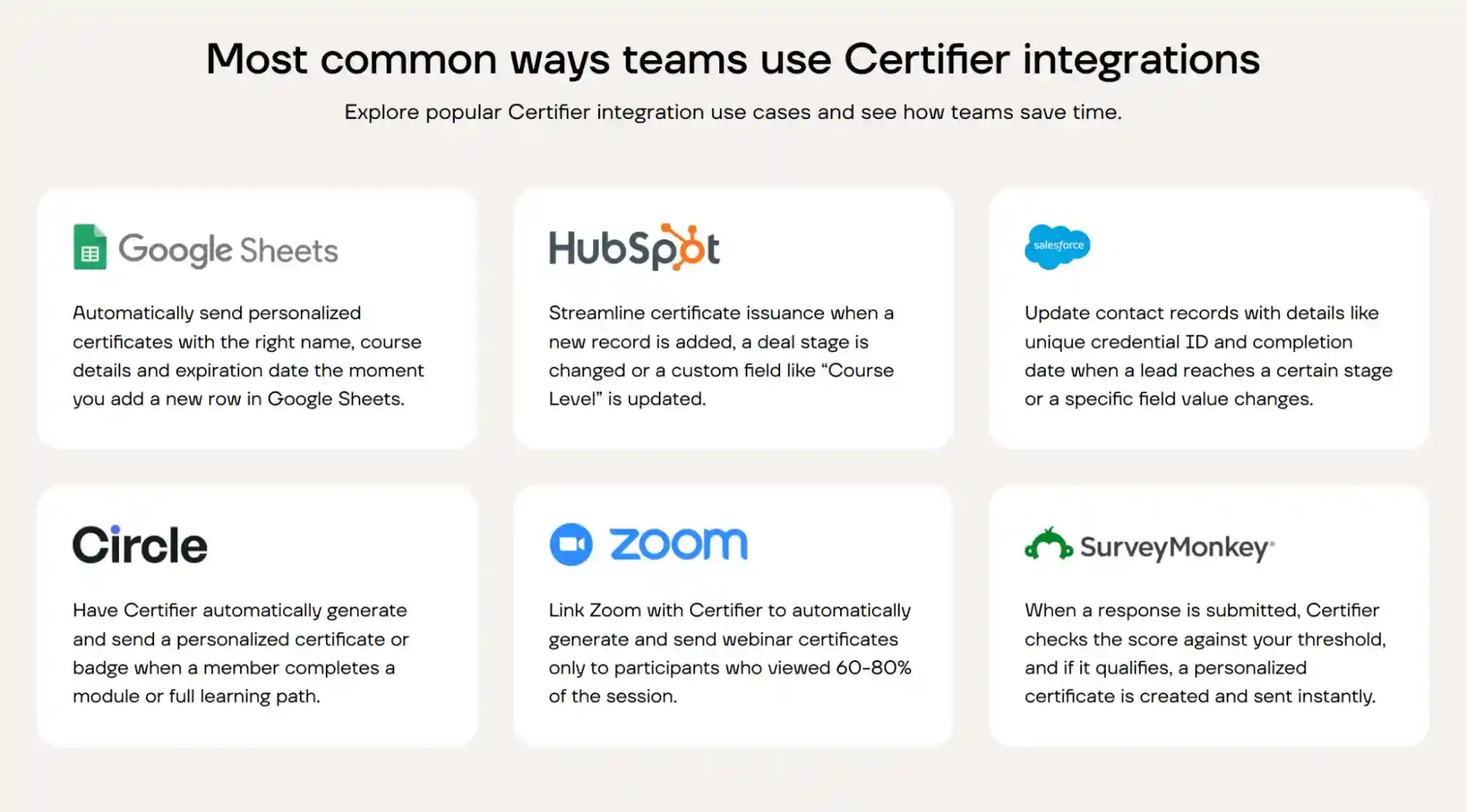
It is not an iPaaS or workflow automation tool. The integration layer it provides sits on top of the credentialing and issuance engine.
Certifier's integration footprint covers all four approaches:
Native connectors across all six system categories: Salesforce, HubSpot (CRM), Google Sheets, Microsoft Excel, Smartsheet, Airtable, Supabase (ops/data), Zoom, Eventbrite (event tools), and Teachable, with more added through the Automations feature.
Workflow automation via Certifier's Zapier integration and Certifier's Make integration–connecting Certifier to thousands of apps–both with dedicated, vendor-maintained integration pages, plus Pipedream as a supported option for teams that have standardized on it.
Certifier’s REST API with webhooks for custom product integrations and high-volume programs requiring full control over the issuance logic. Technical teams can use the REST API documentation to review available endpoints, authentication, and implementation details.
Custom integrations built by Certifier's team for use cases that fall outside the standard set.
Talk to Certifier's enterprise team about your integration requirements.
Enterprise digital credentials integration is an architecture decision. Mapping the six system categories, matching each to the right integration approach, and evaluating vendor claims against the criteria above produces a rollout plan that reflects the actual engineering cost and time savings.
The programs that eliminate the most manual work are the ones where integration choices were made deliberately, per category, before the contract was signed.
For a broader evaluation of how integration fits within the full enterprise platform assessment–across credential trust, compliance, organizational scalability, and lifecycle control–the guide on what makes a digital badge platform enterprise-ready covers the complete framework.
The strongest options for corporate L&D automate certificate issuance from the LMS or training tools your team already uses.
Certifier supports this through Zapier, Make, and API/custom integrations, so credentials can go out after course completion or similar triggers. When comparing vendors, check which integrations they support and which steps run automatically.
Three approaches cover this use case.
Native LMS integrations fire automatically when a completion event is recorded, with no manual step required.
Workflow automation tools like Zapier, Make, or Pipedream sit between the LMS and the credentialing platform and handle the trigger logic through a low-code workflow the customer configures.
Direct API integration lets engineering teams build the connection exactly as the use case requires, with full control over event logic and issuance parameters.
Certifier supports all three; the right choice depends on which LMS you're connecting and what level of control your team needs over the trigger conditions.
Yes. Certifier connects to Zapier, Make, and Pipedream. Zapier and Make each have dedicated, vendor-maintained integration landing pages with setup documentation. Pipedream is supported as a low-code workflow option for teams that have standardized on it.
Three paths cover tools outside Certifier's native connector set. Workflow automation via Zapier, Make, or Pipedream covers thousands of apps without engineering involvement. For tools not on any workflow automation platform, Certifier's REST API provides a documented endpoint for direct integration.
For complex or critical tools that require a more structured approach, Certifier's team builds custom integrations tailored to the customer's stack.
Yes. Certifier supports SAML 2.0 SSO via Okta, Microsoft Entra ID, and Google Workspace, as well as any compatible SAML 2.0 identity provider.
SSO is part of Certifier's enterprise capabilities, alongside 2FA, RBAC, audit log, ISO 27001 and GDPR compliance, and a custom DPA and SLA.

- Content Writing
- On-page SEO
- Localization
- Market Research
- Keyword Research
Content Specialist
Daria creates practical guides and templates that help training providers, educators, and event organizers solve digital credentialing challenges.