

Trusted by:
University of Southern California
Warner Bros.
Volvo
Amazon
Stanford University
Updated: October 20, 2026
5 min read
Not sure if your training spreadsheet will hold up the next time an auditor or client asks for proof? Take our five-point test to find out and see what changes in evidence, validity, and cost once that layer moves into software.
Research with AI:
A spreadsheet is enough for your employee training records. At least, that’s until the record has to leave the building and someone outside your company needs to verify it.
If a records request came in that you barely met in time, a certification lapsed before anyone noticed or a new site or partner tightened compliance standards, it's high time you run the migration trigger test.
You can also start with Certifier’s free employee training record templates, then use the test to decide if you need more.
An employee training record system does five jobs: requirement matrix, completion capture, evidence artifact, validity control, and third-party verification. A spreadsheet only handles the first two well.
Use the five-point migration trigger test below to review your current training record management workflow.
You don't have to replace the spreadsheet. Connect it to Certifier and let the software take over the evidence, validity, and verification layer instead.

Strip away the format and every legitimate training record answers four key questions: who was trained, when, on what content, and by whom.
Unlike records generated with software, spreadsheets start to struggle when you have to answer how long this record must survive and who outside the company has to trust it without calling you.
That’s because a record that has to satisfy an auditor next year, a client's procurement team next quarter, or a regulator who shows up unannounced needs to carry its own evidence.
Retention rules vary from a few years to multiple decades depending on which standards your company has to meet. For example, under the HIPAA Privacy Rule, documentation of workforce training has to be retained for six years from the date it was created or last in effect.
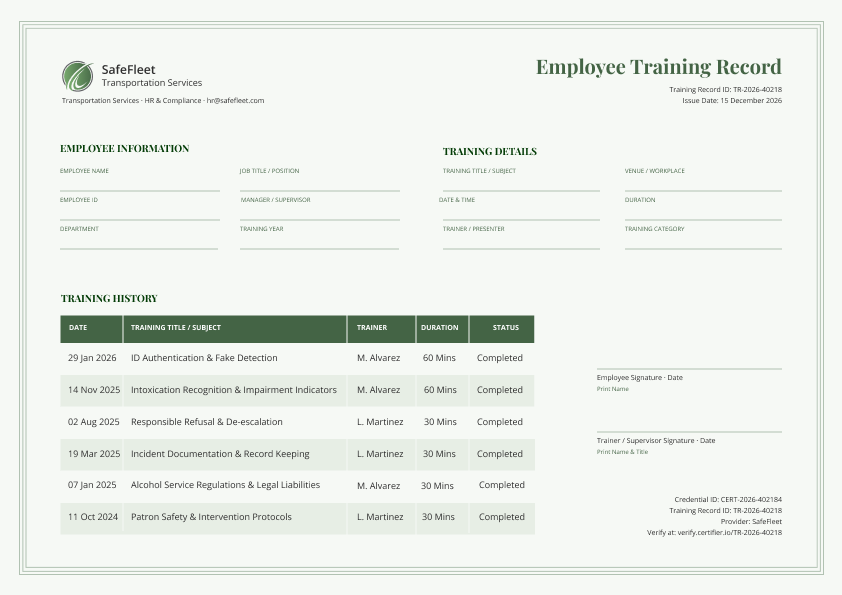
A defensible employee training record needs to include:

the employee's identity
the training date
the topic
who delivered it
how long it ran
a completion status
sign-off from both sides
an expiration date (if the training lapses)
a unique record ID
a way for someone outside the company to verify it
The table below shows which of those elements a typical spreadsheet can carry.
Field | Why It Matters | Can A Spreadsheet Carry It |
|---|---|---|
Employee identity (name, ID, job title, department) | Identifies who the record is about | Yes |
Training date | Establishes when the requirement was met | Yes |
Topic | Shows what was covered, at a title level | Usually, if someone fills it in consistently |
Trainer identity | Establishes who is accountable for delivering it | Sometimes tracked, easy to skip |
Duration | Some standards require a minimum training length | Sometimes tracked, easy to skip |
Completion status | Shows the session was finished, not just scheduled | Often missing entirely |
Unique record ID | Lets one record be referenced without ambiguity | No native way to generate or track this |
Signatures (employee and trainer or supervisor) | Attests both sides confirm the record is accurate | Rarely kept on file |
Verification method | Lets an outsider confirm the record is real | No mechanism exists in a spreadsheet |
Expiration date | Tells you when the record stops being current | Only if checked manually, there are no built-in reminders |
A training record system, whatever form it takes, has five jobs:
Requirement matrix: Knowing who must be trained on what and by when.
Completion capture: Recording who completed a session, when, and what was covered.
Evidence artifact: Producing an attributable, tamper-resistant record of one training event that outlives both the employee and whoever owns the file.
Validity control: Knowing what's about to lapse and acting before it does.
Third-party verification: Letting someone outside the company confirm a record is real without a call to HR.
Here’s how a spreadsheet-based record, an LMS record and a training record generated using a credentialing platform perform across these tasks:
Record Job | Spreadsheet | Lms Tool | Credentialing Platform |
|---|---|---|---|
Requirement matrix | Tracks it well | Tracks it well, often its core job | Not designed for this; stays in the spreadsheet or LMS |
Completion capture | Captures it, if kept current | Captures it automatically from course completion | Captures it at the point of issuance |
Evidence artifact | A date in a cell, not attributable to anyone | Usually not built to produce a standalone verifiable artifact | A unique, attributable, tamper-resistant credential |
Validity control | Depends on someone checking the sheet | Sometimes tracks due dates for retraining | Set a validity period once, get automatic reminders |
Third-party verification | Impossible without contacting the record owner | Rarely built for outside verification | Unique ID and hosted verification page, checked without contacting anyone |
In short, the spreadsheet does well for only two out of five, failing to create a verifiable, tamper-proof employee training record with automatic expiration reminders.
Score your current employee training record creation setup against these five triggers. Give yourself one point for each that's true.
01Renewal pressure - A credential with an expiry date has lapsed and you only found out after the fact.
02External audience - An auditor, client, insurer, regulator, or general contractor asks for proof more than once a year.
03Retention horizon - A record has to survive longer than the employee, the file, or the person who owns the file.
04Access split - More than one person needs to edit it, someone needs to read without editing, or an employee needs their own copy without asking you for it.
05Continuity risk - The workbook lives in one person's account, on a local drive, or without version history.
If You Scored 0 to 1
Keep the spreadsheet and fix the specific weaknesses the test surfaced. The employee training record template collection is a great starting point either way.
If You Scored 2 to 3
Keep the spreadsheet as your requirement matrix and move the evidence layer into a credentialing software.
If You Scored 4 or More
Move the evidence layer now. A single lapsed high-consequence credential, the kind that stops someone from being allowed to operate equipment or work in a role, can justify moving even at a trigger count of one.
ONE CREDENTIAL, MULTIPLE DOCS
Create both designs in one go and issue credentials in bulk.


You don't need to replace the spreadsheet, you rather need to split the jobs.
Let Certifier own the artifact, its validity window, and its verifiability. In practice, that means connecting the spreadsheet you already have to Certifier.
Both Certifier's Google Sheets integration and Excel integration issue a credential when a new row is added. Completion capture stays exactly where your team already does it and the evidence artifact gets created without the manual step.
Certifier is a digital credentialing platform, not a learning management system or a training management system. It doesn't deliver courses, assign required training, or maintain a requirement matrix showing who still owes what.
Tip: If your team is past the trigger threshold, the employee training certificates solution page walks you through the workflow in more detail.
Here's what actually changes when the evidence layer moves off the spreadsheet and what it costs, so you can brief a budget owner without guessing.

Evidence artifact and third-party verification: Every issued credential gets a unique ID and a hosted verification page. This way, an auditor, client, or general contractor can confirm it's real without contacting HR. When the record needs both a shareable certificate and the detailed log behind it, multi-page credentials hold both on one credential — the certificate public, the training record private.
Validity control: Set a validity period once. Certifier sends a reminder two weeks before expiry and a separate notice on the expiration date. Expiration and renewal reminders are Professional plan features, which costs $67 a month billed annually. See Certifier's guide to certificate expiration for the full lifecycle.
Continuity and access split: Keep credentials, recipients, and issuing history live in a shared workspace, not one person's account. CSV and bulk PDF export are free from the Starter plan up. User permissions, custom domain, and the Issuer's Portal are Advanced plan features, which cost from $339 a month billed annually.
Automated issuance workflow: Certifier can map fields directly from an HR or LMS export, then bulk-issue a training record for every employee at the end of a cycle. Bulk upload, CSV export, and the API and Zapier, Make, and Pipedream integrations are available on the free Starter plan.
Data security and privacy compliance: Certifier holds ISO 27001 and ISO 9001 certification, plus it's GDPR compliant. Client data is hosted on AWS in the EU region, encrypted in transit and at rest, and a SOC 2 report can be requested. You need to upgrade to the Advanced plan for a signed DPA, custom terms, an SLA, and security review assistance. Single sign-on and an audit and activity log exist only on the Enterprise plan.
If you're past the migration trigger threshold, use the same ten questions with any vendor you're considering, Certifier included, so the answers are actually comparable.
Does the record carry a unique ID?
Can a third party verify it without creating an account?
Who can edit it and is that logged?
What happens to records after you cancel?
What format does export take and is it complete?
How configurable is expiry-reminder timing?
What's the import path from your existing spreadsheet?
What are the retention and deletion controls?
Is there a DPA and where is data located?
What does it cost at your headcount and credential volume?
Tip: When managing multiple sites, decide up front who holds the master record and how site-level trainers report into it. The requirement matrix can stay distributed, but the evidence artifact shouldn't fragment the same way.
Expect contractor and general-contractor proof requests more than once a year. That alone is enough to clear the external audience trigger.
The spreadsheet-based employee training record still remains the right home for your requirement matrix, which is job one out of five.
However, the evidence artifact, validity control, third-party verification, and the continuity that holds them together are where a shared workbook runs out of road when a record has to reach a third-party reviewer.
Want to test the software side? Sign up for a free Certifier account and connect the spreadsheet you already have.
Technically, yes. However, a spreadsheet can't act as the evidence itself as it has no unique record ID, no tamper-resistant history, and no way for a reviewer to confirm a record is real without contacting you.
That's the gap software like Certifier is built to close by issuing a verifiable credential the moment a row is logged, so the spreadsheet keeps doing what it's already good at while the evidence layer lives somewhere that can prove itself.
Use the migration trigger test to find the best option for your workflow. Keep the requirement matrix in your spreadsheet or LMS, but move the evidence, validity, and verification layers into a credentialing software such as Certifier to issue verifiable, tamper-proof digital training records.
An employee training record has to include the following information:
the employee name, role and ID
the training date and topic
who delivered the training session and how long it ran
the completion status
sign-off from both sides
an expiration date (if the training lapses)
a unique record ID
third-party verification
If you deliver structured training and also need outside proof that it happened, you need both. The LMS handles delivery and assignment while the credentialing platform proves training happened and lets someone outside your company verify it.
Yes, Certifier integrates natively with Google Sheets and Microsoft Excel and allows you to issue a credential the moment a new row is added. Certifier also connects with a wide range of LMS and CRM tools (native or through Zapier). Check our integrations page to learn more.

- copywriting
- B2B content marketing
- content strategy
- on-page SEO
- storytelling
Growth Marketer (Freelance)
Anita Coltuneac is a freelance B2B SaaS marketer with 5+ years helping tech companies grow organic visibility, build authority, and support pipeline. She uses storytelling to turn product expertise into useful content.


