

Trusted by:
University of Southern California
Warner Bros.
Volvo
Amazon
Stanford University
Updated: October 30, 2026
7 min read
Developers, admins, and incident responders carry different cybersecurity risks, so they need different training. Use the worksheet below to map the learning path from responsibility to credential for each role and determine which milestones are worth a credential.
Research with AI:
Giving developers the developer course and administrators the admin course is better than one-size-fits-all training, but it's not a learning path.
A job title doesn't reliably describe responsibility, access, or risk. That’s why title-based grouping still produces mismatched training and credentials that claim more than anyone verified.
NIST defines role-based cybersecurity training as a process that starts with an organization's significant work roles, identifies the people aligned to them, and assigns or develops learning based on the tasks those roles perform.
That makes it a responsibility-to-evidence problem, so the training it produces sits on top of the awareness baseline every employee needs rather than replacing it.
This article gives you the worksheet to build a true role-based learning path, including a 12-field editable template, four worked examples, and the key rules for where credentials belong and when they go stale.
Group people by responsibility, access, and risk, not job title. One work role can span several job titles and one person can sit on several paths.
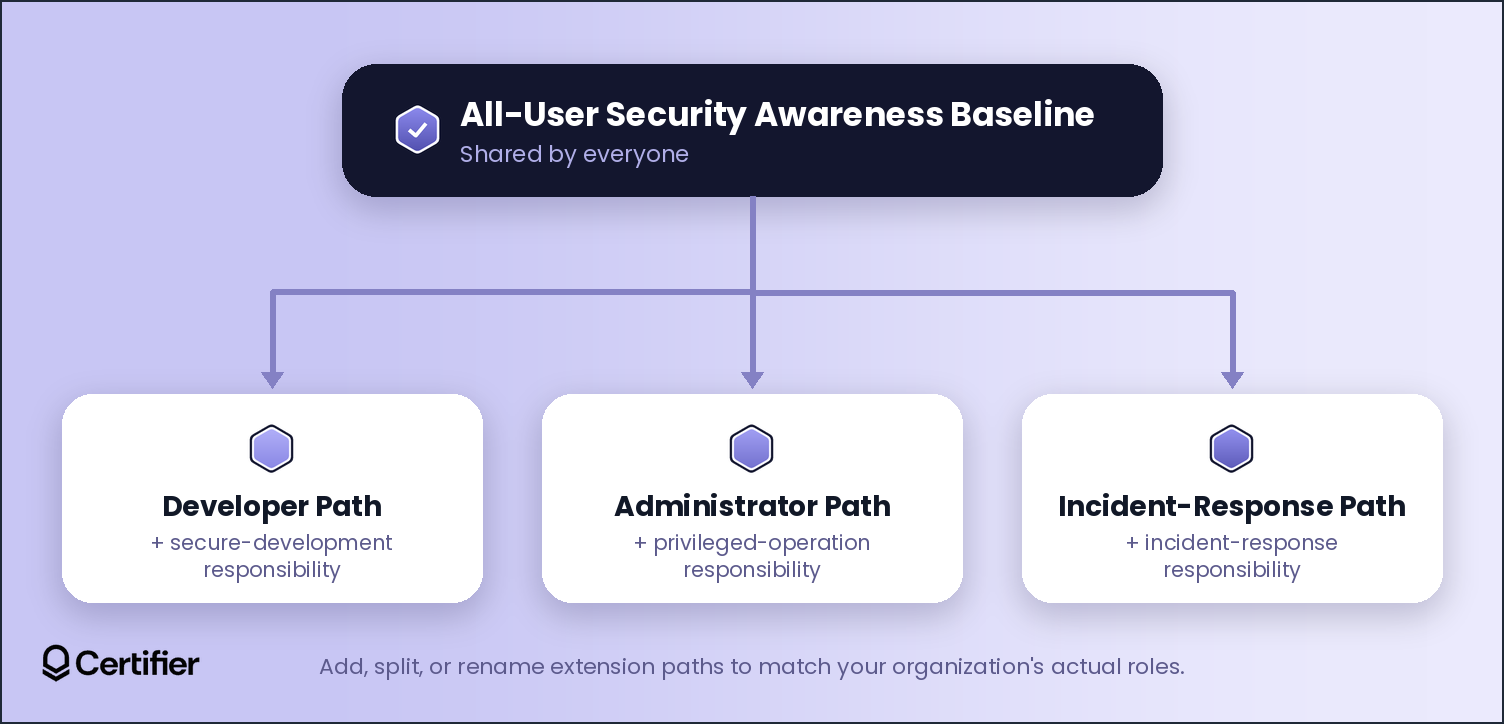
Specialized cybersecurity training learning paths extend the all-employee awareness baseline instead of replacing it.
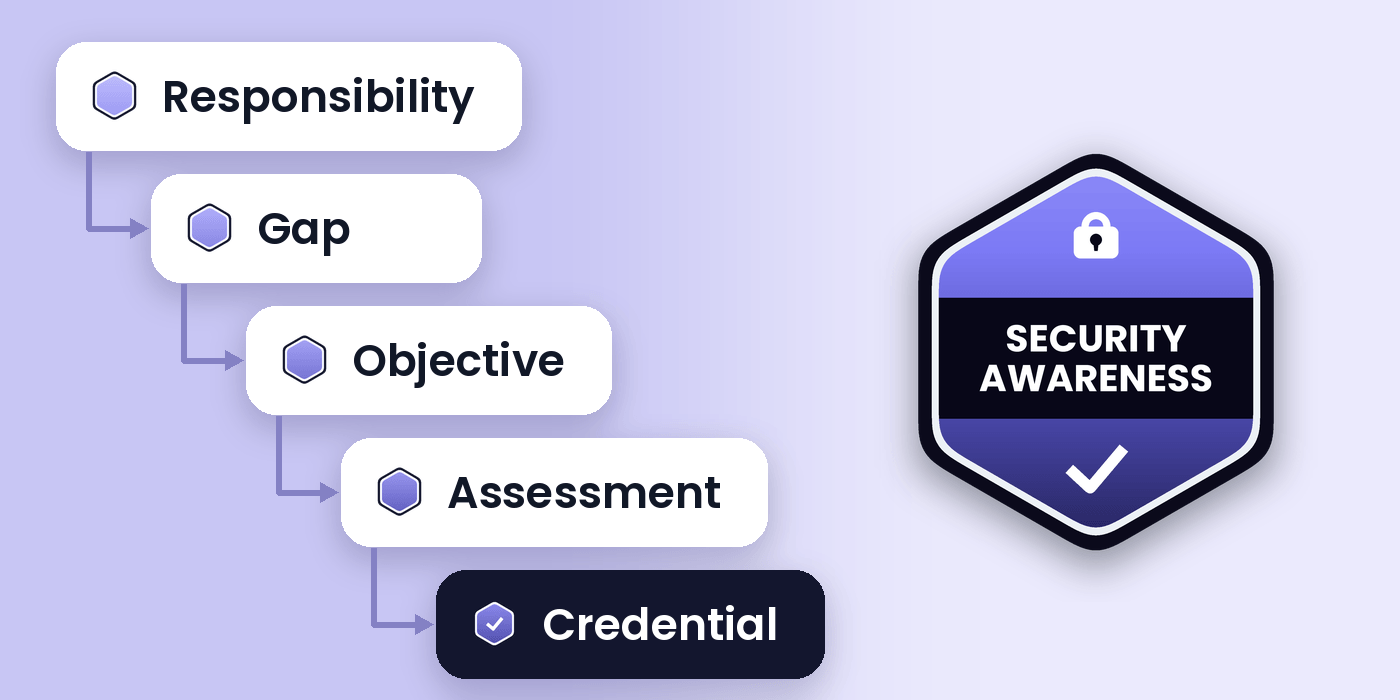
Build every path as one chain, from responsibility to credential, refresh trigger and next step.
Set refresh triggers on what would make a claim misleading, such as a role change, a new privileged system, or an incident lesson.
Keep assessment upstream of issuance, where your LMS, lab, or assessor decides who passed. Certifier only records the approved outcome as a verifiable credential.

Every employee needs the same baseline, which includes recognizing phishing attempts, handling passwords and devices responsibly, and knowing how to report a problem. Role-based training extends that baseline for people with additional security responsibility, access, or risk.
NIST SP 800-50 Rev. 1 frames this as a design process: identify roles, tie objectives and activities to them, assess what was learned, and review the program over time.
It also helps to separate "role" from "job title." NIST's NICE Framework defines a work role as a grouping of related tasks an individual is accountable for. One job can span several work roles and one work role can span several job titles.
Pro tip: Before assigning anyone to a learning path, write down what they're actually responsible for: what data/information they touch, what they can change, what happens if they get it wrong. One person can belong on several paths at once.
Every row in a role-based learning path traces one chain:
Responsibility → Gap → Objective → Exercise → Assessment Evidence → Credential → Refresh Trigger → Next Step
Each link constrains the next. The responsibility defines the gap, which defines the objective. The objective then determines what exercise can test it and the assessment evidence is the ceiling on what any credential can honestly claim.

Responsibility and Gap: Name what this audience does beyond the baseline, and the specific risk if they don't get additional training. No gap, no separate path.
Objective, Exercise, and Assessment Evidence: Write the objective as something a learner can do, not something they know. Confirm your exercise can produce that evidence, and that someone is positioned to judge it.
Credential, Refresh Trigger, and Next Step: Only after the evidence is defined should you decide the credential, the refresh trigger, and the next step.
Open the free role-to-pathway worksheet and make your own copy to get an editable blank template, alongside four examples and field definitions.
Field | What It Captures | Typically Owned By |
|---|---|---|
Audience | Who this row describes: responsibility and access, not job title | Program owner |
Responsibility | The security-relevant work this audience does beyond the baseline | Security SME |
Gap | What's at risk without training for this responsibility | Security SME |
Prerequisite | What must be completed first: usually the baseline, sometimes another path | Curriculum/academy owner |
Learning objective | An observable outcome the learner must be able to do | Curriculum/assessment owner |
Exercise/activity | The lab, simulation, tabletop, or scenario that produces the evidence | Curriculum/academy owner |
Assessment rule | How the exercise is scored or judged, and by whom | Assessment owner |
Credential | The claim type the evidence supports: certificate, badge, pathway credential, or none | Program owner + issuer |
Refresh trigger | The condition that would make the claim stale | Program owner |
Next step | What the learner does after this milestone | Program owner |
Evidence owner | Who can attest the evidence is accurate and current | Named individual or team |
Source system | Where the passing decision is recorded: LMS, lab, or assessor sign-off | IT/academy operations |
The four examples below are illustrative, not NICE-mapped or compliance-validated. Get sign-off from the owners before you build the broader learning-path structure.
General Employee Baseline
Field | This Path |
|---|---|
Responsibility | Handles email, passwords, devices, and data day to day |
Gap | Inconsistent phishing and password exposure without a shared baseline |
Prerequisite | None |
Learning objective | Recognize phishing, act on it (e.g., report it, mark it as spam/delete the email, inform IT/security department if necessary), follow password/device policy |
Exercise | Simulated phishing test plus a short scenario module |
Assessment rule | Reports the test phishing emails and completes the module |
Credential | Completion certificate: attendance/completion only, not skill |
Refresh trigger | Annual, a failed simulation, a policy change or a real security incident |
Next step | Move into the specialized path matching actual access |
Evidence owner | Security awareness lead |
Source system | LMS/academy completion record |
Developer Pathway
Field | This Path |
|---|---|
Responsibility | Writes or reviews code that ships to production |
Gap | General awareness doesn't cover secure development |
Prerequisite | General employee baseline |
Learning objective | Identify and fix common vulnerabilities (e.g., OWASP Top 10) |
Exercise | Secure-code lab with vulnerabilities |
Assessment rule | Scored lab, reviewed by the security engineering lead |
Credential | Assessed-skill badge: demonstrated secure-coding capability against the lab's criteria |
Refresh trigger | Tooling change, new vulnerability-class release, or a related incident |
Next step | Counts toward a broader secure-development pathway |
Evidence owner | Security engineering lead |
Source system | Code-review platform or lab, reviewed by the assessor |
IT System Administrator Pathway
Field | This Path |
|---|---|
Responsibility | Configuration changes, provisioning, patching, privileged accounts |
Gap | Misconfiguration and privileged-account compromise, uncovered by general training |
Prerequisite | General employee baseline |
Learning objective | Apply least-privilege provisioning and hardening in a scored environment |
Exercise | Hands-on sandbox lab and a policy review |
Assessment rule | Task-based scoring in the sandbox, assessor-confirmed |
Credential | Assessed-skill badge: performance on the specific tasks assessed |
Refresh trigger | Access/role change, new privileged system, incident, or policy interval |
Next step | Scheduled reassessment; access review ties into the trigger |
Evidence owner | Infrastructure/security operations lead |
Source system | Lab platform or assessor sign-off, recorded by the owner |
Incident-Response Practitioner Pathway
Field | This Path |
|---|---|
Responsibility | Detects, triages, contains, documents incidents under time pressure |
Gap | Awareness and admin training don't test live incident performance |
Prerequisite | Administrator path or equivalent technical baseline |
Learning objective | Triage and contain a simulated incident within the defined standard |
Exercise | Progressive tabletops building to a live-fire simulation |
Assessment rule | Evaluator-scored against the runbook: containment time, escalation, documentation |
Credential | Pathway-completion credential if prerequisites are stacked; otherwise, an assessed-skill badge |
Refresh trigger | After a real-incident debrief, a runbook change, or a fixed cycle |
Next step | Feed real-incident lessons into the next simulation |
Evidence owner | Incident-response lead |
Source system | Exercise platform or facilitator scoring sheet |
A credential is a claim, so it should exist where someone downstream needs to verify what was completed. Badging every module by default only produces credentials nobody checks.
Match the credential to what the evidence supports:
Evidence Available | What It Proves | Appropriate Credential | What The Claim Should Say |
|---|---|---|---|
Attendance or completion only | The learner was present or finished | Completion certificate | "Completed [training] on [date]." Nothing about skills. |
Scored assessment or demonstrated task | The learner passed a defined assessment | Assessed-skill badge | "Demonstrated [capability] per [assessment], on [date]." |
Every required milestone completed | The learner finished the full sequence | Pathway-completion credential | "Completed the required milestones in [path]." |
No checkable evidence | Nothing a third party needs to verify | No credential | Record it internally instead |
📄 The issuer's claim should never exceed the evidence behind it. If the only evidence is attendance, the credential shouldn't imply skill.
When a path requires several milestones (i.e., baseline, technical path, and scenario assessment), issue each as its own criteria credential. Stackable credentials provide evidence at each real milestone and a learner who finishes the whole path earns a completion credential.
Skip the credential when there's no checkable evidence, when assessment details are too sensitive to publish, or when a small program doesn't need portable proof. A credential shouldn't exist just because the technology supports one.
Instead of asking whether to refresh annually, ask what change would make the credential claim misleading if it stayed as-is.
Trigger | What It Means | Typical Action |
|---|---|---|
Policy or calendar | A policy or regulation sets a fixed interval | Scheduled retraining or reassessment |
Role or access change | Responsibilities or access changed | Reassess against the new path |
Material system or tool change | The environment changed meaningfully | Retrain and reassess against it |
Threat or procedure change | The threat or response procedure changed | Update the exercise, then refresh existing holders if material |
Incident or exercise lesson | A real incident revealed a gap | Correct training and reassess affected holders |
Reassessment result | A reassessment produced a new result | Reissue or expire based on the new result |
Remember that a policy may set your actual schedule. This article gives you the reasoning to defend whatever interval you choose.
However, time is only one refresh trigger. A role or tooling change can make a credential stale before its expiration date arrives and one annual-renewal rule won't catch that.
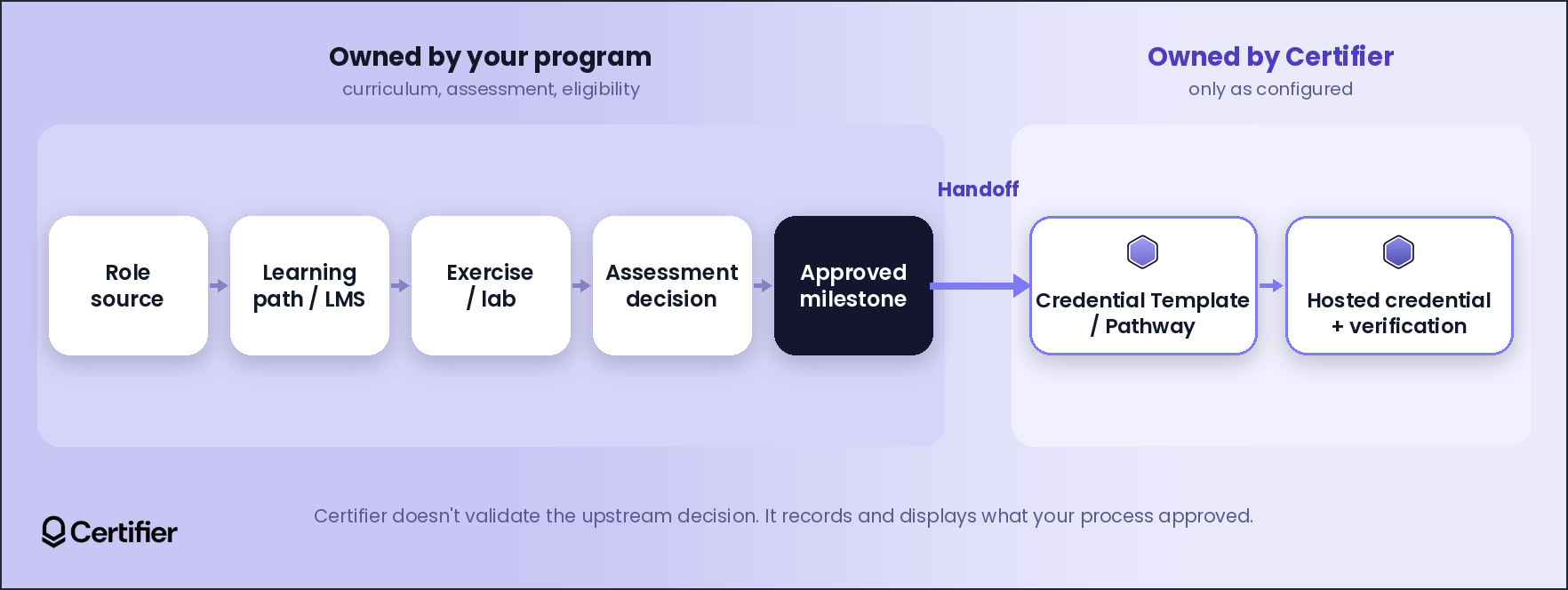
Everything above happens in your academy, LMS, lab, or assessment process. A credentialing layer becomes useful once a milestone is approved and needs to become an issued, verifiable record.
Here’s how the learning path connects to a credentialing workflow:
Role source → learning path/LMS → exercise/lab → assessment decision → approved milestone (owned by your program) → Certifier credential template/Pathway → hosted credential and public verification page (owned by Certifier)
Your academy, LMS, lab, or assessor decides who passed. Certifier doesn't validate an upstream score or skill tag, it only records the approved outcome.
Once your process approves a milestone, Certifier turns it into an issued, managed, verifiable record:

Separate templates for separate paths - If your paths need distinct claims and audience-specific data, use separate credential templates and custom attributes instead of one generic certificate.
Stacked milestones inside one sequence - The Pathways feature (available on the Advanced plan) can link criteria credentials and auto-issue a completion credential once requirements are met.
Expiration where policy calls for it - Certifier supports certificate expiration dates at the template, batch, or recipient level. This feature is available on the Professional plan and above.
A verification path for anyone checking the record - Employers, clients, or learners can view a credential through its hosted page, as configured. Certifier only displays what your process approved but doesn’t verify the competence behind it.
Issue credentials for one real, approved milestone through a small, reviewed spreadsheet upload, then confirm that the claim, data, expiration behavior, and credential page all match.
Once that mapping holds, connect the approved-milestone event from your LMS to issuance through a supported integration.
Create and Send Digital Credentials
Before scaling a learning path across every audience, run it through this checklist:
Write down the learner audience and role-based responsibility.
Set an observable objective the learner can do and an exercise can test.
Get the exercise and assessment rule signed off by the evidence owner.
Define the exact credential claim and metadata so the claim never exceeds the assessment evidence.
Name the source system that records the passing decision and the trigger that fires issuance.
Check the recipient page, verification, privacy, and how you would correct an error.
Decide refresh or expiry handling by trigger, if the claim is time-bound.
Set the next-path rule for where the learner goes once they have earned the credential.
Pilot the audience with the least ambiguous assessment rule such as a clearly scored lab. A clean first pilot shows you whether a problem is in your framework or one path's design.
🔍 Check both sides before scaling the learning path. The issuer's view should show accurate source data and expiration behavior and the recipient's view should show a claim they'd recognize and know how to verify.
A role-based cybersecurity learning path starts with what someone is responsible for and ends with evidence of what they can do. That’s why credentials belong only at the milestones where you can state what was completed and when that claim stops being accurate.
Once your academy, LMS, or lab approves a milestone, Certifier turns it into an issued credential that carries the claim, attributes, and expiration rules you defined.
See how Certifier supports cybersecurity credentialing for training paths.
Role-based cybersecurity training is built around the specific cybersecurity or privacy responsibilities a person holds, not their job title. NIST defines it as identifying significant work roles and developing learning based on the tasks those roles perform.
Security awareness training is the shared baseline every employee needs and includes phishing recognition, password hygiene, and reporting procedures. Role-based training adds to that baseline for people with additional responsibility or access.
At minimum, a cybersecurity learning path should include: audience and responsibility, gap, prerequisite, learning objective, exercise and assessment rule, credential, refresh trigger, next step, evidence owner, and source system.
No. Issue one only where a manager, client, or the learner would later need to verify the claim. Otherwise, only record completion internally.
A credential should expire or be reassessed when a change would make its claim misleading. Common triggers include a policy schedule, a role or access change, a system change, an incident lesson, or a new reassessment result.

- copywriting
- B2B content marketing
- content strategy
- on-page SEO
- storytelling
Growth Marketer (Freelance)
Anita Coltuneac is a freelance B2B SaaS marketer with 5+ years helping tech companies grow organic visibility, build authority, and support pipeline. She uses storytelling to turn product expertise into useful content.


