
Working at Heights Safety Training Certificate
A printable portrait working at heights safety training certificate for HSE teams and site supervisors who keep paper records but want each one to be verifiable online.
Customize this template for free
Email and export in bulk
Track recipient engagement
Download in
Don't have Certifier account? Sign up
Formal green working at heights safety training certificate template
This free printable working at heights certificate documents a worker's completed safety training. It suits in-house HSE teams and site supervisors in any country who keep a paper copy in the site file or induction binder, and still want each certificate to be verifiable online.
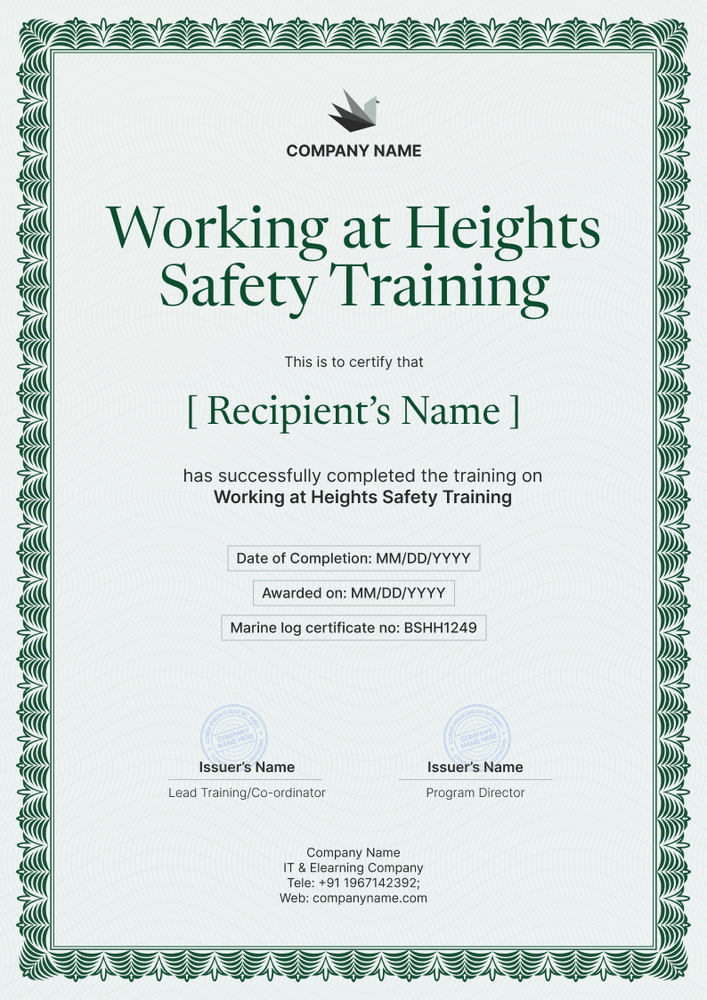
The design is a portrait page inside a deep green border with a fine pattern, like a traditional printed certificate. The title sits in a green serif at the top, followed by the worker's name and a single sentence about the training. Three outlined boxes hold the completion date, award date, and certificate number, and two signature lines with stamp areas sit near the bottom above your company details.
After a toolbox session or induction, list the attendees in a spreadsheet or export them from your LMS, issue the batch, and print it for the binder. Nobody loses the digital record, since each worker has a verification link too.
What is a working at heights safety training certificate?
This safety training certificate documents that a named worker attended working at heights safety training and when it took place. It goes in the site file so supervisors can check before assigning work at height, and so audits find it quickly.
The rules behind the training depend on where you work. For example, in the UK, the Work at Height Regulations 2005 require competence for work at height. In the US, OSHA requires fall protection training in general industry and construction. Ontario requires working at heights training certification from an approved provider.
Whatever country you work in, the printed sheet documents attendance only. Your syllabus, sign-in records, and practical checks carry the rest of the evidence.
Unlike most designs in this set, this one is portrait A4, 21 cm wide by 29.7 cm tall. Sign up for a free Certifier account and edit it right away.
What should a working at heights safety training certificate include?
A sheet in a binder should be readable at arm's length, showing the worker, the training, and the dates. All of these can be edited in the online builder:
Static fields
- Organization block: Logo and company name up top, contact details at the foot.
- Certificate title: Rename it for your session; the sample reads Working at Heights Safety Training.
- Training statement: One line on the training completed.
- Signature and role areas: Stamp boxes beside a Lead Trainer and a Program Director line.
Dynamic fields (automatically populated by Certifier)
- Recipient name: The worker, in green serif type.
- Completion date: When the session ended.
- Award date: When the certificate was produced.
- Certificate number: The binder reference for that worker.
- Expiry date (optional, Professional and Advanced): Worth adding if your sessions repeat on a schedule.
Swap, rename, or remove fields in Certifier's design builder whenever your binder format changes.
How to issue a working at heights safety training certificate
For a printed-and-digital record, follow these four steps:
- Fill in your company details: Add the logo, signatures, and contact block, then set the training name.
- List who attended: Upload the sign-in sheet or connect a system with native integrations or Zapier.
- Add a renewal date if needed, then issue: Recurring sessions can include an expiry date (Professional and Advanced plan feature).
- Print for the binder: Download the PDFs from the Credential Repository, where you can also see who has opened theirs.
Available working at heights safety training certificate formats
Edit and issue the template online with Certifier
Make edits once online and print the whole batch, rather than filling in paper certificates by hand.
Download the template in Microsoft Word
Keeping everything in a shared drive? Request the ZIP by email to get portrait Word files in A4 and US Letter.
PDF document export
Print the portrait PDF for the induction binder while workers can grab their copy from the delivery email.
Who issues working at heights safety training certificates?
HSE teams
Health and safety teams keep a training record for every worker who goes up a ladder, scaffold, or roof. A printed copy for the site file and a digital one for audits cover both needs.
Site supervisors and contractors
Contractors running toolbox talks or short in-house sessions can issue a certificate the same day, so the record exists before work starts.
Safety training providers
Training companies can print a class set on the day and email each worker the digital copy afterward.
Frequently asked questions
Yes. Certifier's free Starter plan lets you edit and issue this working at heights certificate, and the completion date field uses just one of Starter's five custom attributes. Upgrading to the Professional or Advanced plan lets you add the QR code and optional expiry.
Yes, print the PDF from each worker's credential page or print the Word download on your office printer.
They type in the URL printed on the sheet, or scan the code if you've enabled one, and see the worker's record with your company as issuer, when it was issued, and the certificate number.
No. Requirements vary by country and industry, and a training certificate shows only that a worker completed your session on a given date.
After confirming their email, the worker submits the correction from their record. You approve it, the record changes at once, and you print a corrected PDF for the binder.
Certifier templates are provided for general informational and design purposes only. They do not constitute legal, regulatory, or compliance advice and are not guaranteed to satisfy the requirements of any regulator, auditor, standard, insurer, or jurisdiction. The issuing organization is responsible for the content of its training program and for verifying that its records meet the requirements that apply to it.