
Sign Language Certificate
Customize this sign language certificate for students who complete an American Sign Language course level. Add the training period, hours, and competencies, then issue to the whole class.
Customize this template for free
Email and export in bulk
Track recipient engagement
Download in
Don't have Certifier account? Sign up
Modern green sign language certificate template
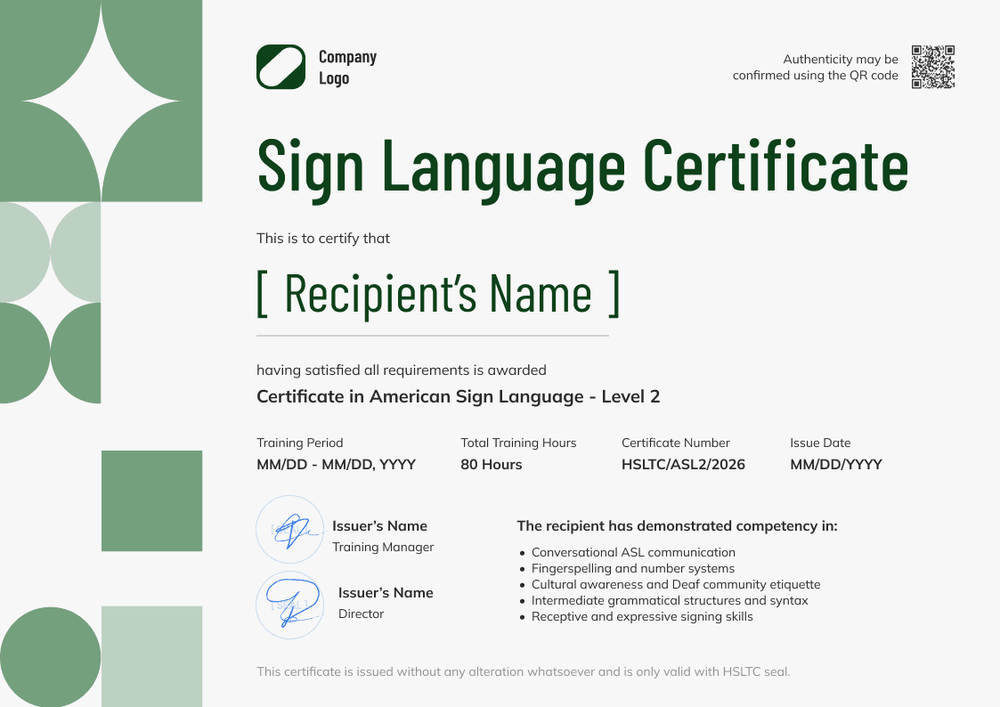
This free sign language certificate records that a student completed a level of the American Sign Language course. It suits ASL schools, community colleges, and community programs that teach ASL at different levels and want to recognize each one.
The design is bright and modern: soft green geometric shapes run down the left side, and a bold, condensed green title fills the top. Under the student's name, a line names the certificate and level. A row of four fields holds the training period, total hours, certificate number, and issue date. Two signature lines sit on the left, while a list of demonstrated competencies sits on the right.
When a course level ends, import your class list from a spreadsheet or connect your LMS to issue every certificate at once. Each student receives a credential page with a verification link they can share.
What is a sign language certificate?
A sign language certificate shows that a named student completed a course level in American Sign Language on specific dates. Schools issue one at the end of each level, so students can show their progress to employers, schools, or the next program.
ASL courses are often taught in levels, with each level building conversational skills, fingerspelling, grammar, and cultural awareness of the Deaf community. A course certificate records the level completed and the hours studied.
Interpreter credentials are awarded by separate professional bodies with their own exams, so a course certificate isn't an interpreter certification.
This template is laid out on A4 landscape (29.7 x 21 cm). Sign up for a free Certifier account to edit the design and start issuing certificates with this template.
What should a sign language certificate include?
A sign language certificate should show who completed the course, which level, and how many hours of study it took. Use the online builder to edit and customize the following fields:
Static fields
- Organization block: Your school's logo and name at the top.
- Certificate title: The award type (e.g., Sign Language Certificate).
- Competencies list: What students can do at this level (e.g., conversational ASL, fingerspelling and numbers, Deaf community etiquette).
- Signature and role areas: Two signature lines (e.g., Training Manager and Director).
Dynamic fields (automatically populated by Certifier)
- Recipient name: The student's full name.
- Course level: The level completed (e.g., Certificate in American Sign Language, Level 2).
- Training period: The course start and end dates.
- Total training hours: The hours of instruction (e.g., 80 hours).
- Certificate number and issue date: A unique identifier and the date issued.
This list describes the template design, but it's not a fixed standard. You can rename, add, or remove fields in Certifier's design builder until the layout matches your course records.
How to issue an ASL certificate
Follow these four steps to issue certificates to every student who completed the level:
- Edit the design to match your brand: Upload your logo and signatures, then update the competencies for the level you teach.
- Upload student data: Import your class list from a spreadsheet, or connect your LMS through native integrations or Zapier.
- Issue the certificates: Certifier emails each student their personalized certificate with a verification link.
- Track and keep records current: Use the Credential Repository to see who opened, viewed, downloaded, or shared their certificate, and correct a misspelled name without reissuing.
Available sign language certificate template formats
Edit and issue the template online with Certifier
Keep one ASL design and switch the level and competencies for each course, instead of creating a separate file per level.
Download the template in Microsoft Word
Need a file for a community center's records? Enter your email to get landscape Word versions, in A4 and US Letter formats.
PDF document export
Students can print the PDF or send it to an employer, using the link in their credential email.
Who issues ASL certificates?
ASL schools and community programs
Schools and community centers that teach ASL at various levels issue a certificate when each level ends, so students can track their progress.
Community colleges and universities
Colleges with non-credit or continuing education ASL courses can give students a verifiable record of each course completed.
Employers and public services
Organizations that train staff in basic ASL, such as healthcare and customer service teams, can record who has completed the training.
Frequently asked questions
Yes, you can customize this template on Certifier's free Starter plan and issue it there. Starter allows up to 5 custom attributes, and this template's custom fields (course level, training period, and hours) fit within that limit.
Yes. Map the course level to a spreadsheet column or duplicate the design for each level with its own competencies list.
Yes. Following the student's credential link shows which school issued it, to whom, on what date, and under which certificate number. Paid plans let them scan a QR code instead.
The student verifies their email and asks for the change on their credential page. Once you approve, the page shows the corrected name, and no certificate needs resending.
Certifier templates are provided for general informational and design purposes only. They do not constitute legal, regulatory, or compliance advice and are not guaranteed to satisfy the requirements of any regulator, auditor, standard, insurer, or jurisdiction. The issuing organization is responsible for the content of its training program and for verifying that its records meet the requirements that apply to it.