
Working at Height Certificate with Expiry
A working at height certificate that puts the exam date and expiry date side by side, so employers see at a glance whose training is still current.
Customize this template for free
Email and export in bulk
Track recipient engagement
Download in
Don't have Certifier account? Sign up
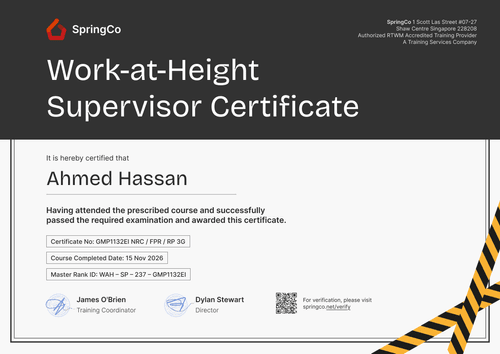
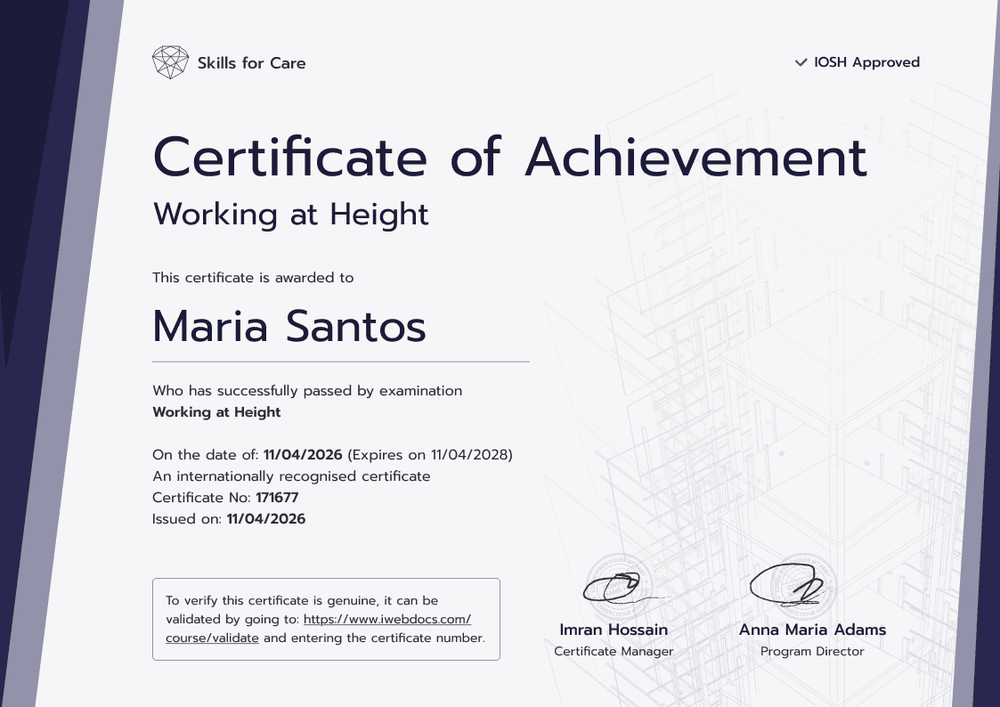
Modern purple working at height certificate template with expiry date
This free working at height certificate shows when a worker passed and when their training expires, on the same line. It suits employers and training providers that renew working at height training every two to three years and need to see who's due without opening a spreadsheet.
The design frames a light page with dark purple diagonal bars on both sides and a faint scaffold line drawing behind the details. The worker's name sits in a large modern sans serif, followed by the exam date, expiry date, certificate number, and the date of issue. A bordered box in the bottom left tells readers how to validate the certificate online, while two signature lines with stamps sit on the right.
Add an expiry column to your results sheet, then import the results or sync them from an LMS so every pass goes out already dated for renewal. The verification link tells anyone who opens it whether the training has lapsed.
What is a working at height certificate with an expiry date?
Here the certificate pairs a worker's pass date with the date their training should be renewed. Employers use that second date to book refreshers before anyone's training lapses.
The Work at Height Regulations 2005 require competence, or competent supervision, for anyone working at height, but they don't set a fixed renewal period. Many employers and training providers choose two or three years, and some clients write a renewal period into their site rules.
An expiry date makes renewal visible, but it doesn't make the worker competent or the employer compliant. Pair the certificate with exam results and your supervision plan.
This certificate layout uses landscape A4 paper, size 29.7 by 21 cm, and prints the expiry near the name. Sign up for a free account on Certifier to start editing.
What should a working at height certificate with an expiry date include?
Site managers look for three facts: who passed, on what day, and until when it counts. Each one is editable in the online builder:
Static fields
- Organization block: Top-left space for your logo and organization name.
- Title block: Certificate of Achievement over a Working at Height course line.
- Validation box: Short instructions telling readers how to check the certificate online.
- Signature and role areas: Stamped lines for, say, a Certificate Manager and a Program Director.
Dynamic fields (automatically populated by Certifier)
- Recipient name: In large type, e.g., Maria Santos.
- Exam date: The date the worker passed.
- Certificate number: Your unique reference for that pass.
- Issue date: The certificate's send date.
- Expiry date (Professional and Advanced): Two years after the exam in the sample; shown on the credential page too.
None of this is fixed. Use Certifier's design builder to add or retire fields until the layout fits your renewal policy.
How to issue a working at height certificate with an expiry date
Getting expiry dates onto every certificate takes four steps:
- Set up the dated design: Add your logo and signatures, then rewrite the validation instructions if needed.
- Bring in the exam results: Upload them or send them via native integrations or Zapier.
- Attach the renewal period: Give each certificate a two- or three-year expiry in line with your policy (Professional and Advanced plan feature), then issue.
- Act on lapses: Filter the Credential Repository by expiry date and book retraining for whoever's next.
Available working at height certificate with expiry date formats
Edit and issue the template online with Certifier
Manage expiry dates in one online dashboard, where each certificate's status updates by itself as dates pass.
Download the template in Microsoft Word
Need a paper backup? Enter your email and you'll receive landscape Word versions in A4 and US Letter, zipped.
PDF document export
Workers and site managers can each pull a PDF with the expiry date printed, straight from the emailed link.
Who issues working at height certificates with expiry dates?
Employers with refresher policies
Construction, facilities, and maintenance employers renew working at height training on a fixed cycle. An expiry date on every certificate shows which workers are current before planning work.
Safety training providers
Providers that train client crews can show each client when their workers need to return, which makes the next booking easier to plan.
HSE teams
Health and safety teams preparing for audits can show training status per worker from one credential record instead of a folder of paper certificates.
Frequently asked questions
You can edit and issue it on Certifier's free Starter plan, since its custom field, exam date, is within the five attributes Starter allows. The expiry date and the QR code need the Professional or Advanced plan.
Many employers and training providers choose two or three years, while other clients set their own rule. Set the expiry date to match the policy that applies to your workers.
Yes. In the Credentials repository, filter by expiration date (for example, “is between” today and a date a few months out) and by status Issued to see whose credentials are coming due. Then plan your next session around them.
The link or QR code opens the worker's record, which names the issuer and recipient, gives the issue date and certificate number, and flags the training as expired once the date passes.
Yes. A worker who confirms their email can submit the corrected spelling from their record. When you accept it, the name updates while the exam date and expiry stay as issued.
Certifier templates are provided for general informational and design purposes only. They do not constitute legal, regulatory, or compliance advice and are not guaranteed to satisfy the requirements of any regulator, auditor, standard, insurer, or jurisdiction. The issuing organization is responsible for the content of its training program and for verifying that its records meet the requirements that apply to it.