Professional brown CEU transcript template
Certify a period of professional continuing education with a full credit table, three ways of counting, and per-row certificate IDs. Issue it with the matching training certificate.
Customize this template for free
Email and export in bulk
Track recipient engagement
Download in
Don't have Certifier account? Sign up
Free professional brown CEU transcript template
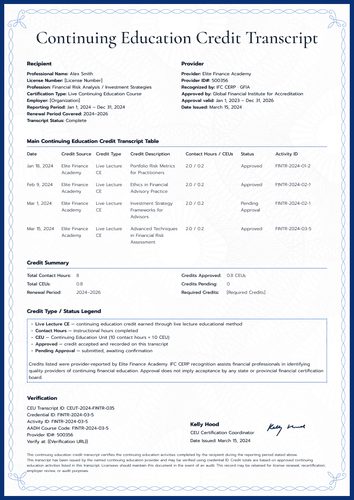
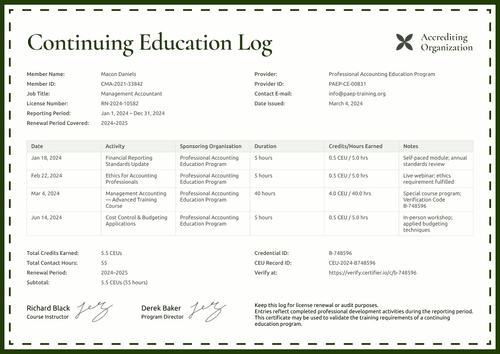
Different boards count learning differently, and this free CEU transcript template accommodates them all. Its credit summary lists the period in credit hours, CEUs, and CE credits side by side, and the transcript table backs up each total with dated, approved entries.
This CEU transcript design is for continuing education providers, training institutions, professional associations, and records administrators. The sample documents an architecture refresher program, yet the fields can be used for any licensed profession.
A woven brown border frames the page, giving the template a clean, professional look. The recipient and summary blocks sit above the main table, as each row carries its own certificate ID. A certification paragraph with the transcript IDs and a chairman's signature closes the record.
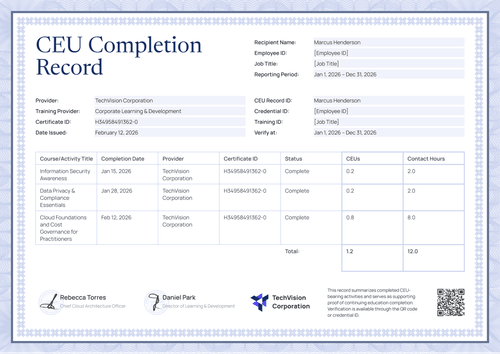
The matching certificate of training covers one course, with its reference number linking it directly to a transcript row.
Need to issue transcripts in bulk at period close? Import the credit records from a spreadsheet or connect your LMS so every professional has their summary in hand. Each recipient receives a personal verification link that they can submit to a licensing board or a professional body.
What is a CEU transcript?
A CEU transcript is the credit-by-credit record of one person's continuing education for a reporting period. It’s issued by the provider or association that approved the credits, and readers use it for license renewal, recertification, and employer review.
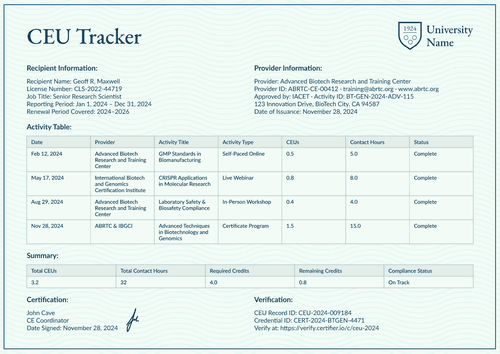
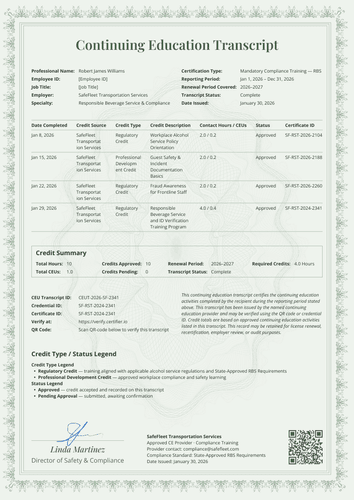
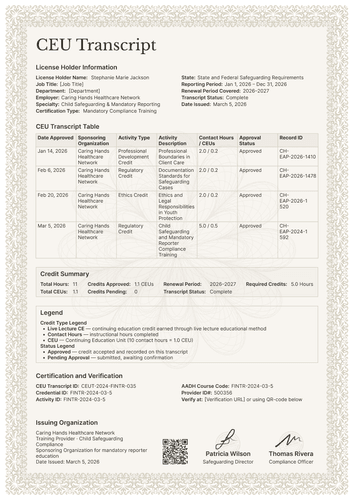
This design lists each activity's source, type, description, hours, status, and certificate ID, then certifies the entire period in a single paragraph. Choose A4 (21 x 29.7 cm) or US Letter (8.5 x 11 in), in portrait orientation.
Certifier issues the transcript and its matching CE training certificate as a single credential via a single verification link. Create a free account to open the design and start issuing period transcripts.
What should a CEU transcript include?
A renewal reviewer wants totals they can trust and rows they can check. The design provides both, all editable in Certifier’s online builder:
Static fields
- Section Headings: Labeled blocks for recipient information, credit summary, the main transcript table, and certification and verification.
- Transcript Table Headers: Column set for the record: date completed, credit source, credit type, credit description, credit hours and CEUs, status, and certificate ID.
- Certification Paragraph: Standing text certifying the listed activities for the stated period.
- Signature Area: Designated space for the certifying role (e.g., Commission Chairman).
Dynamic fields (automatically populated by Certifier)
- Professional Name & Registration Number: Identity fields for the recipient (e.g., C-75904).
- Profession or Specialty: Field naming the practice area (e.g., Architectural and Construction Design).
- Certification Type: Field describing the program completed (e.g., Refresher Course, Continuing Education).
- Reporting & Renewal Periods: Date-range fields for the record and cycle (e.g., Jan 1 – Dec 31, 2024; 2024–2025).
- Transcript Status & Date Issued: Status and date fields closing the record (e.g., Complete; December 12, 2024).
- Total Credit Hours & CEUs: Summary values in two units (e.g., 30 hours; 3.0 CEUs).
- Total CE Credits: Third summary value for audiences reporting in credits (e.g., 15).
- Credits Approved & Pending: Status counts at the moment of issue (e.g., 30; 0).
- Required Credits: Value field stating the renewal target (e.g., 15).
- Credit Source & Type per Row: Row-level fields naming the provider and credit category (e.g., Professional CE).
- Credit Description per Row: Text field naming each activity (e.g., Building Codes & Regulatory Compliance Update).
- Credit Hours & CEUs per Row: Paired value fields for each entry (e.g., 4.0 / 0.4).
- Status & Certificate ID per Row: Approval field and the source document's own code (e.g., Approved; C-75801).
- CEU Transcript ID & Credential ID: Verification tracking codes (e.g., CEUT-2024-C75904).
- Verify-at Address: Live verification page link for the issued transcript.
Your program may record more or fewer details than the sample. Rename, add, or delete fields in Certifier's design builder so the layout matches what your compliance team actually tracks.
How to issue a CEU transcript
Here’s how you can customize and issue a CEU transcript in five steps using Certifier:
- Configure the design for your program — Pick the size and orientation, then upload your provider block and the chairman's signature. Mark the dynamic text blocks for recipient details, credit summary, and transcript rows.
- Bundle it with the matching certificate of training — Link the transcript to the certificate of training so that the course award and the period transcript are generated together.
- Upload recipient data — Connect your records system or use our native integrations with LMS apps like Canvas, Moodle, and LearnDash; populating every row takes less than a minute.
- Issue, send, and verify — Certifier issues and emails a personalized transcript to each professional automatically. Recipients can download their record or share it online through its verification link.
- Keep track of engagement and update records — Track email opens, credential views, downloads, and shares for every transcript in the Credential Repository. Statuses and details can be corrected without reissuing, and the corrections appear on the public record right away.
Available CEU transcript template formats to customize
Edit and issue the template online with Certifier
Edit the design in Certifier for instant access to recipient-specific data, direct inbox delivery, and a live credential page behind every transcript.
Download the CEU transcript template in Word
Do you work in your own files or you need an internal copy before the cycle closes? Enter your email address and get the ZIP file with the customizable Word documents in both portrait and landscape orientations, in A4 and US Letter sizes.
PDF document export
Every issued transcript also serves as a print-ready PDF, available for professionals and records staff to download from the delivery email or the credential page.
Who issues CEU transcripts?
Continuing education providers
Providers issue it at period close so each professional carries an approved, checkable summary of the year.
Professional associations and training institutions
Associations use the three-unit summary because members report to boards that count in different currencies.
Records administrators
Administrators like per-row certificate IDs so every line in the table can be traced to its own document.
Frequently asked questions
Because your recipients report to bodies that count differently. The summary displays the conversions your program approved side-by-side, so nobody has to recalculate. Remove any column that your audience doesn’t use.
The transcript states the period as it stood on the issue date, including credits submitted but not yet confirmed. When a pending credit is confirmed, update the record, and the live page reflects the new status.
Yes, and that is the design's quiet strength. Every activity row links to the certificate that produced it, such as C-75904 in the sample, which matches the training certificate. Auditors can trace any line to its source document.
Yes. Credit type is an ordinary per-row value. Use the exact category names your profession reports under, and keep them consistent between the transcript and the certificates.
Yes. The summary block is the part reviewers quote, so it must stand alone. Repeating the period and status there means a screenshot of the summary still tells the full story.
Certifier templates are provided for general informational and design purposes only. They do not constitute legal, regulatory, accreditation, or academic-recognition advice and are not guaranteed to satisfy the requirements of any institution, recognition body, regulator, or jurisdiction. Using this template does not by itself make a document an official diploma supplement or prove a qualification. The issuing organization is responsible for verifying the content, authority, approvals, and suitability of every document before use. This template is not an official Europass document and does not guarantee recognition of a qualification.