Professional green CEU tracker template
Show each professional where they stand: activities completed, credits earned, and how much is still required for renewal. Issue it as one verifiable record per person and period.
Customize this template for free
Email and export in bulk
Track recipient engagement
Download in
Don't have Certifier account? Sign up
Free professional green CEU tracker template
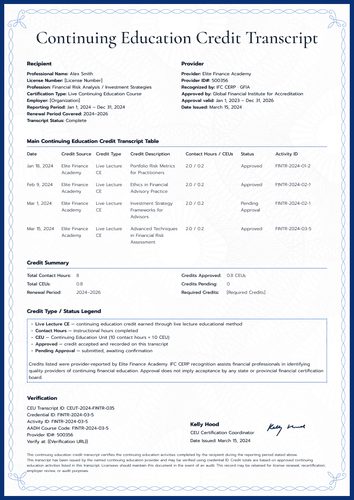
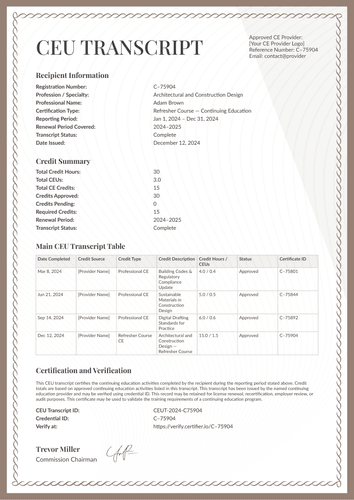
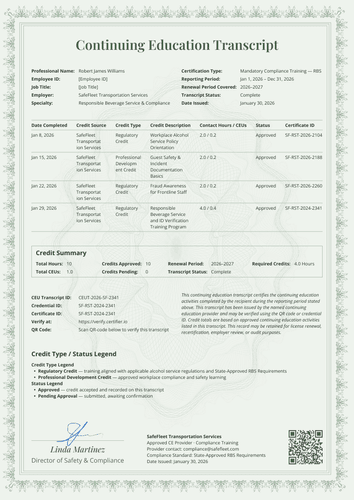
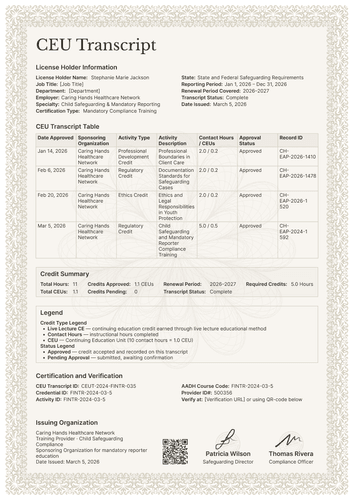
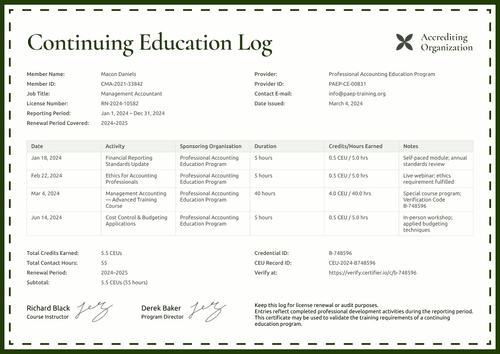
This free CEU tracker template also looks ahead, unlike most CEU records. In addition to total CEUs and contact hours, the summary shows the credits required for renewal, the credits remaining, and a compliance status that the reader can understand at a glance.
It is built for continuing education providers, professional associations, training teams, universities, and credential administrators who answer one question all year: Is this person on track?
The page keeps a calm look, with soft green waves behind clean tables. Each activity row records the date, provider, title, activity type, CEUs, contact hours, and status, so mixed learning formats fit comfortably in a single table.
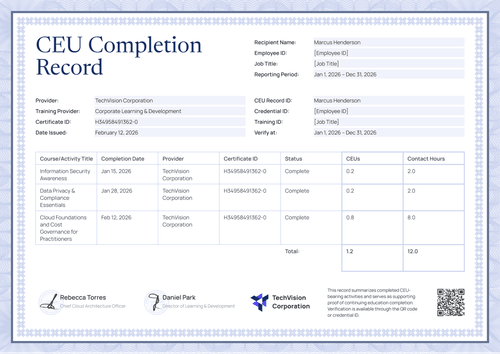
The matching CEU certificate of completion covers a single activity, including those granted together by two organizations, with both names on the page.
Need to issue trackers for every professional at once? Import the period's data from a spreadsheet or connect your LMS so the records are ready when the reporting period closes. Each professional receives a personal verification link they can share with a licensing board or an employer.
What is a CEU tracker template?
A CEU is a standard unit of continuing education, and under the common IACET rule, one CEU equals ten contact hours. A CEU tracker template is a document layout that lists a person's CEU activities for a reporting period and totals them against a renewal target.
This design adds the target itself: required credits, remaining credits, and a status label. The reader sees not just what was done, but what it means. Sizes include A4 (21 x 29.7 cm) and US Letter (8.5 x 11 in), in portrait and landscape orientations.
You can issue the CEU tracker and the matching completion certificate as a single credential bundle with a single verification link. Create a free Certifier account to customize the tracker and issue it at period close.
What should a CEU tracker include?
A useful tracker saves the reader from having to do math. The CEU tracker template includes these editable elements:
Static fields
- Section Headings: Labeled blocks for recipient information, provider information, activity table, summary, certification, and verification.
- Activity Table Headers: Column set for the record: date, provider, activity title, activity type, CEUs, contact hours, and status.
- Summary Table Labels: Fixed labels for total CEUs, total contact hours, required credits, remaining credits, and compliance status.
- Signature Area: Designated space for the certifying role and date signed (e.g., CE Coordinator).
Dynamic fields (automatically populated by Certifier)
- Recipient Name & License Number: Identity fields for the professional (e.g., CLS-2022-44719).
- Job Title: Labeled field for the recipient's role (e.g., Senior Research Scientist).
- Reporting & Renewal Periods: Date-range fields covering the record and the renewal cycle (e.g., Jan 1 – Dec 31, 2024; 2024–2026).
- Provider Name & Provider ID: Fields identifying the issuing organization (e.g., ABRTC-CE-00412).
- Provider Approval Line: Field stating the accreditation behind the credits (e.g., Approved by IACET, Activity ID BT-GEN-2024-ADV-115).
- Provider Contact Details: Address, email, and website fields for the issuing body.
- Activity Title & Provider per Row: Row-level fields naming each activity and who delivered it.
- Activity Type per Row: Category field describing the format (e.g., Self-Paced Online, Live Webinar, In-Person Workshop).
- CEUs & Contact Hours per Row: Value fields recording what each activity earned (e.g., 0.5 CEUs; 5.0 hours).
- Status per Row: Confirmation field for each activity (e.g., Complete).
- Total CEUs & Contact Hours: Period totals in the summary block (e.g., 3.2 CEUs; 32 hours).
- Required & Remaining Credits: Issuer-supplied values showing the renewal target and the gap (e.g., 4.0; 0.8).
- Compliance Status: Issuer-set label summarizing the professional's status (e.g., On Track).
- CEU Record ID & Credential ID: Verification tracking codes (e.g., CEU-2024-009184).
- Verify-at Address: Live verification page link for the issued record.
Treat this as a description of the sample design, not a required standard. Change fields freely in Certifier's design builder to create and issue your documents.
How to issue a CEU tracker
Follow these five easy steps to customize and issue a CEU tracker in Certifier:
- Edit the design to match your program — Choose the size and orientation, then upload your logo and the coordinator's signature. Select the dynamic text blocks for recipient details, activity rows, and the credit summary.
- Bundle it with the matching CEU certificate — Link the tracker to the CEU certificate of completion so that the activity award and the period record are generated in one run.
- Upload learner data — Connect your CRM or use our native integrations with LMS apps like Canvas, Moodle, and LearnDash, and populating the design takes less than a minute.
- Issue, deliver, and verify — Certifier issues and emails every professional a personalized tracker automatically. Recipients can download the record or share it online through its verification link.
- Review engagement and update records — The Credential Repository shows email opens, credential views, downloads, and shares for each tracker. Update a professional's details without reissuing and the public record follows immediately.
Available CEU tracker template formats to customize
Edit and issue the template online with Certifier
Editing the design in Certifier gives you professional-specific data, direct inbox delivery, and a live credential page for every tracker issued.
Download the CEU tracker template in Word
Rather work in your own files or keep an internal copy alongside your program records? Enter your email address to receive a ZIP file with the editable Word documents in both portrait and landscape orientations, in A4 and US Letter sizes.
PDF document export
Each issued tracker doubles as a print-ready PDF, which professionals and CE coordinators can pull straight from the delivery email or the credential page.
Who issues CEU trackers?
Professional associations
Associations issue it so each member can see earned credits and the gap to renewal on one page, without a portal login.
Continuing education providers and universities
Providers use the activity type column to combine webinars, workshops, and certificate programs into a single, honest record.
Training teams and credential administrators
Administrators like the status label because it turns a table of numbers into an answer.
Frequently asked questions
They show the renewal target and the gap, based on your approved data at the time of issue. The template displays the values you supply, but it doesn’t calculate them. Update the record when the numbers change and the live page follows.
You do. "On Track" in the sample is an issuer-set value, not a value computed by the template. Use the exact labels your auditors and boards accept and keep them consistent across every record you issue.
Yes. The activity type column contains values such as self-paced online, live webinar, in-person workshop, and certificate program. Rename them to match how your programs actually run.
It’s a display field for your provider accreditation details. If your program holds IACET or similar approval, state it exactly as granted. Printing a standards body's name alone does not constitute approval.
The matching completion certificate handles it: the granting line names both organizations and both logos fit on the page. On the tracker, the provider column carries the pairing for that row.
[a]Design changes:
1. Relabel the provider approval line, "Approved by: IACET". Change to "Accredited by IACET".
Certifier templates are provided for general informational and design purposes only. They do not constitute legal, regulatory, accreditation, or academic-recognition advice and are not guaranteed to satisfy the requirements of any institution, recognition body, regulator, or jurisdiction. Using this template does not by itself make a document an official diploma supplement or prove a qualification. The issuing organization is responsible for verifying the content, authority, approvals, and suitability of every document before use. This template is not an official Europass document and does not guarantee recognition of a qualification.