
Internal Trainer Train-the-Trainer Certificate
Keep a verifiable record of every employee who completes your internal train-the-trainer track. Department, employee ID, and location print on each certificate, and managers can open the credential page to check it.
Customize this template for free
Email and export in bulk
Track recipient engagement
Download in
Don't have Certifier account? Sign up
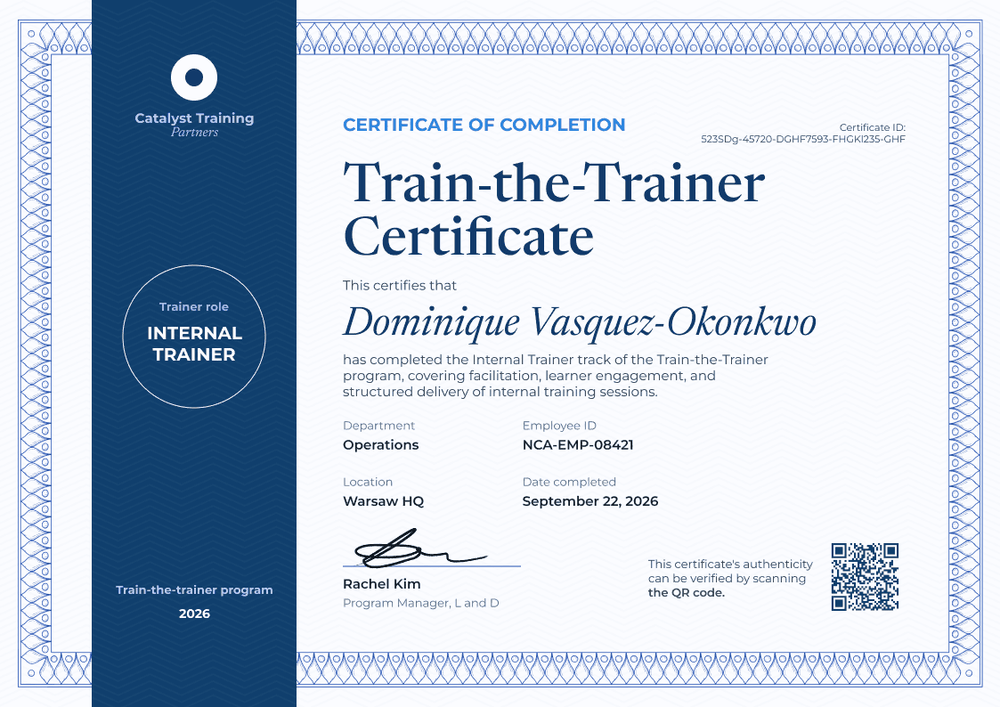
Formal navy blue internal trainer certificate template
This free internal trainer certificate confirms that an employee completed the internal trainer track of your train-the-trainer program. It's built for corporate L&D teams that grow their own trainer networks, whether for a system rollout, onboarding at scale, or an upcoming ISO audit.
A wide navy blue sidebar runs down the left side, holding your logo, a round seal that names the trainer role, and the program name and year at the bottom. A fine blue guilloche border frames the white main panel, where a bright blue "Certificate of Completion" label sits above a large serif title and an italic recipient name.
Your LMS already logs that a course was finished, and this certificate gives the trainer and their manager a record they can open outside the LMS. Issue from your HR system or a spreadsheet, and each trainer gets a credential page with a verification link on every plan.
What is an internal trainer certificate?
An internal trainer certificate records that an employee completed your company's train-the-trainer track and can deliver sessions to colleagues. L&D teams use it as their register of who has been trained to teach, by department and site.
The certificate records completion, and any authorization to deliver specific modules is your company's decision: name those modules on the certificate to show managers the scope. Quality standards such as ISO 9001 ask organizations to keep documented evidence of competence. A certificate is one piece of that evidence, alongside course content and assessment records, and it doesn't prove competence on its own.
This template is laid out on A4 landscape (29.7 x 21 cm). Sign up for a free Certifier account to brand the sidebar and start building your trainer register.
What should an internal trainer certificate include?
An internal record needs to tie each trainer to a person, a team, and a site. These fields do that.
Static fields
- Sidebar branding: Your logo, organization name, and program line (e.g., Catalyst Training Partners, Train-the-trainer program 2026).
- Title and label: The award type and name (e.g., Certificate of Completion, Train-the-Trainer Certificate).
- Completion statement: What the track covered (e.g., "facilitation, learner engagement, and structured delivery of internal training sessions").
- Signature area: The program owner (e.g., Rachel Kim, Program Manager, L and D).
Dynamic fields (automatically populated by Certifier)
- Recipient name: The employee's full name (e.g., Dominique Vasquez-Okonkwo).
- Trainer role: The role printed in the sidebar seal (e.g., Internal Trainer).
- Department: The trainer's team (e.g., Operations).
- Employee ID: The ID from your HR records (e.g., NCA-EMP-08421).
- Location: The site the trainer covers (e.g., Warsaw HQ).
- Date completed: The day the track was finished (e.g., September 22, 2026).
Match the fields to your HR data in Certifier's design builder.
How to issue internal trainer certificates
- Brand the sidebar: Add your logo, program name, and year to the navy sidebar, and upload your program owner's signature.
- Pull the trainer list from HR: Connect BambooHR, or export a spreadsheet with name, email, department, employee ID, and location columns.
- Issue to each new trainer group: Map the columns to the certificate fields and issue the whole group in one run. Each trainer gets an email with their certificate and credential page.
- Use the repository as your trainer register: The Credential Repository shows who received, opened, downloaded, or shared their certificate. Use it to answer "who's trained to teach at this site?" before an audit.
Available internal trainer certificate template formats
Edit and issue online with Certifier
Edit the design in your browser, issue from your HR data, and keep every trainer's certificate in one register.
Download in Microsoft Word
Enter your email to receive a ZIP with editable Word files.
PDF document export
Trainers and their managers can download a PDF from the credential page.
Who issues internal trainer certificates?
Corporate L&D teams
Building a network of employee trainers across departments calls for a record of who completed the track, and this certificate is that record.
HR and operations managers
When a new system or process rolls out site by site, local trainers carry the training. Department and location fields show who covers each site.
Training companies running client programs
Providers that deliver train-the-trainer courses inside client companies issue these certificates with the client's employee data.
Frequently asked questions
Yes, you can customize this internal trainer certificate on the free Starter plan. Its custom fields (trainer role, department, employee ID, and location) fit Starter's limit of 5 custom attributes. The QR code needs the Professional or Advanced plan.
The LMS record lives inside the LMS. The certificate gives the trainer and their manager a record they can open with one link, from any device, without an LMS login. It also stays with the trainer if they move to another team.
Yes. Add a field for the approved modules and fill it per trainer from your spreadsheet, so managers who check the certificate can see your authorization scope. With the four existing custom fields, this fifth field still fits the Starter limit.
Every field printed on the certificate is visible to anyone with the verification link. If you'd rather keep employee IDs internal, remove that field from the design and keep the ID in your spreadsheet.
Certifier templates are provided for general informational and design purposes only. They do not constitute legal, regulatory, or compliance advice and are not guaranteed to satisfy the requirements of any regulator, auditor, standard, insurer, or jurisdiction. The issuing organization is responsible for the content of its training program and for verifying that its records meet the requirements that apply to it.