
Facilitator Train-the-Trainer Certificate
Certify the facilitators who complete your licensed train-the-trainer track, and give clients one link to check their status. Set the expiry date to match the licence period.
Customize this template for free
Email and export in bulk
Track recipient engagement
Download in
Don't have Certifier account? Sign up
Professional purple facilitator train-the-trainer certificate template
This free facilitator train-the-trainer certificate confirms that a person completed the facilitator track of your program. It's built for licensed curriculum vendors that certify client staff to deliver their programs, and for any provider whose clients ask, "Is this facilitator still certified?"
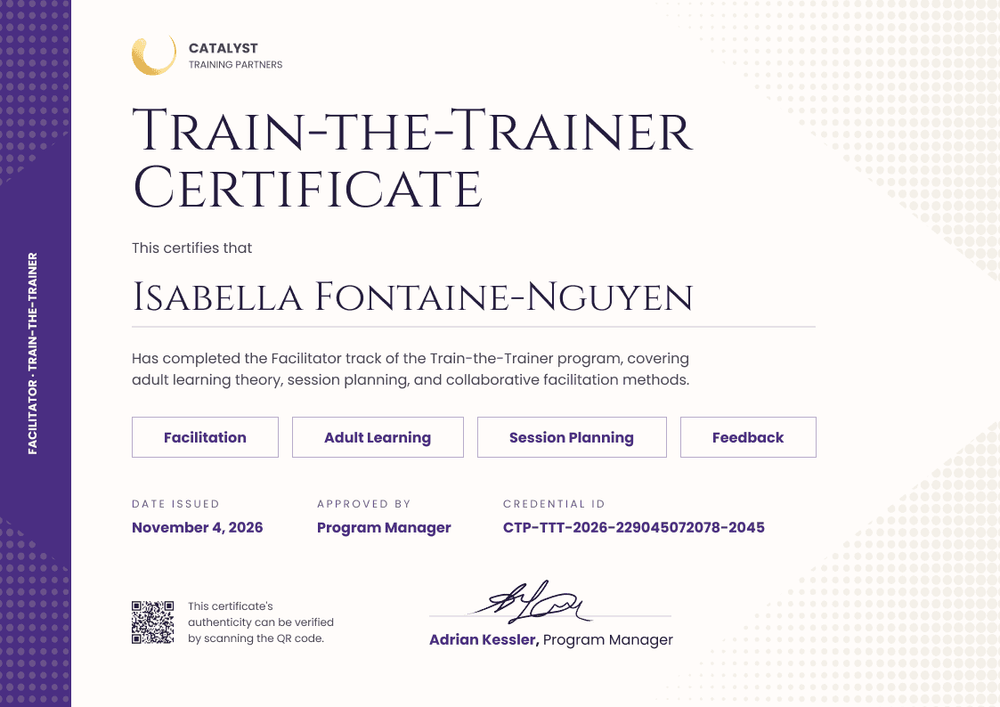
A purple bar runs down the left edge, with "Facilitator · Train-the-Trainer" set vertically and a dot pattern at each end. The ivory page carries a gold circular logo, a large small-caps serif title in deep plum, and the recipient name above a thin rule. Below the completion statement and four outlined skill chips, date issued, approved by, and credential ID run in violet above a QR code and one signature line.
On the Professional and Advanced plans, set an expiry date that matches the licence period. The credential page then shows whether the facilitator's certification is current, so a client can check it without contacting you. Import facilitators from a spreadsheet after each certification event, or connect your LMS or training course platform.
What is a facilitator train-the-trainer certificate?
A facilitator train-the-trainer certificate records that a person completed your facilitator track: the methods, adult learning principles, and session planning they need to deliver your curriculum.
For curriculum vendors, the certificate often stands for authorization too: permission to deliver your licensed program, usually for the length of the licence. Keep the two clear: the certificate records completion, and your licence agreement sets the authorization and how long it lasts. Neither is a regulated qualification, which only an awarding body can award.
This template is laid out on A4 landscape (29.7 x 21 cm). Sign up for a free Certifier account to brand it for your program.
What should a facilitator train-the-trainer certificate include?
A client checking a facilitator wants to see your program, the skills covered, and whether the certification is still current.
Static fields
- Organization block: Your logo and name (e.g., Catalyst Training Partners).
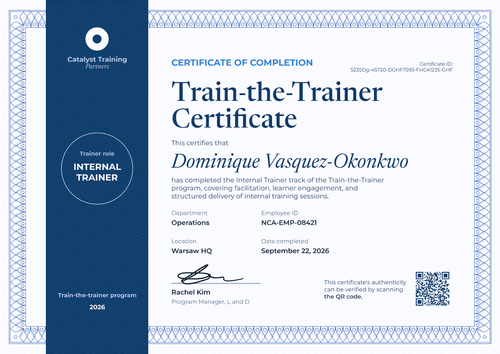
- Title and statement: The award name and what the track covered (e.g., Train-the-Trainer Certificate, "covering adult learning theory, session planning, and collaborative facilitation methods").
- Skill chips: Four outlined labels for the core skills (e.g., Facilitation, Adult Learning, Session Planning, Feedback). Rename them for your curriculum.
- Signature area: The person who certifies facilitators (e.g., Adrian Kessler, Program Manager).
Dynamic fields (automatically populated by Certifier)
- Recipient name: The facilitator's full name (e.g., Isabella Fontaine-Nguyen).
- Track: The track named in the side bar and statement (e.g., Facilitator).
- Date issued: The certification date (e.g., November 4, 2026).
- Approved by: The approving role (e.g., Program Manager).
Add the expiry field or rename the chips in Certifier's design builder.
How to issue facilitator train-the-trainer certificates
- Brand it for your program: Add your logo, rename the skill chips, and upload the signature of the person who certifies facilitators.
- Match the expiry to the licence: Set the expiry date to the last day of the licence period (Professional and Advanced plan feature).
- Issue after each certification event: Upload the facilitators who passed, or send them from your registration system through Zapier, and issue in one run.
- Let regional coordinators issue their own: On the Advanced plan, credential template scoping limits which team members can issue which credentials, so each coordinator issues only for their region.
Available facilitator train-the-trainer certificate template formats
Edit and issue online with Certifier
Edit the design in your browser, set expiry dates, and issue to every facilitator from one dashboard.
Download in Microsoft Word
Enter your email to receive a ZIP with editable Word files.
PDF document export
Facilitators can download a PDF from their credential page to share with a client.
Who issues facilitator train-the-trainer certificates?
Licensed curriculum vendors
Certifying client staff to deliver a licensed program means clients need to see whether each facilitator is current.
Training companies with facilitator tracks
Providers that run a facilitator track alongside other trainer levels issue a separate certificate for it.
Corporate L&D teams
Teams that buy a licensed program certify their internal facilitators and keep the dates in line with the licence.
Frequently asked questions
Yes, you can customize this facilitator train-the-trainer certificate on the free Starter plan. Its custom fields (track and approved by) fit Starter's limit of 5 custom attributes. The QR code and the expiry date need the Professional or Advanced plan.
A client can check a facilitator's status by opening the verification link on the certificate, or by scanning the QR code on paid plans. Both lead to the facilitator's credential page. It shows your organization as the issuer, the facilitator's name, the issue date, the credential ID, and any expiry date you set.
Yes, on the Professional and Advanced plans. Set the expiry date to the end of the licence period. When the facilitator renews, issue a new certificate with the new dates.
Yes, on the Advanced plan. Credential template scoping limits which team members can issue which credentials, so each coordinator works only with the credentials you assign them.
No. It records completion of your facilitator track. Any permission to deliver your program comes from your licence terms, and it doesn't extend to programs from other providers.
Certifier templates are provided for general informational and design purposes only. They do not constitute legal, regulatory, or compliance advice and are not guaranteed to satisfy the requirements of any regulator, auditor, standard, insurer, or jurisdiction. The issuing organization is responsible for the content of its training program and for verifying that its records meet the requirements that apply to it.